The best LinkedIn automation tools in 2026 - Tried, Tested and Ranked

Updated October 2026
The best LinkedIn automation tools can act as your ultimate sales accelerator. The right ones foster genuine engagement that actually gets replies, safeguard your account, and free you up to focus on the conversations that really matter - with the prospects that will become your next clients.
Here we review the best-known LinkedIn automation tools for 2026 - evaluating each one on features, pricing, safety record, and the latest must-have LinkedIn automation capability - AI personalization for one-to-one messaging.
The most widely used LinkedIn automation tools in 2026 are the newly released STACKED powered by Dux-Soup, Dripify, La Growth Machine, Expandi, Octopus CRM, HeyReach and Waalaxy. Each suits a different use case:
- STACKED leads on AI-personalized messaging, CRM integrations and scalability with a pay-as-you-use agency subscription model
- Dripify is the easiest-to-use cloud option for solopreneurs
- Expandi is popular with recruiters, has strong campaign logic, and offers image and GIF personalization
- Octopus CRM is the most affordable entry point for beginners
- HeyReach is best for agencies running high-volume multi-account outreach
- Waalaxy suits sales professionals who want a simple, self-contained LinkedIn and email outreach workflow
The right tool depends on your team size, outreach volume, CRM requirements, and whether AI personalization matters to your results.
What is LinkedIn Automation – and why use it?
LinkedIn automation tools help sales teams, recruiters, consultants, and agencies automate repetitive LinkedIn activities such as profile visits, connection requests, messages, post likes, and InMails. LinkedIn outreach that engages with and nurtures prospects over time, in a targeted and personal manner, can help businesses to grow their sales pipeline, and their business.
Building a pipeline manually on LinkedIn is slow, repetitive, and hard to scale. Automation tools handle the volume so you can focus on the conversations that really matter. Done right, automation doesn't just save time, it manages your pipeline for you - allowing you to focus on closing deals. Examples include closing $1million in sales from using LinkedIn automation and one person managing multiple accounts making $1.58m in two years demonstrate its effectiveness as a business growth enabler.
What Are The Best LinkedIn Automation Tools in 2026?
Here we review the top seven LinkedIn automation tools that dominate the market, and here are the results.
| Tool | Best For | AI Personalization MCP connection |
Cloud / Browser / Desktop | Price | Trustpilot Score |
|---|---|---|---|---|---|
|
STACKED |
Sales teams, Agencies |
✅ Claude, ChatGPT, Gemini | Desktop app | $99/month cloud $55/month local |
4.6 |
| Dripify |
Solopreneur, ease-of-use |
❌ | Cloud | $59/month | 4.6 |
| La Growth Machine |
Small teams, wanting omni-channel outreach |
⚠️ Message optimization only, not full generation. Claude MCP connection | Cloud | $150/month | 2.9 |
| Expandi | Recruiters, image and gif users | ⚠️ in beta | Cloud | $99/month | 4.4 |
| Octopus CRM | Beginners, simple campaigns | ❌ | Cloud | $9.99/month | 3.5 |
| HeyReach | Agencies, multi-account | ❌ | Cloud | $79/month | 4.0 |
| Waalaxy | Sales Professionals, simple workflows | ❌ | Cloud | $52/month | 4.7 |
1. STACKED powered by Dux-Soup
Dux-Soup is one of the longest-running LinkedIn automation platforms with more than 10 years of experience helping users automate LinkedIn outreach safely and effectively. In 2026, Dux-Soup launched STACKED, combining that decade-plus of automation and safety expertise with a modern, intuitive desktop experience. You can run STACKED locally, using your own computer's resources, or in the cloud, with the infrastructure managed by Dux-Soup for reliable, always-on automation. STACKED makes LinkedIn automation faster and easier, from creating campaigns and managing multiple accounts to running LinkedIn outreach directly from your AI tools. With faster campaign creation, individually personalized outreach messages, and AI-powered response management to identify high-intent leads, you can spend less time managing your automation and more time turning meaningful conversations to long-term partnerships.
Key Strengths
- AI-Powered Campaigns: Generate individually personalized messages for every prospect, using ChatGPT, Claude, or Gemini, helping outreach feel more relevant and human while improving reply rates
- Integrations: Two-way integrations with leading CRMs including Salesforce, HubSpot, Pipedrive and HighLevel, plus two-way sync with MS Teams and Slack
- Enhanced Safety Features: Built-in warm-up, recommended settings depending on your individual circumstances, human-like behavior, automatic snoozing when limits are reached and personalized messaging designed to support more natural engagement
- Unified Inbox: Reads and manages messages from LinkedIn, Sales Navigator and Recruiter in one central inbox, giving you a single view of your leads and conversations
- Team & Agency Management: Manage multiple LinkedIn accounts, share campaigns, view team statistics, and assign roles
- AI-Powered Response Assistant and Lead Prioritization: Use AI to help manage and qualify responses, identify high-intent leads, and prioritize the conversations that matter most.
- MCP Connection: Run STACKED directly from your preferred AI tool, allowing you to create, manage and control your LinkedIn automation without needing to go into STACKED
Best For
Sales teams using Sales Navigator and an existing CRM who want to scale personalized, AI-powered LinkedIn outreach. STACKED lets you run LinkedIn outreach directly from CRMs including HubSpot, Salesforce, Pipedrive, and more, or send leads and conversations to Microsoft Teams or Slack for your team to follow up and close.
Agencies managing multiple client LinkedIn accounts can benefit from STACKED’s flexible postpaid subscription model, making it easy to scale accounts up or down as client requirements change.
For Sales Teams
If you're running LinkedIn outreach as a team, STACKED lets you:
- Share campaigns across teammates for coordinated outreach.
- Prevent duplicate prospect enrollment, ensuring the same prospect isn't contacted by multiple team members.
- Manage your team centrally, including licenses, access, campaigns, enrollment, and replies, with admins able to manage accounts on behalf of team members.
- Track performance with metrics for individual users and your team as a whole.
For Agencies
A postpaid subscription, designed for agencies managing multiple client LinkedIn accounts, lets you:
- Scale accounts instantly by adding or removing LinkedIn accounts directly within the platform.
- Pay monthly for the prorated seats used during the month.
- Add unlimited admins for free, making it easy for your agency team to manage client accounts.
AI Personalization, Response Assistant and MCP Connection
STACKED supports AI personalization, generating individually crafted outreach messages based on each prospect’s LinkedIn profile. You can use ChatGPT, Claude, or Gemini to create messages that are more relevant to each prospect, helping your outreach feel more personal and authentic while making it possible to personalize messages at scale.
STACKED’s AI Response Assistant automatically prioritizes and sorts incoming responses into Continue, Qualify In, and Qualify Out, helping surface high-intent leads so you can focus your time on the conversations most likely to turn into business. At the same time, prospects who aren't ready to engage can continue to be nurtured through your campaigns.
STACKED also connects to any AI tool via MCP, allowing you to control STACKED directly from your AI tool. You can ask your AI assistant to create campaigns, find leads, respond to messages, and perform many other tasks—all without leaving your preferred AI platform.
Check out the LinkedIn automation AI rankings.
Cloud or Local Automation
STACKED is a desktop app, downloadable from the website. One of STACKED’s distinguishing features is the flexibility to choose between cloud and locally run automation, giving you control over where your LinkedIn automation runs.
- Cloud-based automation: Runs on Dux-Soup’s infrastructure and operates 24/7, so your campaigns can continue running even when your computer is turned off.
- Local automation: Runs locally on your computer, using your own computer’s resources to manage LinkedIn automation directly from your desktop.
Safety
STACKED by Dux-Soup is designed with safety controls that help users manage LinkedIn automation responsibly. Dux-Soup has maintained a track record of zero known LinkedIn account bans when using its built-in safety controls.
STACKED includes six key safety points, including its unique automatic snooze functionality:
- Human-like behavior: Automation is designed to mimic natural user activity.
- Direct account activity: STACKED operates through your own LinkedIn account rather than creating a separate or shared LinkedIn identity.
- Preconfigured activity speeds: Recommended automation speeds help prevent activity from running too quickly.
- Preconfigured daily limits: Built-in limits help keep daily activity within recommended levels.
- Automatic snooze: STACKED automatically pauses activity when daily limits are reached.
- AI-powered personalization: STACKED individually personalizes outreach messages, helping avoid sending identical messages to multiple prospects.
There’s another important consideration: personalized outreach can lead to more relevant conversations and higher-quality engagement. When prospects respond and conversations become genuinely two-way, your outreach is more natural and useful for both sides. Better outreach isn’t just about getting more replies—it’s about creating more meaningful interactions.
Curious about LinkedIn automation safety? Check out this LinkedIn automation safety guide for the latest insights and best practices.
What Can You Achieve With STACKED?
STACKED in 2026 makes LinkedIn outreach more personalized, efficient, and scalable—helping you create more relevant conversations, improve reply rates, prioritize high-intent leads, and seamlessly manage your outreach alongside your CRM and AI tools
Free Trial
Get a free 14-day STACKED trial - you don't need to enter credit card details or make a commitment.
Price
There are two paid plans:
Local: $55/month
Run unlimited drip campaigns concurrently from your computer, with AI-powered personalization to make every message unique and individually crafted. Connect STACKED with your CRM and other apps, and manage your LinkedIn lead funnel from prospecting through conversion.
Cloud: $99/month
Everything in Local, with the added benefit of cloud-based, always-on automation. Run campaigns without keeping your computer on, manage multiple LinkedIn accounts, and scale your outreach more easily. An ideal option for agencies and teams managing multiple accounts.
Integrations
The list of two-way STACKED integrations is ever-growing too, which currently includes: ChatGPT, Claude, Gemini, Microsoft Teams, Slack, Salesforce, Hubspot, Pipedrive, HighLevel, SharpSpring, Zapier, Make, LeadFuze and Freshsales, making your outreach efforts even more effortless.
Reviews
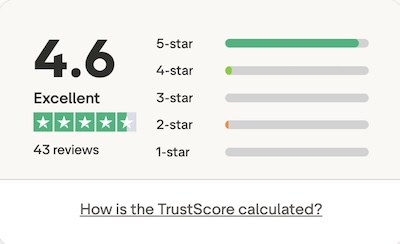
Dux-Soup scores 4.7/5 on Trustpilot. Check out some of the latest reviews.
FAQs
Does STACKED have AI personalization?
Yes, STACKED's built-in AI integrations automatically personalizes every LinkedIn message using live profile data including job title, company, industry, and profile summary - before it's sent.
How Does STACKED AI Personalization Work?
Most LinkedIn tools send the same message to everyone. STACKED does something different. STACKED AI individually writes every message before sending it - not just using merge tags, but intelligently creating hooks from a prospect's LinkedIn profile. Because your outreach is relevant, you'll get more responses. Personalized messages generate reply rates of up to 9.66%, compared to 5.44% for generic templates, and connection acceptance rates of 45% compared to 15% for generic outreach. That's the difference STACKED AI makes at the message level.
STACKED is currently the only LinkedIn automation tool with a built-in AI integration included for free. Connect ChatGPT, Gemini or Claude within seconds.
Is STACKED AI safe to use on LinkedIn?
Yes, AI-personalized messages generate more genuine two-way conversations, which improve your response rates and signal authentic engagement to LinkedIn. Combined with STACKED's pre-configured safety limits and snooze feature, STACKED has one of the strongest set of safety protocols on the market.
What is STACKED's AI lead management and prioritization feature?
STACKED's AI response assistant offers smarter lead management, it reads every incoming campaign reply and automatically categorizes it as Continue, Qualify In, or Qualify Out. High-intent leads are flagged instantly, allowing users to focus on closing deals, not sorting their inbox.
Does STACKED AI work with existing campaigns?
Yes, the AI-powered feature can be enabled in any new or existing drip campaign without rebuilding the sequence.
2. Dripify
Dripify is a popular cloud-based LinkedIn automation tool that gets good reviews for its intuitive visual campaign builder and simple approach to building drip campaigns.
Key Strengths
- Clean UI: drag-and-drop interface with conditional logic makes it easy to design complex sequences with ease
- Multi-channel: combines LinkedIn outreach with email sequences in higher plans, for companies that don't have a CRM system
- Solid performance dashboards for easy visibility and analysis of campaign results
- Team management and role assignment, with delegation capability
For users who want something simple and don't need deep CRM integration or AI-Powered personalization, it's a strong option. But with the need to upload contacts into Dripify before your outreach can start, campaigns can be delayed by days. It doesn't send paid InMails or support Sales Navigator, so you won't be able to benefit from sending InMail campaigns, and you won't be able to communicate with prospects via Sales Navigator - a less cluttered inbox.
Best For
Solopreneurs, freelancers and small teams who prioritize simplicity, visual workflow design and standalone LinkedIn and email outreach. It's a good fit for users who want cloud convenience without CRM or third-party integrations.
Safety
Dripify operates within LinkedIn’s daily activity limits and uses randomized delays to mimic human interaction patterns. Dripify also supports activity throttling, safe connection speeds, and session time randomization to reduce risk and maintain your professional reputation.
Dripify comes with the following pre-set limits:
Free LinkedIn plan/day: 200 visits, 75 connections, 50-100 messages, like/follow 50, InMails 25
Paid LinkedIn plans/day: 400 visits, 150 connections, 100-200 messages, like/follow 100/day, InMails 50
What Can You Achieve With Dripify?
Fast set-up and intuitive drip campaigns that run autonomously, helping you to scale outreach. Useful for consistent lead generation once you have a workflow that converts.
Free Trial
Dripify offers a 7-day free trial that gives users full access to the platform’s features, without a credit card required.
Price
Dripify has three main pricing tiers:
- Basic, $39/month: Includes a single drip campaign
- Pro, $59/month: Unlimited drip campaigns, 100 email finder credits a month
- Advanced, $79/month: Multi-team management
Discounts are available for annual billing and team licenses, with flexible plans to suit both individuals and enterprise users.
Integrations
Dripify integrates using Zapier or Make. As of now, there are no native integrations so you will need additional investment and skillsets if you want to integrate with third party tools.
Reviews
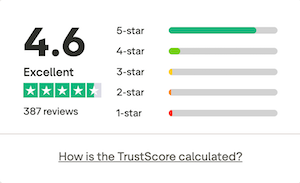
Dripify is rated 4.6/5 on Trustpilot. Check out their reviews.
Users praise its ease of use, team features, and safe automation design. But negative reviews have been left when users haven't cancelled during the trial period and have been charged for continuing the service unknowingly, and for the lack of guidance when getting started.
Limitations
Delayed outreach: Before Dripify can start sending messages, it needs to upload your contacts. At a rate of 200 -400 per day, which can take up to five days - delaying your outreach start date. You can only add 1,000 prospects to each campaign, equivalent to LinkedIn's search limits, a constraint if you are running high-volume outreach.
No native integrations: Dripify connects to third-party tools via Zapier or Make only. There are no native 2-way integrations with CRMs like Salesforce, HighLevel, HubSpot, or Pipedrive. This means additional cost, setup and points of failure compared to STACKED's native integrations.
No AI personalization: Dripify has no built-in AI personalization. Messages are template-based, with standard variable insertion. There is no equivalent to STACKED AI, which automatically generates a personally written message for every prospect based on their live LinkedIn profile data.
Doesn't support Sales Navigator and paid InMails: Dripify can't read the Sales Navigator inbox, send paid InMails in campaigns, or interact with Sales Navigator inboxes. For users who have invested in Sales Navigator licenses, you're missing an opportunity to engage on a less crowded platform, and instead sending messages to the same inbox that every other templated message is arriving in.
Dripify can't send paid InMails, and with LinkedIn effectively removing free InMails to OpenProfiles unless you're using Sales Navigator, the InMail feature in Dripify is something even they have recommended not using. Read our article on why LinkedIn-only automation tools are failing Sales Navigator users.
Sends email, but replies are not displayed in the Dripify inbox. Although you can connect Dripify to your Gmail or Outlook email account and send emails as part of your outreach workflow, you won't see the reply in your Dripify inbox, leaving your response management disjointed, especially if running outreach as a team.
| STACKED cloud | Dripify Pro | |
|---|---|---|
|
Price |
$99/month |
$79/month |
| AI personalization |
✅ |
❌ |
| Native CRM and App integrations |
✅ Salesforce, HubSpot, Pipedrive, HighLevel, MS Teams, Slack and more |
❌ Zapier only |
| Campaign prospect limit | ✅ Unlimited | ⚠️ 1,000 |
| Free trial | ✅ 14 days, no credit card | ⚠️ 7 days, no credit card |
| Cloud based | ✅ (local also available) | ✅ |
How does STACKED compare to Dripify?
3. La Growth Machine
La Growth Machine (LGM) Is a French-built cloud-based multi-channel outreach platform that runs LinkedIn email and X sequences from a single visual workflow builder. It's less of a pure LinkedIn tool and more of an all-in-one prospecting system, with built-in lead enrichment and a unified inbox layered on top of the automation.
Key Strengths
- Visual Multi-Channel Sequence Builder: Drag-and-drop workflow editor that lets you branch your sequence across LinkedIn, email, and X in one campaign
- AI voice messages: LGM can clone a sample of your voice and generate personalized LinkedIn voice notes for each prospect automatically
- Magic Messages: AI-assisted message personalization based on a lead's job title, industry, company size, and recent activity
- Built-in enrichment automatically finds and verifies emails, phone numbers, LinkedIn, and X profiles from a name and company without a separate data tool
- Unified Inbox centralises LinkedIn and email replies in one place, with the ability for teammates to cover each other's inboxes
Best For
Small to mid-sized sales teams who want LinkedIn, email, and X outreach running from one interface and who are willing to pay a premium per-seat price for a genuinely multi-channel workflow rather than a LinkedIn-only tool.
AI Personalization
LGM connects to Claude via MCP so you can instruct it to run your outreach from Claude. When it comes to AI message personalization, LGM offers an AI assistant using Claude to improve your outreach messages - you can instruct on tone and target audience, but ultimately the same message is then sent to every prospect on your list, rather than the individually crafted messages for each prospect.
Cloud-Based
LGM is a cloud-based tool, so campaigns keep running independently of your browser or computer.
Safety & Compliance
LGM builds in randomised delays between actions, daily activity caps, and gradual warm-up for new accounts to mimic human behavior. As with any LinkedIn automation tool, LGM cannot guarantee immunity from LinkedIn restrictions, and outside reviewers who tested it over extended periods report no LinkedIn warnings when used within its default limits.
What Can You Achieve With La Growth Machine?
A single sequence that opens on LinkedIn (visit, connect, message) and automatically falls back to email or adds an X touch point if a prospect doesn't respond, with enrichment and reply tracking. It's smaller teams who don't have a pre-existing tech stack and want to consolidate several tools (Scraper, LinkedIn Automation, Cold Email, and X) into one system.
Free Trial
LaGrowth Machine offers a 14-day free trial with no credit card required.
Price
LGM prices per identity, one LinkedIn profile, and paired email running campaigns across three tiers:
- Basic, $50/month: Includes a single campaign running a templated workflow with LinkedIn actions (visit, like a post, connect and message), email and waterfall email enrichment
- Pro, $100/month: Includes up to 6 campaigns, dashboard, campaign analytics, custom workflow creation, API access
- Ultimate, $150/month: Includes CRM integrations
Integrations
LGM has a wide integration catalogue for a tool this size, including native CRM connectors (Pipedrive, HubSpot, and others), data providers (Zapier, Airtable, Google Sheets), and ad platforms like Meta, Google, and LinkedIn ads. Deeper CRM sync, however, is reserved for the top Ultimate tier.
Reviews
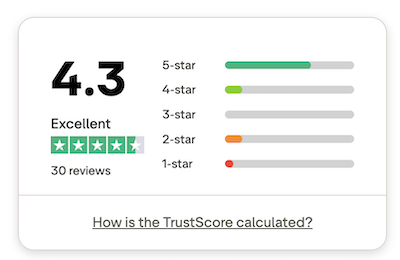
LGM scores 4.3 out of 5 on Trustpilot. You can read their reviews here.
Limitations
- LGM is one of the most expensive tools on the market, and if you're only looking for a LinkedIn automation tool, they're not as functionally rich. It doesn't support Sales Navigator, so you can't send paid InMail messages to non-connected profiles
- Key features are gated behind the top tier. CRM sync and X outreach are only unlocked on the Ultimate plan, which pushes the realistic price further for teams that want the full feature set of Omni-Channel Outreach
- Bugs and sync errors are a recurring complaint across review sites, including reports of messages or replies syncing incorrectly between accounts
- No AI personalization comparable to STACKED by Dux-Soup. Magic Messages optimizes existing copy rather than writing individually crafted messages from a prospect's live profile data, the way that STACKED's ChatGPT, Claude, and Gemini integrations do
| STACKED local | La Growth Machine Pro | |
|---|---|---|
|
Price |
$55/month |
$100/month |
| AI Personalization |
✅ Individual message generation. |
⚠️ Message optimization only, not full generation. Claude MCP connection |
| Native CRM and App integrations |
✅ Two-way - Sales force, Hubspot, HighLevel, Pipedrive, Slack, Teams and more |
⚠️ One-was. Full CRM sync gated at top Ultimate plan |
| Unified inbox - reads Sales Navigator | ✅ | ⚠️ Unified inbox for LinkedIn / email, no Sales Navigator read |
| Free Trial | ✅ 14 days, no credit card | ✅ 14 days, no credit card |
| Pricing model | ✅ Flat plans, team discounts available | ⚠️ Per identify - costs scale directly with team size without discounts |
| Cloud based | ❌ local ✅ cloud | ✅ |
| Multichannel | ❌ LinkedIn-only | ✅ LinkedIn, email, X (on Ultimate tier only) |
4. Expandi
Expandi is a well-established cloud-based LinkedIn automation platform. Designed with advanced outreach capabilities, it is well-regarded for its smart sequence messaging, multi-channel capabilities, and native image personalization tools. While originally built with a heavy focus on the recruitment sector, Expandi has recently expanded its focus to target the agency and B2B growth markets.
Key Strengths
- Smart campaign logic that gives you control over the path your prospects take in your campaign flows
- LinkedIn outreach that includes personalized video messages and GIFs to help you stand out in crowded inboxes
- Integrated LinkedIn and email outreach
- A unified inbox combining email and LinkedIn responses into a single dashboard
Expandi offers a single product plan, at a single price point, which is at the high end of the market. This limits its accessibility for smaller companies and single users who are paying for it personally. Whilst Expandi offers extra message features which can enhance engagement e.g. the ability to send personalized videos (a paid Sendspark add-on), images, and GIFs (with a Hyperise license, which is an additional cost), these increase the cost further beyond the $99/month.
Best For
Expandi is best suited for specialized recruiters who have a healthy budget and want a combined cloud-based LinkedIn and email outreach tool, with more fun outreach methods like using videos and GIFs.
AI Personalization
Expandi has an AI feature currently in beta testing. Unlike with STACKED which can connect to your chosen LLM (ChatGPT, Claude), Expandi doesn't reveal its choice of inbuilt LLM, and you would need to train it on your brand tone and language.
Cloud-Based
Like many LinkedIn automation tools, Expandi runs in the cloud, meaning your campaigns can continue even if your computer is off. The architecture is designed to simulate human-like behavior (random delays, IP rotation, warm-up modes) to minimize detection risk.
Safety & Compliance
Expandi markets itself heavily on safety, relying on standard cloud-architecture protocols to mimic human-like behavior.
- Dedicated IP per account, which reduces the risk of shared-IP problems.
- Warm-up mode to gradually increase activity rather than blasting high volumes immediately.
- Campaign logic to stay within LinkedIn’s accepted daily limits and behave more like a human user.
It's worth noting that these safety features are commonplace with most LinkedIn automation tools. And, despite their original key message being one of the 'safest LinkedIn automation tools', users have been banned. We don't see any differences in their safety settings to most of the other tools listed here.
Agency & Team Usage
For agencies, Expandi's pricing model presents a steep financial hurdle. You'll need to buy a minimum of 10 licenses to access multi-account management. At $99/month per license, that's $990/month before you've run a single campaign for a client.
What Will You Achieve with Expandi?
Expandi pitches itself towards the more advanced lead generation users, and keeps pricing simple, but potentially limits its audience by not offering a more introductory plan.
They have worked hard on their dashboard which follows the look and feel of popular SaaS platforms like Mailchimp and HubSpot, although some users say that their interface is tricky when doing basic tasks like adding personalized links and could do with more development.
Optional extras are integrations with third-party apps, which require additional costs, and other integrations often require Zapier or Make which again increases the costs of using the integrations. Compared to STACKED's two-way integrations that require no technical knowledge or additional Zapier/Make cost, STACKED leads when it comes to building integrated workflows with your existing tools.
Free Trial
Expandi offers a 7-day free trial. You'll need to enter your credit card details, then cancel if you don't wish to pay beyond the 7 days. For a high-priced tool, their trial period is one of the shortest.
Price
Once your free 7-day trial ends, you enter into a 1-size-fits-all, monthly pay-as-you-go plan:
- Business Plan, $99/month. For your monthly fee, you get an unlimited number of campaigns, with the ability to manage multiple accounts from one dashboard, connect any email provider and personalize images and GIFs.
Reports suggest that, beyond sending LinkedIn messages, it offers little functionality for the price point, meaning that the ROI has been perceived as being undervalued.
Integrations
Expandi integrates with 3rd-party tool using Zapier and Make, using Webhooks. This means that you'll be spending more for every third-party tool you want to integrate with, and need additional skill sets to set up the integrations.
Reviews
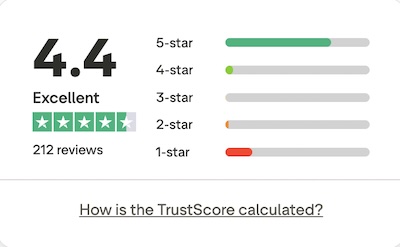
Expandi scores 4.4/5 from its reviews. Read their Trustpilot reviews.
Limitations
- No native CRM integrations. Reliance on Zapier, Make and webhooks introduces extra monthly middleware costs and technical friction. This stands in sharp contrast to STACKED's native plug-and-play two-way CRM integrations
- Rigid pricing model. The flat $99/month per seat pricing makes it inaccessible for solo-preneurs or small teams who do not require the full enterprise-level feature set. Additional costs are involved for integration with SendSpark (video), Hyperise (images) and Smartlead (email), which hikes the price up even higher for core features stated on their website
- Users regularly complain about their short trial period and upfront commitment, which often catches them off guard when they end up paying for the product when they are not quite ready to commit
- Some users say the support isn't very easily accessible and it is difficult to communicate with that function
How does STACKED compare to Expandi?
| STACKED local | Expandi Business | |
|---|---|---|
| Price | $55/month | $99/month |
| AI Personalization | ✅ | ⚠️ in beta |
| Native CRM and App integrations | ✅Two-way Salesforce, Hubspot HighLevel, Pipedrive, MS Teams, Slack and more |
⚠️ Zapier and Make |
| Unified inbox- reads Sales Navigator | ✅ | ❌ |
| Free Trial | 14 days, no credit card | 7 days - credit card and cancellation required |
| Trustpilot score | 4.7 | 4.4 |
| Cloud based | ❌ Local ✅ Cloud plan at $99/month | ❌ |
| Send images, gifs, videos | ❌ | ✅ |
5. Octopus CRM
Octopus CRM is a budget-friendly LinkedIn automation solution designed for salespeople, recruiters, and marketers who want to scale outreach without breaking the bank. Operating as a compact lead management dashboard, Octopus CRM focuses on automating core LinkedIn actions: connection requests, profile visits, bulk messages, endorsements, and simple funnel flows.
Octopus CRM has no AI personalization capability. Outreach is template-based with standard variable insertion. The same message structure goes to every prospect. For users whose reply rates have plateaued, this is often the single biggest factor holding back results.
Key Strengths
- Core activity Automation: Covers all essential LinkedIn actions, including automated connection requests, profile views, skills endorsements, and sending direct messages
- Low financial barrier: Offers one of the lowest entry-level price points on the market, making it accessible for LinkedIn automation beginners
- Short learning curve: Features are uncomplicated, and the interface is visually clean. It means that users can launch simple outreach tasks within minutes of installation
- Supports Sales Navigator, which many of the other LinkedIn automation tools don't, at a higher price
On-Premise
Octopus CRM works as a Chrome extension (plus dashboard) which makes setup simple: connect your LinkedIn account, install the extension, and away you go. Because it’s browser-based, you’ll need your browser open to keep your automation activities running.
Safety
The tool includes basic safety controls such as delay settings and activity monitoring to help you stay within LinkedIn’s limits. Users should still moderate volumes, vary actions, and closely monitor account behavior.
Best For
Octopus CRM is ideal for those just starting with LinkedIn automation - solopreneurs and freelancers - who want basic functionality and a nice-looking UI.
Its value lies in helping you save time, build consistent outreach, and track simple campaign metrics - without needing huge budgets.
Team & Agency Usage
While Octopus CRM's unlimited plan allows users to import and export lead lists, it lacks the ability to manage multiple accounts from a single dashboard, making it unsuitable for teams and agencies
What Will You Achieve Using Octopus CRM?
Octopus CRM focuses on bypassing the existing LinkedIn weekly connection limit in a similar way to other LinkedIn automation tools that can scrape LinkedIn email addresses and perform automation tasks to an email list to bypass connection limits.
This is now an old hack, which is somewhat outdated. Tools that rely on methods to bypass LinkedIn's connection limits carry a higher account risk than those that work within them. STACKED's pre-configured daily limits are deliberately conservative, a key reason it has maintained a zero known account ban record since 2015.
Octopus' features don't seem to have moved on beyond basic automation tasks. Whereas other tools are introducing agency dashboards and more granular lead management to perform clever targeting tricks, Octopus has remained relatively stagnant in its messaging. But it does offer an easy-to-use UI at a low price point, making it a good choice for those new to LinkedIn automation.
Free Trial
Octopus offers a 7-day free trial, no credit card required.
Price
Following the 7-day trial period, there are 4 plans to choose from:
- Starter, $6.99/month: Enables you to auto-send personalized invites and connect with Premium LinkedIn users
- Pro, $9.99/month: Allows you to send automated messages in bulk, auto-endorse and auto-view profiles
- Advanced, $14.99/month: Gives you the option to import and export data and build your sales funnel, and create campaigns
- Unlimited, $24.99/month: Provides the ability to integrate with workflow tools
Integrations
Octopus integrates with 3rd-party tool using Zapier. This means that you'll be spending more for every third-party tool you want to integrate with, and need additional skill sets to set up the integrations.
Reviews
Octopus scores 3.5/5 from its customer reviews. Poor customer service is a regular comment in the reviews, and an area letting them down.
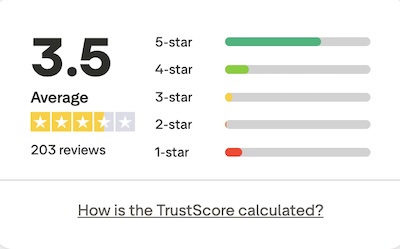
Common feedback is that features are missing from the basic plans and, although this is not an uncommon practice, users found the communication of the product features confusing, leading to them feeling let down by what they ended up receiving.
Limitations
- Features: Octopus's low price point is offset by its limitations. Its lower-priced tiers significantly restrict functionality. To get standard outreach functionality in 2026, you're forced to upgrade to their highest price tier.
- No generative AI personalization: Octopus CRM features no built-in AI script generation or open LLM integration. Outreach relies entirely on rigid text templates mixed with basic merge tags.
- No unified inbox
- Octopus CRM's website is light on information. Want to know if it can read Sales Navigator inboxes and create a unified inbox with all your messages? There's no help centre and a lack of easy-to-find documentation to help with this.
6. HeyReach
HeyReach is a cloud-based LinkedIn outreach automation platform originally designed for sales agencies that need to manage multi-account campaigns, centralize conversations, and scale safely. With native integrations, sender rotation across many LinkedIn accounts, and agency-specific features, HeyReach works best for agencies that create workflows using tools like Clay, n8n and Instantly.
Key Strengths
- Multi-account sender rotation: allows you to pull dozens of LinkedIn accounts into a single campaign, automatically distributing the message load across profiles to maximise weekly outreach volume safely.
- Unified inbox: consolidates incoming messages from every connected client or team profile into a single dashboard,
Best For: Agencies
HeyReach focuses on serving the agency market, for those looking to run outreach across multiple LinkedIn accounts - enabling higher volume campaigns while staying within LinkedIn safety limits.
- It supports unlimited senders (depending on plan) and distributes actions across accounts to avoid triggering LinkedIn blocks
- Visual campaign builder allows you to set up sequences like profile view → connect request → message, with delays, branching logic, and lead status tracking
- Like STACKED, HeyReach is one of the few automation tools to support Sales Navigator and Recruiter, reading their inboxes and providing a unified inbox which centralizes replies across all linked accounts, making management of multiple campaigns and senders much easier
One important consideration: HeyReach requires you to provide your LinkedIn username and password directly to their platform. HeyReach accesses your account via external servers using your login details. For users and agencies who consider account security a priority, this is a meaningful distinction.
Cloud-Based
HeyReach runs entirely in the cloud, like many of the tools available here.
Key benefits:
- Campaigns continue running regardless of your local browser or device.
- Dedicated or country-matched proxies help reduce risk of LinkedIn action flags.
- Agency-oriented workspace features: separate workspaces for clients, shared templates, central dashboards, role-based permissions.
This combination of scale + infrastructure makes HeyReach a strong choice when you’re managing many LinkedIn accounts and campaigns.
Safety & Compliance
HeyReach, like many others, places account safety at the forefront of their design. Here's what they say:
- Actions per account are capped by default (e.g., ~40 actions/day) to stay within safe usage thresholds.
- Account rotation, proxy management, and built-in warm-up logic all help minimize risk of LinkedIn restrictions.
- While no automation tool can guarantee full immunity, user reviews cite HeyReach as relatively safe when used as intended.
If you treat your LinkedIn outreach responsibly, HeyReach gives you the infrastructure to scale while managing risk.
Team & Agency Features
HeyReach’s features to support teams and agencies include:
- Workspaces: isolate clients, accounts, campaigns per client, avoiding cross-account confusion.
- Master View / central dashboard: monitor all campaigns and accounts across the organization in one place.
- Role / permission settings, shared templates, unified inbox for multiple senders.
This means whether you’re a one-man team or agency managing dozens of clients, HeyReach scales your outreach operations cleanly.
What Will You Achieve with HeyReach?
By using HeyReach you can:
- Run automated LinkedIn campaigns across many accounts, with high volume safely.
- Build sequences of connect requests, messages, profile views, follow-ups with logic based on replies or non-replies.
- Exclude profiles that meet certain criteria e.g. leads that have been messaged by anyone in your company to avoid duplicate targeting.
- Centralize chat, track all responses from many senders in one inbox.
- Integrate with your tech stack (CRMs, enrichment tools, chat apps) for streamlined workflows using Zapier.
- Gain visibility into campaign performance and sender-level metrics to continuously improve.
In effect: HeyReach turns manual LinkedIn outreach into a high-volume, managed, team-oriented system.
Analytics & Reporting
HeyReach includes solid analytics for tracking performance:
- Reply rates, connection acceptance rates, lead conversions per account or campaign.
- Filters by campaigns, tags, team members; allows you to spot under-performing sequences.
- Some users note the analytics are less extensive compared to full-CRM tools, but sufficient for LinkedIn-centric outreach.
Free Trial
HeyReach offers a free 14-day trial of its free plan with up to 3 accounts, so you can test its features before subscribing.
Price
HeyReach price tiers are oriented around number of senders/LinkedIn accounts and agency use:
- Starter: ~$79 per sender/month (for small teams)
- Agency: ~$999/month for up to ~50 senders/accounts.
- Unlimited: ~$1,999/month for unlimited accounts/send-outs.
While the pricing may seem high for solo users, it’s competitive for agencies managing dozens of accounts.
HeyReach's Agency Pricing starts at $999/month for up to 50 senders. STACKED's Postpaid agency solution starts at $389/month for five seats with native CRM integrations, AI personalizations, and full campaign management included.
Integrations
HeyReach integrates with a broad range of tools, enhancing workflows and data connectivity, however these are mostly one-way integrations, which don't allow you to run HeyReach outreach from the third-party app:
- CRM & data tools (HubSpot, Clay, RB2B)
- Workflow automation (Zapier, webhooks, API) for linking to other systems.
- Unified Inbox & team collaboration features pulling all LinkedIn messages into one view.
Reviews
HeyReach scores a 4.0/5 from its users. Read their Trustpilot reviews.
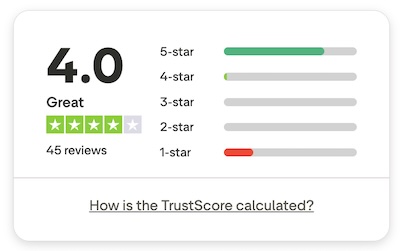
Their reviews include a mixed batch of experiences, with user comments commonly highlight:
✅ Ease of use for teams
✅ Multi-account scalability
✅ Safety
❌ Steeper pricing for smaller users
❌ Support response times are lagging
❌ Mostly LinkedIn-centric (less email/multi-channel)
Limitations
HeyReach isn't as strong as other tools in the market when it comes to integrating with existing tech stacks. Instead of offering two-way integrations like STACKED, where you can run your LinkedIn outreach direct from your incumbent CRM like Hubspot, HighLevel, Salesforce, Pipedrive etc, HeyReach only offers one-way integrations that update data in your CRM with HeyReach intelligence. This won't allow you to enroll prospects from your CRM info LinkedIn outreach campaigns - an important missing piece for corporate sales teams with embedded tech stacks.
The tool was built for agencies and offers strong sender rotation and multi-account management, but HeyReach's $999 per month minimum for agency use, technical proxy setup requirements and absence of AI personalization are real trade-offs. For agencies who want enterprise-scale capability without handing over client LinkedIn passwords, and with AI personalization built in, STACKED delivers more at a lower starting price point, with an attractive pay-as-you-use model.
HeyReach has no built-in AI personalization. Outreach relies on template-based messaging with variable fields. There is no equivalent to STACKED's AI feature, which generates a unique message for every prospect based on live LinkedIn profile data - a capability that directly impacts reply rates at scale.
How does STACKED compare to HeyReach?
7. Waalaxy
Waalaxy (formerly Prospectin) is a cloud-based LinkedIn automation tool aimed at sales professionals and small teams who want a straightforward outreach workflow without a steep learning curve.
It combines LinkedIn and email outreach in a single interface: making it a good option for those who don't have or don't want a separate CRM.
Key strengths
- Simple guided campaign setup with pre-built sequence templates
- Combined LinkedIn and email outreach on higher plans
- A clean, modern UI that is easy to onboard without training
- Chrome extension, with an interception script that intercepts LinkedIn's detection
Best For
Sales professionals and small teams who want a self-contained outreach tool with email included, and don't need deep CRM integrations or AI personalization.
Safety
Waalaxy follows the human behavior protocols, and automatically pauses on hitting LinkedIn limits to avoid bans. Their tool is visible under LinkedIn's 'permitted services' tab, but it has a Chrome extension script that intercepts LinkedIn detection.
What can you achieve with Waalaxy?
While Waalaxy is built for speed of setup rather than depth of capability, if you have a straightforward outreach sequence that includes profile visits, connection requests, and messages, Waalaxy gets you up and running quickly with minimal configuration. Its combined LinkedIn and email sequences on higher plans make it useful for users who want a single tool to handle both channels without connecting a separate email platform.
For solo sales professionals or small teams running consistent, repeatable outreach to a defined audience, it delivers reliable volume within LinkedIn's limits.
Trial
Waalaxy offers a free 14-day trial, which requires a credit card, and cancellation, if you don't want to be automatically charged following the end of the trial.
Price
Waalaxy's paid plan starts around $52 a month for LinkedIn-only outreach, and $69/month for multi-channel email and LinkedIn outreach.
Integrations
Waalaxy integrates with third-party tools via Zapier. They offer native integration with noCRM sync, BeamAI, Pabby and Dropcontact, but these are all one-way - offering data upload into Waalaxy only.
Reviews
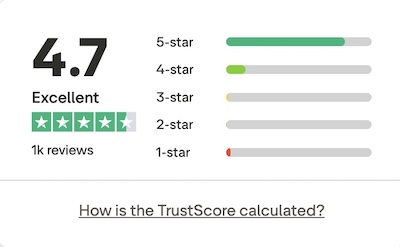
Waalaxy scores 4.7/5 on Trustpilot. Users praise its ease of use and clean interface. Criticisms typically focus on limitations at higher outreach volumes.
Limitations
Waalaxy is a solid, approachable tool for users taking their first steps into multi-channel outreach. It is well designed and held in high regard, but the absence of AI personalization, limited CRM depth, and Zapier-dependent integrations mean it doesn't scale well for sales teams or agencies with more complex requirements.
It only supports LinkedIn and doesn't read the Sales Navigator or Recruiter inboxes, meaning that it won't send paid InMails as part of its campaigns. Campaigns only support automation actions: Connect, Message, Visit and Follow.
So, which LinkedIn Automation Tool is Right for You?
In 2026, with a fresh view of every tool on this list, the answer depends on what you're optimizing for, and your choice of tool should meet your individual requirements.
If you want the best results: AI Personalized Outreach consistently outperforms template-based messaging. With their new AI capability, STACKED looks set to take the market in 2026 with more personalized outreach that will get more results.
If account safety is non-negotiable: STACKED has maintained a track record of zero known LinkedIn account bans since 2015. HeyReach also has a good safety track record, but ultimately safety comes down to how you use the tools, rather than the tools themselves.
If you need CRM integration without the overhead: STACKED has native two-way integrations with Salesforce, HubSpot, Pipedrive, Microsoft Teams, Slack, HighLevel, and more. No Zapier required, no additional cost.
If price matters: Octopus CRM offers the cheapest plans, but their review scores mean that you should tread with caution. When you look at value for money, STACKED local is feature-rich, including individual AI-created messages and two-way integrations.
Why a trial is crucial
With so many articles containing reviews of LinkedIn automation tools on the market, how do you know if they are honest and unbiased? Language models (AI) will only serve the answers they find, often relying on weak evidence. Which is why the best way to find the right LinkedIn automation tool for you is to self-evaluate with your own research.













.png)