You’ve Made the Connection - What’s Next?

You've made the connection - what next?
In a previous blog we talked about LinkedIn outreach and gave tips for writing direct messages to your 1st-degree connections.
So, if a prospect has accepted your connection request (and if you used our templates, they probably did), the next question you might have is: what next?
First things first - you should have an elevator pitch of your product/service ready and personalized for your target connections.
We talked about the importance of personalized templates in the last post, so be sure to read it if you haven’t yet.
It’s important to note that before you start pitching, you should already have a clear image or ‘persona’ of who you’re targeting and what the pitch should look like to that particular person. While it is possible to group people by persona, a single, generic message across all your different targets is not going to work.
As a very high-level example, the language you use when pitching to a CEO or a CFO is likely to be different.
Once you know what your unique selling proposition is to that person or persona, you can move on to preparing your pitch(es) to these connections.
Why not get a free STACKED trial and give it a go?
Here’s what you need to know:
Using templates
If you’re going to be automating your outreach on LinkedIn by using STACKED, you can either choose to have personalized templates ready to save you time and manual messaging, or use STACKED AI to personalize each message to individual LinkedIn profiles.
For now, we'll stick with templates. While you can’t personalize templates for every occasion, it’s still a good idea to have some ready to act as a starting point - you can always edit them depending on the context.
Generally, you should make sure that when you’re pitching, your messages are about them more than you; are short, and focus on the value you offer.
Be as brief as possible.
Chances are, your prospects get a lot of other pitches daily and don’t have the time to go through it all. If you respect their time and make it easier for them to go through your replies, they’ll be more likely to respond.
Keep this in mind when creating your templates.
You want to keep it simple enough to be automated, but also feel personalized to each prospect.
The best way to do this is by using STACKED markers to personalize your outreach.
Personalizing your message
STACKED markers give users the ability to personalize their messages and connection requests so that you can automate your outreach.
You create your campaign workflows in the 'Drip Campaigns' section of the STACKED dashboard. Watch: How to create campaigns in STACKED.
For every action where you can add copy (connections, messages and InMails) , you can personalize your outreach using the markers underneath the copy box, as shown below:
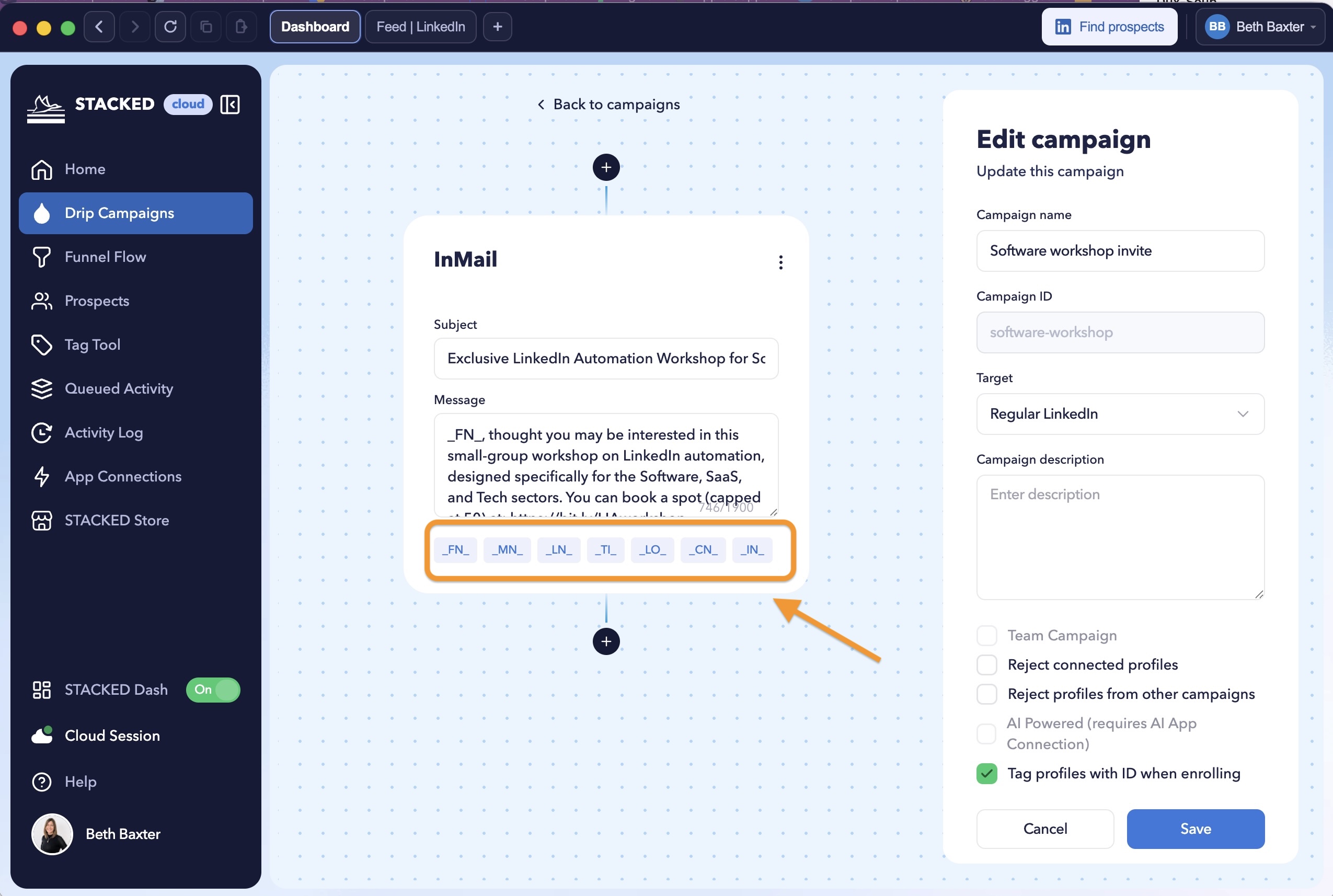
Click on these to insert them into your copy.
Once you’ve made a connection on LinkedIn, they become your 1st-degree connections. This allows you to message them directly on LinkedIn.
But you want to make sure your messages are personal to your connections.
To begin with, always use their first name (_FN_) when addressing them so that you don’t come off as distant.
Other markers include:
_FN_ - will be replaced by the profile’s first name
_MN_ - will be replaced by the profile’s middle name
_LN_ - will be replaced by the profile’s last name
_TI_ - will be replaced by the profile’s job role
_CN_ - will be replaced by the profile’s current company name
_LO_ - will be replaced by the profile’s location
_IN_ - will be replaced by the profile’s industry
_(<expr>)_ - replaced with the value of the evaluated JavaScript expression
Most of the time, you’ll be using _FN_, when greeting and addressing them.
Depending on your template and who you’re targeting, you can also use the location tag (_LO_), their job role (_TI_), industry (_IN_), and others.
Creating templates
You can get really creative with your markers, depending on who you’re targeting.
It’s worth noting that the more segmented and specific your audience is, the more effective the markers will be. Based on the industry and their job role, you can change the message and the tone of your situation, which will result in a better response.
For example, if you were to reach out to all the CEOs of marketing and advertising agencies in London, UK (guide on how to do that here), your connection request might look something like this:
“Hi _FN_,
I hope you are well. I see that you’re a _TI_ in _IN_ based in _LO_. I work in the same field as you and I thought it would be great to exchange connections to keep up with your posts.
Thanks.
(Your name)”
Now that you know how the STACKED markers work, you can start using them in your templates to prepare your pitching.
Here are a few more to get you started.
Remember, it’s all about who you’re targeting. So, while your messages might look different, based on your unique offering, it’s still best to personalise them with the markers.
So, once they accept your connection request, your first welcome message might look something like this:
“Hi _FN_,
Thanks for connecting.
I work with startups and SMBs in the _IN_ industry. More specifically, we help agency-owners gain leads through lead generation automation, and I wanted to check with if you’d be interested.
Feel free to book a call here and we can talk about helping you scale up more in-depth.
(Link here)
If you have any questions, let me know and keep in touch.
(Your name)”
This template is just about 70 words (takes less than a minute to read), explains your offerings and even has a strong call-to-action at the end.
You can also customise your template based around their location (_LO_) to make it more personal and even try and meet them in person (if possible):
“Hi _FN_,
Thanks for connecting.
I work with a lot of local startups and SMBs in the _IN_ industry over at _LO_ to help them scale up through various growth hacking techniques.
Are you currently looking for any support in regards to your lead generation?
I’d love to sit down with you and discuss this more in-depth and see if we can come up with something together.
Let me know if you have any questions.
(Your name)”
Since the above is targeted at a particular group of people within a specific location, it’s likely to perform better as well.
The key to using templates efficiently is customising them to the details, so that it almost feels like a personal message written just for them, to the point where it doesn’t even feel like a template.
Finally, if they don’t reply, be sure to follow up after 5 or 10 days. Similarly, your follow-up needs to be straightforward to briefly remind them about yourself.
Following up
Sending a follow-up message can increase your reply rate on average from 9% to 13% (Source).
Similarly, with LinkedIn, it’s worth sending your prospects a reminder every now and then if they don’t seem to reply.
To automate your follow-up messages, you just need a STACKED license.
When sending a follow-up message, we generally recommend waiting at least 5-10 days if there is no response and following up to 3 times in between in order to get a response.
So, let’s break down some of the follow-up templates you might use to politely remind your leads what you do.
5 days after no reply:
“Hi _FN_,
I hope you’re well and are having a great week.
At Dux-Soup, we help startups and SMBs generate high quality leads through LinkedIn automation.
We’ve recently had the wonderful opportunity to work with other _IN_ startups in _LO_ to help them scale up, and I wanted to introduce our services to you as well.
Are you currently looking for any support with your lead generation?
(Your name)”
For now, you’re essentially reminding them what you do and that you also worked with similar startups in the area (social proof is important).
It’s worth experimenting with the call-to-action at the end.
If they didn’t book a call straight away, try asking if they need general support or if they have any questions regarding your services. They might be more likely to talk with you if they can see you’re willing to help with their current system.
10 days after no reply:
“Hi _FN_,
How are you doing?
Just wanted to see if you have any lead generation projects you needed help or advice with on your website? I’d be happy to help or follow up via email - if that’s easier.
Or, we can always hop on a quick call to discuss.
Looking forward to hearing from you.
(Your name)”
The call-to-action is different here as well and the general tone is about helping them with their current methods, less so about pitching your services.
How long to wait depends on the lead and what you’re asking them for.
Generally though, it’s always a good idea to follow up on your leads.
To maximize your follow-up success, be sure to note down the frequency and the number of your messages. These vary for everyone, depending on the niche. Be sure to experiment with the text that you use and your final call-to-action.
Conclusion
To recap, make sure your outreach message is personal (based on their first name, job role, industry, location, etc.) and clearly describes how you can help solve their business problem(s).
You don’t have to be in-depth about how your product or service works. Instead, focus on the benefits in these early stages.
After making a connection, the next goal is to book a call or a demo. You can always flesh out the details once they choose a time to talk.
The key to successful outreach is being memorable. People tend to remember connections that are personal, straight to the point and relevant to their current position.
We hope you found this post useful and now have a better idea of what to do after making the connection. If something is unclear or you have any questions at all, feel free to contact us at info@dux-soup.com or leave a comment below and we’ll get back to you!