How to get email addresses from LinkedIn with STACKED
Finding someone's LinkedIn profile is often the first step in building a professional relationship. But if you want to contact a prospect outside LinkedIn, you may also need their business email address.
STACKED helps you find and organize email addresses as part of your LinkedIn prospecting workflow. It can capture email addresses available for your first-degree LinkedIn connections and use its Address Finder to look for email addresses associated with second- and third-degree connections.
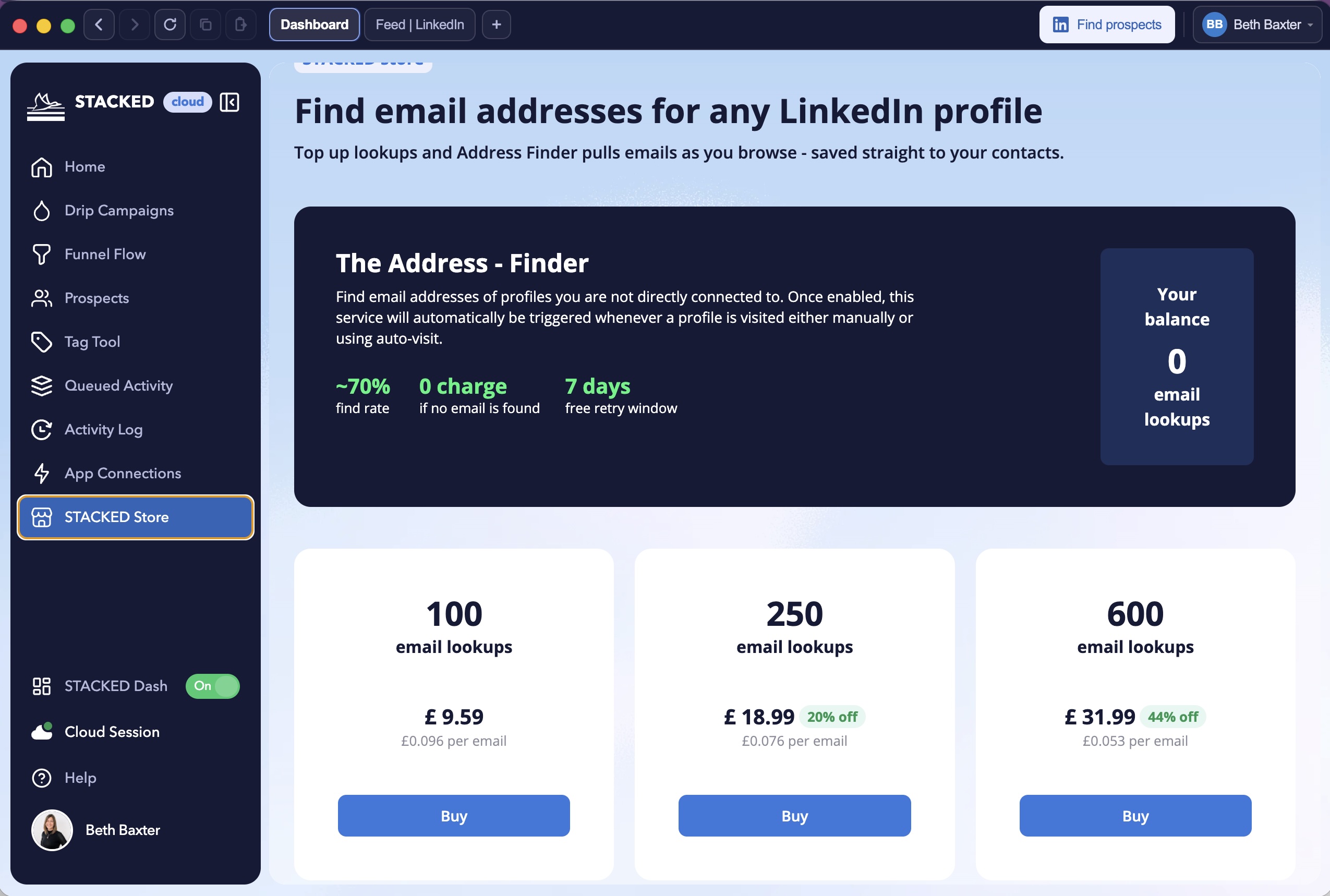
STACKED's Address Finder is available through the STACKED Store. It can be used manually when viewing a LinkedIn profile or triggered through a STACKED drip campaign.
This guide explains how to find email addresses from LinkedIn using STACKED, how email lookup credits work, and how to use the contact information you collect in your sales and marketing processes.
Quick answer: How do you get email addresses from LinkedIn?
You can find email addresses from LinkedIn in two main ways with STACKED:
For first-degree connections: STACKED can capture email addresses available for your existing LinkedIn connections. These captures do not require Address Finder lookup credits.
For second- and third-degree connections: Use STACKED's Address Finder to search for an email address associated with a prospect. One lookup credit is charged when an email address is successfully found.
Not every LinkedIn profile has a discoverable email address. A successful lookup depends on whether contact information is available for that person.
What is STACKED?
STACKED is a LinkedIn prospecting and automation platform that helps sales professionals, recruiters, and businesses manage LinkedIn outreach and prospect information.
If an email address is available, it can be included in the prospect information captured by STACKED.
This is useful when you want to enrich an existing LinkedIn network with contact information for business development, recruiting, or account management.
How to find email addresses for second- and third-degree LinkedIn connections
A second-degree connection is connected to one of your first-degree connections. A third-degree connection is further removed from your direct LinkedIn network.
These prospects may not share their email addresses directly with you. STACKED's Address Finder can help by searching for an email address associated with the LinkedIn profile.
How to use the STACKED Address Finder
Open the STACKED Store.
Purchase email lookups
Create a Visit campaign
Enroll your target list into the Visit campaign
Access the email addresses in the same way as in point 4 above.
When an email address is successfully found, STACKED adds it to the prospect data captured by the application.
The Address Finder is designed to make contact enrichment part of your LinkedIn prospecting process. You can research an individual profile or incorporate email lookup into a wider campaign workflow.
Important: The Address Finder does not guarantee an email address for every LinkedIn profile. Results depend on the contact information available for the prospect.
How do STACKED email lookup credits work?
STACKED's Address Finder uses a credit-based lookup system. You use credits when the tool successfully finds an email address.
The main rules are:
Lookup outcome
Credit usage
An email address is successfully found
1 credit
No email address is found
No credit charged
The same profile is revisited within the seven-day free retry window
No additional credit for retrieving the same email address
You can purchase additional email lookup credits through the STACKED Store.
Your remaining email lookup balance is displayed in the Store, helping you monitor usage and plan your prospect research.
Can STACKED find email addresses when manually browsing profiles?
Yes. You can trigger the Address Finder manually when visiting a LinkedIn profile or trigger it automatically as part of a STACKED drip campaign that visits LinkedIn profiles.
For example, a sales team could create a prospecting workflow that visits relevant LinkedIn profiles and triggers an email lookup as part of the campaign.
This approach can help reduce repetitive contact research and make it easier to enrich prospect records while carrying out LinkedIn prospecting.
An automated lookup does not guarantee a result for every profile. Review the contact information collected before using it in an outreach campaign.
Where does STACKED store the email addresses it finds?
When STACKED successfully captures an email address, it adds the email to the prospect information stored in STACKED.
This gives you a more complete record of the people you're researching and engaging with on LinkedIn.
You can use the captured information to:
Review email addresses associated with individual prospects.
Organize prospect records for sales and recruiting workflows.
Export prospect data for further analysis or use in other systems.
Connect prospecting activity with supported integrations and CRM processes.
How can you use LinkedIn email addresses for sales prospecting?
Finding an email address is only one part of building a successful prospecting process. The next step is using that information to support relevant, well-targeted communication.
1. Build a more complete prospect database
Combining LinkedIn profile information with available email addresses gives your sales team a more useful view of each prospect.
You can organize contacts by:
Job title
Company
Industry
Location
Prospecting campaign
Sales priority
A structured prospect database makes it easier to identify relevant decision-makers and prioritize follow-up activity.
2. Support targeted email outreach
Email can complement your LinkedIn prospecting activity.
For example, a sales representative might use LinkedIn to identify a relevant decision-maker, research their company, and then use available business contact information to support an appropriate follow-up.
Keep messages relevant to the recipient, identify your organization clearly, and follow the marketing and privacy rules that apply to your audience.
3. Connect prospecting with your CRM
Your prospect data becomes more useful when it fits into your wider sales process.
STACKED supports two-way integrations with CRMs including Hubspot, Salesforce, Pipedrive, HighLevel and more. You can move prospect information into the systems your team already uses every time a profile is visited with STACKED.
Before setting up a process, check the current integrations and export options available for your STACKED account.
4. Reduce repetitive contact research
Manually searching for contact details can take time, particularly when you're researching a large group of prospects.
STACKED can capture available email addresses for first-degree connections and use the Address Finder to look for email addresses for other LinkedIn prospects.
This helps bring prospect research and contact enrichment into a more organized workflow.
Is it legal to find and use email addresses from LinkedIn?
Finding an email address and using it for marketing are two separate activities. You should consider privacy requirements and electronic marketing rules before contacting a prospect.
In the United States, the CAN-SPAM Act applies to commercial email. It includes requirements relating to accurate sender information, non-deceptive subject lines, a valid physical postal address, and a clear way for recipients to opt out.
If you contact people in other countries, additional rules may apply. For example, the GDPR and UK GDPR regulate the processing of personal data, while the UK's Privacy and Electronic Communications Regulations (PECR) contain rules for electronic marketing.
Before using an email address for outreach:
Establish an appropriate legal basis for processing personal data where required.
Follow the marketing rules that apply to the recipient's location and type of email address.
Identify yourself and your organization accurately.
Include an unsubscribe mechanism where required.
Respect opt-out requests and objections.
Keep contact information accurate and secure.
Retain personal data only for as long as necessary.
A publicly available email address does not automatically mean that its owner has agreed to receive marketing messages. Your organization is responsible for ensuring that its prospecting and email campaigns comply with applicable laws.
You should also review LinkedIn's terms and policies before using automated activity on the platform.
Frequently asked questions about finding emails from LinkedIn
Can you get someone's email address from LinkedIn?
Sometimes. LinkedIn makes some email addresses available to connections, depending on the member's settings. For other prospects, an email lookup service such as STACKED's Address Finder can search for an associated email address. Results are not guaranteed.
Can STACKED find email addresses for first-degree LinkedIn connections?
Yes. STACKED can capture email addresses available for your first-degree LinkedIn connections. These captures do not use Address Finder lookup credits.
Can STACKED find email addresses for second- and third-degree connections?
Yes. STACKED's Address Finder can look for email addresses associated with second- and third-degree LinkedIn prospects. One lookup credit is charged for each successfully found email address.
Do I pay if STACKED cannot find an email address?
No. The Address Finder charges a credit only when an email address is successfully found.
Can I use STACKED's Address Finder automatically?
Yes. You can trigger the Address Finder manually when visiting a LinkedIn profile or through a STACKED drip campaign.
Where can I buy more STACKED email lookup credits?
You can purchase additional email lookup credits through the STACKED Store. Your remaining credit balance is displayed there.
How long is the free retry period?
STACKED provides a seven-day free retry window. If you revisit the same profile within that period, you won't be charged another credit for retrieving the same email address.
Where does STACKED save the email addresses it finds?
Successfully found email addresses are added to the prospect information captured by STACKED. You can then use that information as part of your prospect management and export workflows.
Does STACKED send marketing emails?
STACKED helps you find and organize prospect contact information as part of your LinkedIn prospecting workflow. Your email marketing and sending campaigns should be managed through an appropriate email platform or CRM, with the necessary compliance checks in place. STACKED can send LinkedIn data to your CRM system, where you control your multi-channel outreach, including LinkedIn outreach through STACKED.
Does STACKED guarantee an email address for every LinkedIn profile?
No. An email address may not be available for every prospect. The Address Finder only charges a lookup credit when it successfully finds an email address.
Find more LinkedIn prospect contact details with STACKED
A useful prospect database needs more than names and LinkedIn profile URLs. Relevant contact information can help your team build a more complete picture of the people and companies you're targeting.
STACKED brings LinkedIn prospecting, contact management, and email lookup together in one workflow.
Use STACKED to:
Capture available email addresses for first-degree LinkedIn connections.
Look up email addresses for second- and third-degree prospects with the Address Finder.
Trigger email lookups manually or through drip campaigns.
Organize captured contact information for your wider sales process.
Ready to improve your LinkedIn prospecting workflow?
Download STACKED for free and explore a more organized way to find, manage, and engage your prospects.