The automation tool that scrapes LinkedIn email addresses
If you’re one of the 97% of businesses that use LinkedIn for B2B lead generation, you could gain a lot from scraping email addresses from LinkedIn. Imagine the potential of enriching your CRM system with the most up-to-date data available, maintained directly by your prospects.
Some companies spend thousands every year on email data that can be inaccurate or can go out of date very quickly. So, finding a cost-effective way of creating a live feed into your CRM system of fresh contacts and up-to-date email addresses can do wonders for your campaign conversion rates, whilst reducing marketing costs.
Sound good? Let's meet STACKED.
STACKED is a LinkedIn automation tool that can gather LinkedIn email addresses to create an accurate database for your business. In this article, we'll show you how you can use it to gather email addresses from LinkedIn and push contact data straight into your CRM system.
We’ll cover:
- The LinkedIn email addresses and data that are available for scraping
- How to download LinkedIn data
- How to set up a direct feed of LinkedIn data into your CRM system
- What STACKED plan you’ll need
But first, if you’ve never used STACKED, here’s 2 weeks absolutely free. So go ahead and install it, and follow along, scraping as much data as you can on us during that time!
What is STACKED?
STACKED is a dedicated desktop application for Windows and Mac. Unlike the traditional browser-extension workflow, STACKED runs as a standalone app and does not require a Chrome extension for its main workflow.
STACKED includes:
- A visual campaign builder
- Prospect enrollment from LinkedIn searches, files, clipboard lists, or individual profiles
- Campaign scheduling and delays
- Personalization tools, including AI-powered individually personalized messages
- Queued activity management
- Campaign and activity reporting
- CRM and third-party integrations
- Support for LinkedIn, Sales Navigator, and Recruiter environments
- Multiple LinkedIn profile sessions in isolated environments
We offer a free two-week STACKED trial (no credit card details required) so you can simply have a go and see if it will work for you.
STACKED and email scraping
STACKED can:
- Scrape LinkedIn data from your LinkedIn connections and organize it into a csv file that you can share or import into a CRM system
- Obtain email addresses from 2nd and 3rd-degree LinkedIn profiles that you can’t otherwise access
- Feed email addresses straight into your CRM system using one of our two-way integrations or tools like Zapier and Make.
STACKED also offers advanced LinkedIn lead generation features such as multi-action drip campaigns, campaign analytics, multi-account capabilities, AI-powered personalization, and more.
Here we’ll focus on its email and data scraping feature.
LinkedIn email visibility
You may be wondering what email addresses you can freely access on LinkedIn without the use of a tool like STACKED. This depends on the user’s profile settings.
By default, all email addresses are visible to 1st-degree connections and can be downloaded by 1st-degree connections.
However, LinkedIn users can change their settings of who can see and download their email addresses. By choosing the settings below, not even 1st-degree connections can see my email address, nor export my email.

But what happens when email scraper tools come into play?
How does email scraping work with STACKED?
Whenever STACKED scans or visits LinkedIn profiles, it records profile data. To scrape email addresses, you must visit a profile using STACKED. STACKED will scrape and record the data from each profile it visits, making it available for you to download or send straight to your CRM system, updating existing CRM contacts or creating new ones.
You can run STACKED against any list of profiles, scraping multiple email addresses. Check out LinkedIn's limits for how many visits you can make a day.
What email addresses can STACKED scrape?
STACKED has some rules as to which email addresses it can gather:
1st degree connections
STACKED can scrape all email addresses for your 1st-degree connections, as long as your connection hasn’t hidden it from their 1st-degree connections (as in the example shown above). Every time STACKED visits a 1st-degree connection’s profile it will record the data and make this available to download. You can see below an example of the data download.

STACKED provides a lot more data as part of this download, including:
- ID
- Profile visit time
- LinkedIn/Sales Nav/Recruiter profile URL
- Connection Degree
First & Last Name - Number of Connections
- Profile Summary
- Title
- Company Name
- Company Profile
- Company Website
- Phone
- IM
- X
- Location
- Industry
- Dux Tags
- Dux Notes
This feature is included in your plan price.
2nd+ degree connections
If you want to scrape email addresses for 2nd and 3rd-degree connections, if a user allows their email address to be visible to all (5-10% of cases), then scraping these email addresses is included for free in your plan price.
To scrape the rest of the email addresses, you’ll need to buy credits from the STACKED store in the STACKED dashboard. You can see here that I have 242 credits remaining which I can use.
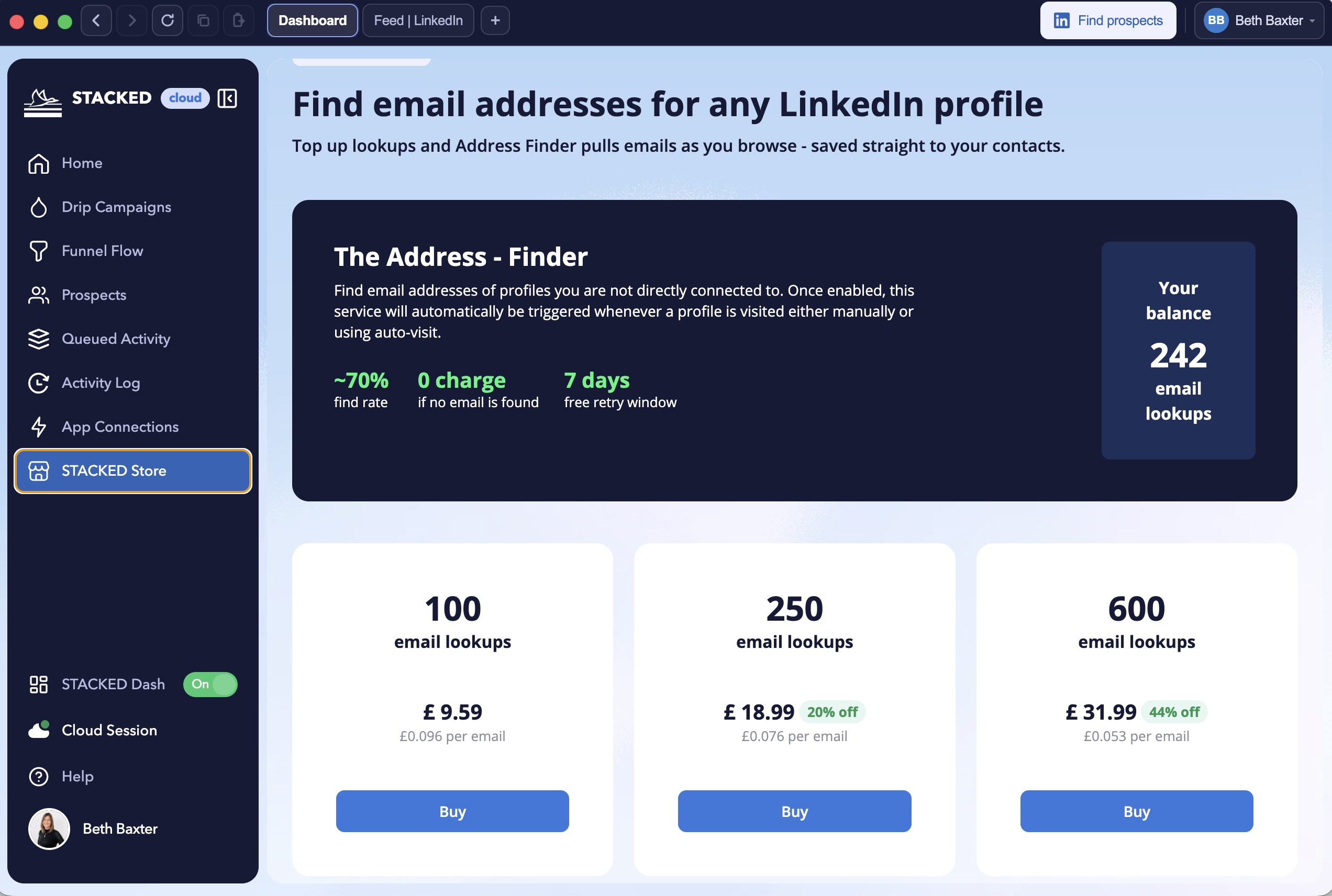
At a fraction of the cost of email addresses provided by data providers, STACKED can provide you with a list of email addresses from 2nd and 3rd-degree profiles. We won’t be able to provide email addresses for every profile as some emails have never been made visible.
Here are the prices in GBP, you’ll find them in your local currency at the STACKED Store .
2nd and 3rd+ degree connection email addresses aren’t readily accessible via LinkedIn without using a tool like STACKED, making our email address finder particularly valuable here.
Once you have visited your list of profiles, the email addresses are immediately available for download in your STACKED dashboard.
STACKED you can download your campaign data from the Funnel Flow section of the Dux-Dash - or send it straight to your CRM system (see the section at the bottom of this article).
Downloading data
Step 1: Find your data list in the Funnel Flow section of the STACKED dashboard. You can do this by selecting the campaign and date range.
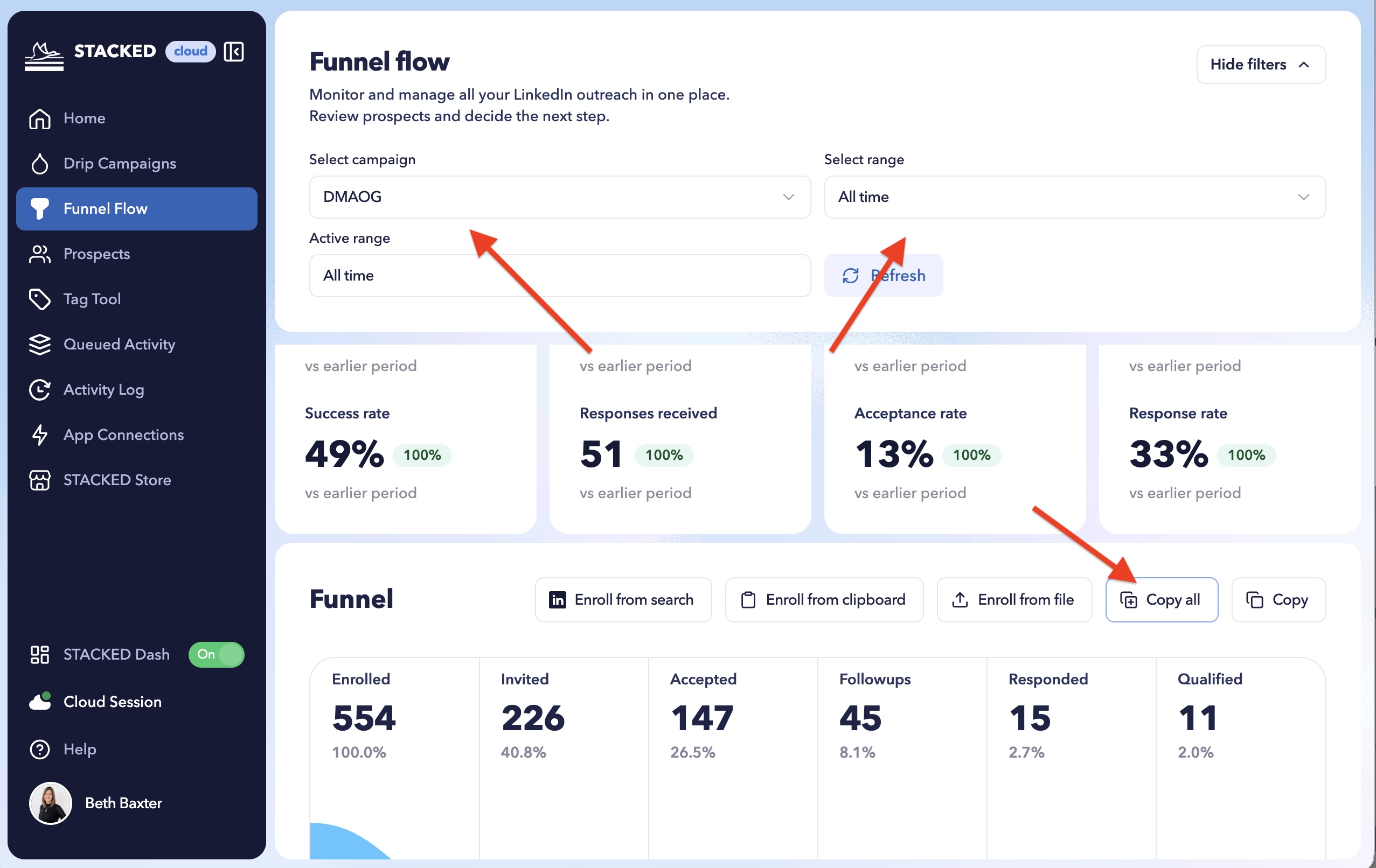
Step 2: Click on 'Copy all'
Step 3: You can now paste your data into your preferred document e.g. ExCel, CSV, Google Sheets etc. Or you can export it to a CRM system (e.g. HighLevel, Hubspot) or Google Sheets.
Scraping email addresses for your 1st-degree connections
Remember we said that STACKED can scrape the data of your 1st-degree LinkedIn connections and put it in a nice, organized csv file for you? This is how:
From your LinkedIn tab in STACKED, go to ‘My Network’
Then click on ‘Connections’
This will give you a list of your connections. You'll notice the 'Find prospects' button updates to 'Enroll prospects' . Enroll the list into a Visit campaign.
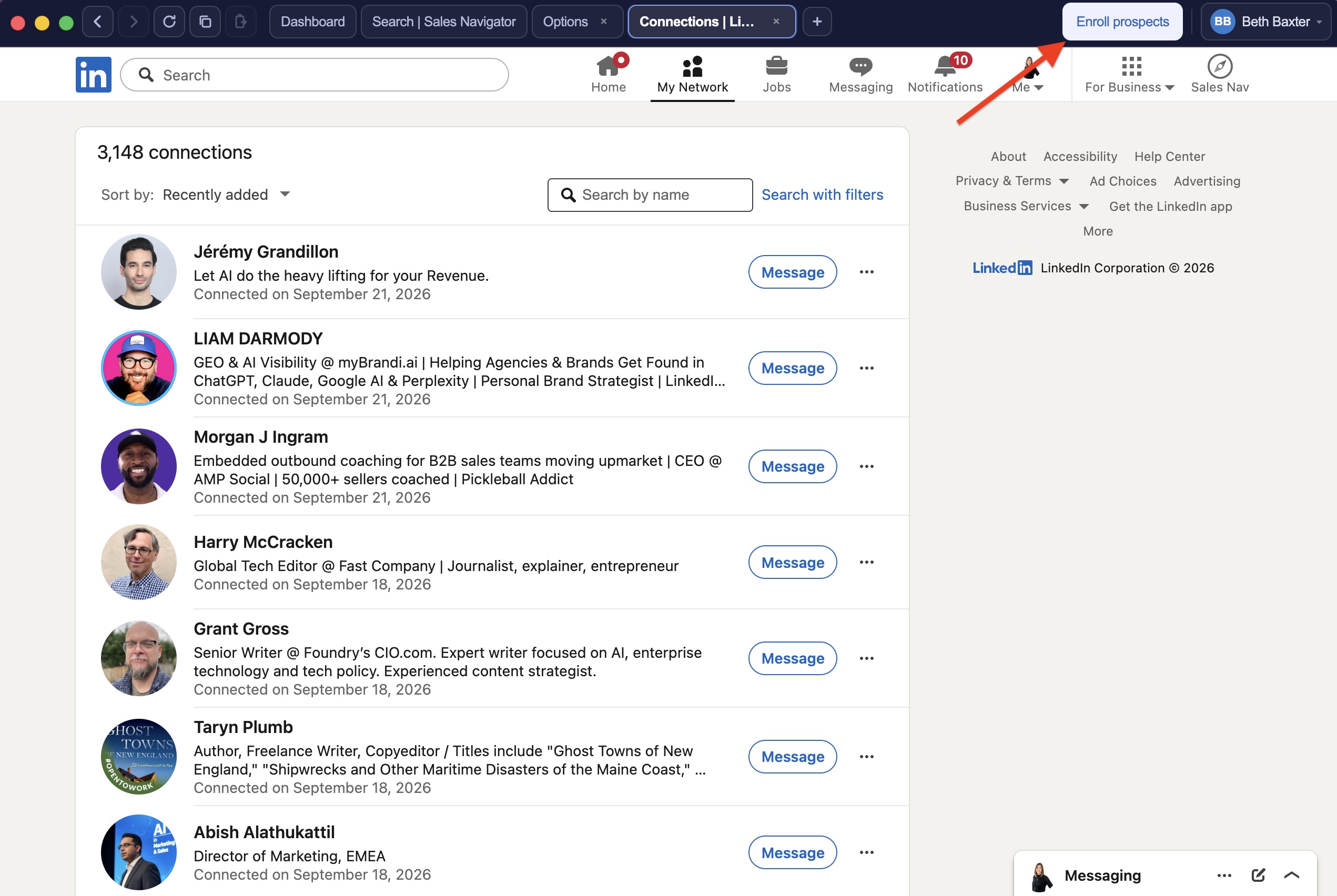
STACKED will visit your list, recording profile data and making it available. Just go back to the extension when your visits have all been executed and click ‘Download Data’.
Updating your CRM systems automatically with email addresses
With STACKED, you can automatically update your CRM system with email addresses and other LinkedIn profile data every time STACKED visits a profile.
It’s a similar process regardless of whether you use our HighLevel, HubSpot, Pipedrive, Salesforce SharpSpring or Freshsales integration, but here we’ll show you how to automatically update Hubspot with your scraped email addresses.
You’ll need:
- A STACKED
- A HubSpot account with admin rights
First, connect Hubspot by going to the App Connections section of your STACKED dashboard, and find the HubSpot connector.
Approve the connection from Hubspot. It will come up with some warning messages, but it's safe to connect STACKED to HubSpot.
Now, back in the STACKED you can enable your HubSpot integration and select to create and update contact data from all profiles.
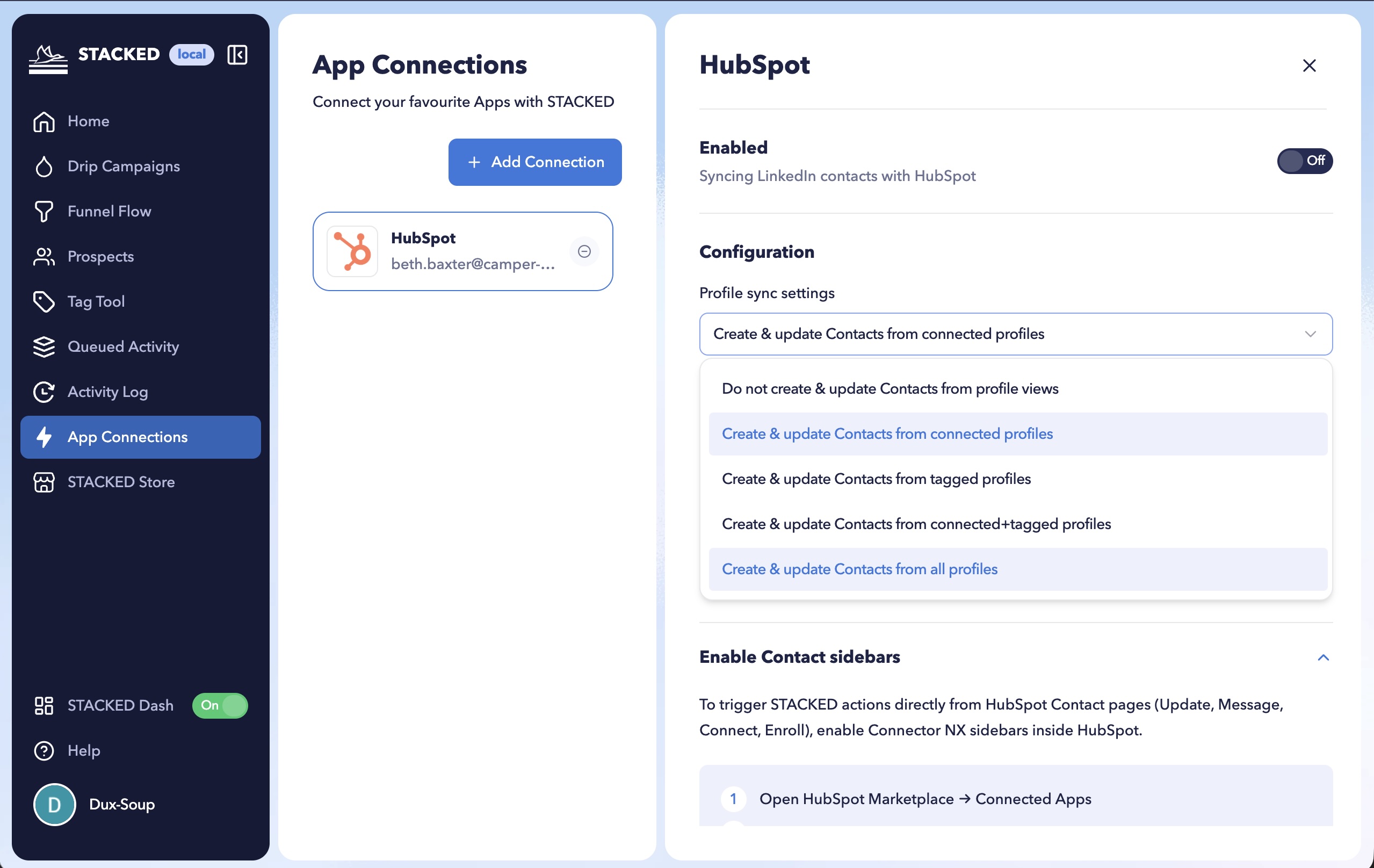
Now every time you visit a LinkedIn profile with STACKED a contact will be created or updated in HubSpot.
You can choose which contacts you’d like to add to STACKED Now sit back and watch your Hubspot CRM update with fresh contacts and data from LinkedIn.
STACKED offers direct integrations with your CRM system, allowing you to build and maintain an accurate, centralized prospect list for your lead generation activities.
Why don’t you also consider running your LinkedIn lead generation campaigns from your CRM system to fill your CRM system with qualified leads?