Test the Dux-Soup API with Postman

Want to integrate LinkedIn automation into your own software? The Dux-Soup Public API gives developers the building blocks to connect LinkedIn activity to CRMs, lead management platforms and custom applications.
Whether you're automating outreach from your CRM, building a lead generation platform, or creating your own reporting tools, you can use the API to connect Dux-Soup's LinkedIn automation capabilities with the systems you already use.
Getting started is straightforward with our public Postman collection. It includes ready-to-use requests, authentication scripts and examples to help you explore the API and test your integration.
What is the Dux-Soup Public API?
The Dux-Soup Public API lets developers integrate LinkedIn automation into their own applications and workflows. It supports STACKED, powered by Dux-Soup, as well as existing users of the Dux-Soup Turbo and Cloud extensions.
It lets developers integrate STACKED with CRMs, lead management platforms, databases, automation tools, and other external systems, while also enabling programmatic LinkedIn outreach.
The API can be used to schedule LinkedIn activities, manage campaigns and prospects, retrieve conversations and activity, manage account settings, monitor teams, and more.
Webhooks complement the API by sending LinkedIn activity and data back to your systems in real time.
Combine the API with Webhooks to build workflows such as:
- Trigger a LinkedIn connection request when a lead is created in your CRM
- Enroll prospects into a STACKED campaign from your lead management system
- Create and manage campaigns programmatically
- Retrieve LinkedIn conversations and recent automation activity
- Monitor campaign performance across managed accounts
- Receive LinkedIn profile data, messages, actions performed, and automation outcomes in your CRM or database
A simple way to think about it is:
- API → tell STACKED what to do or retrieve data
- Webhooks → receive data and events from STACKED as they happen
Using the Dux-Soup Public API collection in Postman
Postman makes it easy to explore API endpoints, send test requests and inspect responses without building a full integration first.
Our public collection includes ready-to-use requests, documentation, example payloads and scripts that handle the common authentication steps for you.
You'll also find Webhook documentation and example payloads to help you understand the events your application can receive as LinkedIn activity takes place.
The collection covers:
- LinkedIn Activity API (Remote Control)
- Webhooks
- Campaign Management API
- Messaging & Activity API
- Prospect API
- User Settings API
- Extension Control API
- Queue Management API
- User Profile API
- Team Monitoring API (admin)
- Reporting & Discovery API
Start with an endpoint that matches your use case, configure your collection variables and send a request to see how it works.
LinkedIn Activity API and Webhooks
One of the most common integration patterns combines the LinkedIn Activity API with Webhooks.
The LinkedIn Activity API, formerly known as the Remote Control API, lets an external application schedule LinkedIn actions.
For example, your CRM could submit a connection request through the API. The command is added to the activity queue and a successful API call returns a messageid.
That messageid can then appear in subsequent Webhook events, allowing your integration to correlate the command it submitted with what happened during execution.
This means your workflow doesn’t need to stop after:
“Connection request submitted.”
It can continue through:
CRM → API request → activity queue → STACKED executes action → Webhook → CRM updated with outcome
The same pattern can be used for messages, profile visits, follows and other supported activities.
Before you start
You’ll need your:
User ID
This identifies the STACKED or Dux-Soup account the API request relates to.
Authentication Key
This is used to authenticate and cryptographically sign API requests.
You can find your Authentication Key in: Settings → Connect
Keep your Authentication Key private. It is used to generate the request signature and should not be sent as a normal request parameter.
Configure the Postman collection
Once you’ve opened the Dux-Soup Public API collection in Postman, configure the collection variables.

The two main variables used throughout the collection are:
- userid - Your User ID
- authKey - Authentication Key from Settings → Connect.
Individual requests may use additional variables such as profileid, campaignid, etc.
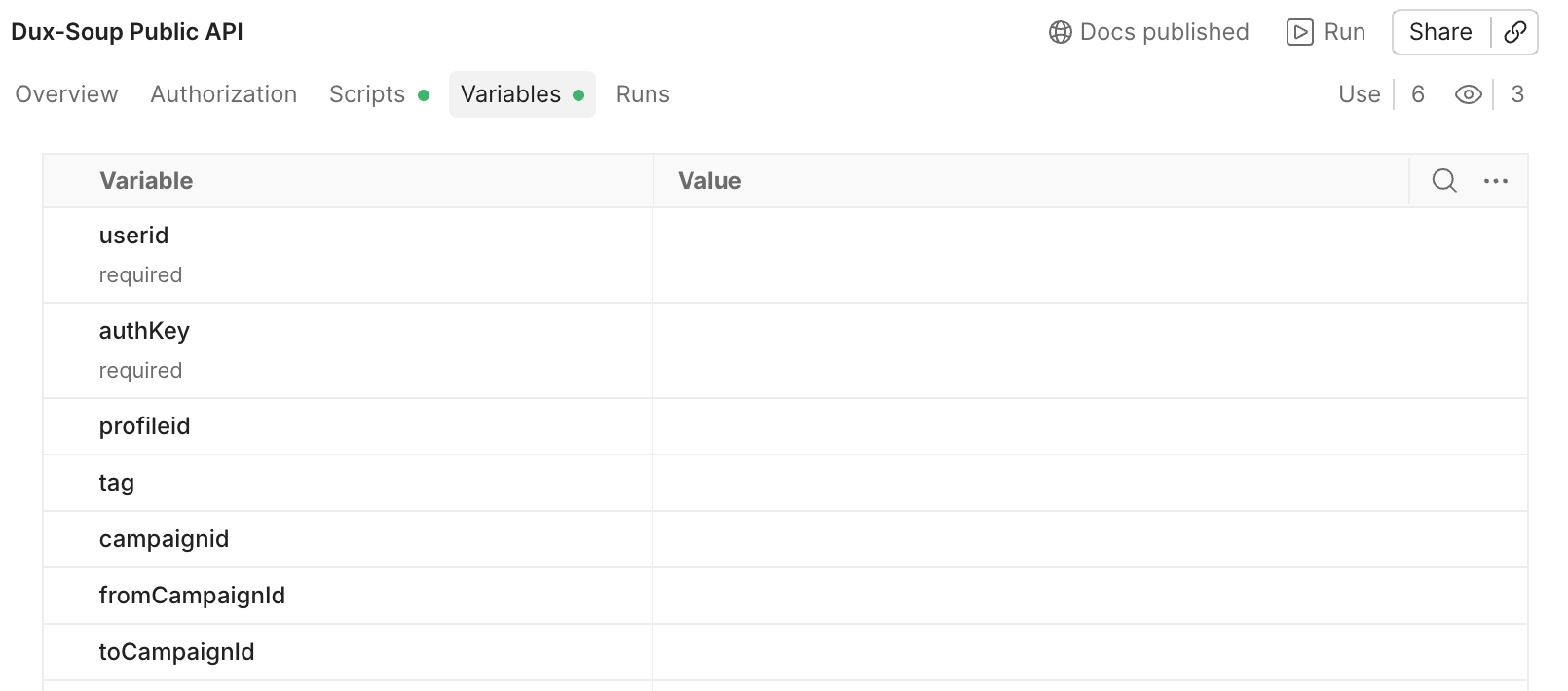
These can be configured as required for the endpoint you’re testing.
Once userid and authKey are configured, the collection handles the common authentication logic for you.
How API authentication works
All Dux-Soup API requests are authenticated using a cryptographically generated signature sent in the X-Dux-Signature HTTP header.
You don't need to generate this signature manually when using our Postman collection. A collection-level Before request script handles the common authentication steps automatically.
This lets you focus on testing endpoints and understanding their responses, rather than calculating signatures for every request.
To inspect the script in Postman:
- Open the Dux-Soup Public API collection.
- Select Scripts.
- Open Before request.
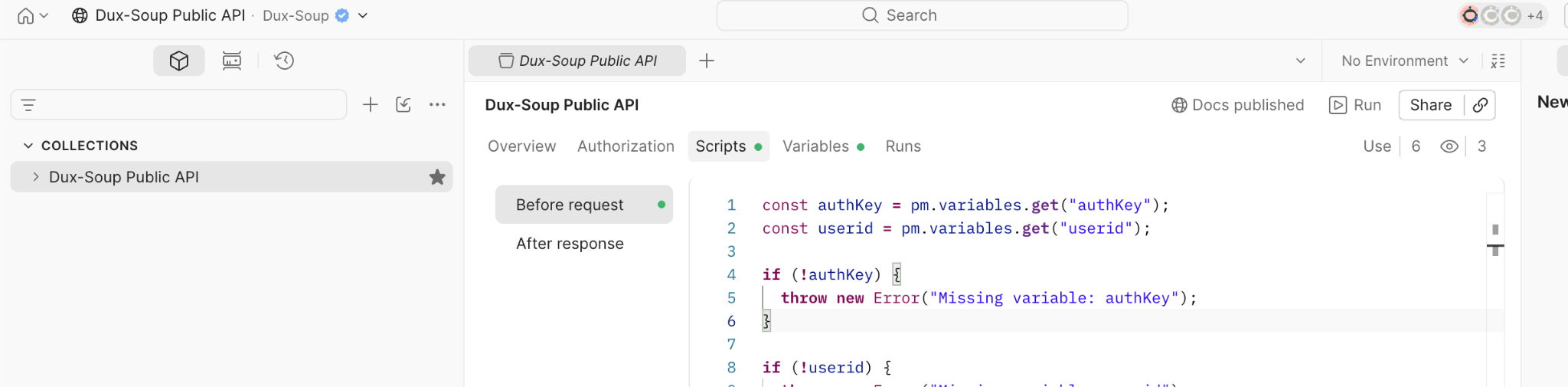
The Before request script then:
- Generates a fresh timestamp for every request
- Resolves the final request URL and makes it available as targeturl
- Generates the appropriate HMAC signature using your authKey
- Adds the resulting X-Dux-Signature header to the request
- Sets the required request headers
The script automatically handles the different signing rules used by the API.
For GET requests, the HMAC signature is calculated over the complete request URL, including any query parameters.
For POST, PUT, and DELETE requests, the signature is calculated over the raw JSON request body. These requests include the standard fields targeturl, timestamp, and userid.
This means you can move between the requests in the collection, change the endpoint-specific parameters, and click Send without manually calculating a new signature each time.
Explore the API documentation in Postman
Open the Dux-Soup Public API collection in Postman, configure your userid and authKey, choose an endpoint, and send your first request.
Depending on the endpoint, you’ll find information about:
- What the request does
- Required and optional parameters
- Collection variables
- Request bodies
- Supported values
- Example cURL requests
- Example responses
- Endpoint-specific behavior and limitations
You can then change the example values to your own and send the request directly from Postman.
Postman is useful for understanding and testing an endpoint, but your integration doesn’t need Postman to use the API.
Once you’ve confirmed that a request behaves as expected, you can implement the same request in your preferred programming language or application.
What can you build?
The Dux-Soup Public API can be used in two main ways: to add LinkedIn automation and data to systems you already use, or to provide the LinkedIn automation engine behind your own software.
For example, you could:
Integrate LinkedIn with your CRM - trigger connection requests, messages, profile visits, and campaign enrollment directly from your CRM, while sending LinkedIn activity and outcomes back through Webhooks.
Build end-to-end lead generation software - use the Dux-Soup API as the LinkedIn automation engine within your own platform, while your application manages prospect sourcing, qualification, campaign logic, CRM workflows, reporting, and the user experience.
Create recruitment and sourcing workflows - send prospects or candidates into STACKED from your recruitment platform and return profile data, conversations, messages, and activity outcomes to your system.
Connect lead databases and enrichment platforms - pass prospects into LinkedIn automation workflows and use Webhooks to receive structured LinkedIn profile data and subsequent activity.
Create AI-powered sales and outreach tools - combine your own AI, business logic, and user interface with Dux-Soup APIs for LinkedIn campaign management and activity execution.
This means you don’t have to build and maintain the LinkedIn automation layer yourself. Your software can manage the wider lead generation or sales workflow, while STACKED handles the LinkedIn automation, with the API and Webhooks connecting the two systems.
Have feedback, questions, or comments about the API? We’d love to hear from you.














.png)