STACKED HighLevel integration: Add LinkedIn to your multi-channel CRM campaigns
If you use HighLevel to power your sales and marketing, then STACKED is the natural extension to your tech stack - bringing LinkedIn lead generation into your workflow processes and LinkedIn data into your CRM.
STACKED automates the LinkedIn outreach process for over 300,000 users across the globe. With a two-way connection to HighLevel, you can run a multi-channel outreach machine, including sending LinkedIn connection invitations, messages and InMails to segments of your CRM data. Plus, automatically create and update contacts in HighLevel once they interact with you on LinkedIn.
It eliminates manual data entry, keeps your contact records up to date, and allows you to harness LinkedIn as a lead generation platform.
Here's everything you need to know.
Why LinkedIn and HighLevel belong together
HighLevel gives agencies and sales teams an incredible amount of firepower across email, SMS, calls, and more. But LinkedIn remains one of the highest-intent channels for B2B outreach, and historically, it's been the one that sits outside of the HighLevel workflow.
That gap creates problems. You're running LinkedIn outreach in one place, managing contacts and campaigns in another, and spending valuable time manually copying data between the two. Leads fall through the cracks. Context gets lost. Your team has no visibility over what's happening on LinkedIn unless they log in and check themselves.
The STACKED HighLevel integration fixes all of that. LinkedIn activity is synced to your CRM automatically, and your HighLevel contacts become actionable in STACKED without any duplication of effort.
What does the integration do?
STACKED’s HighLevel integration is a proper two-way sync, not just a data export. Here's what it brings to the table on both sides.
Sync LinkedIn data straight into HighLevel
Whenever you visit a LinkedIn profile, either manually or through an automated STACKED campaign, the integration can create or update a Contact and Company record in HighLevel automatically. No exports. No copy-paste. No spreadsheets.
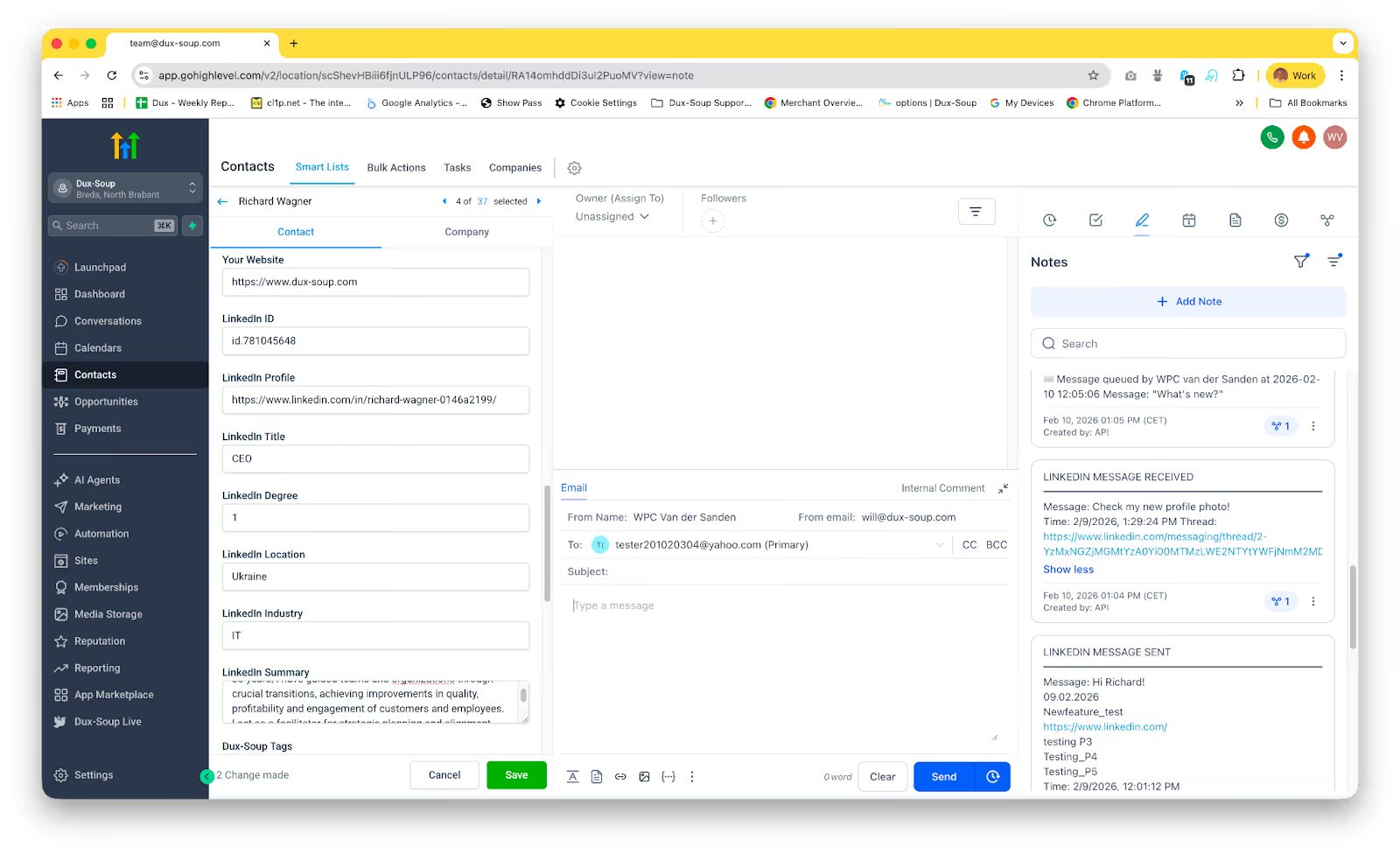
Alongside the contact record, you can apply STACKED tags to keep your CRM organised, generate notes from LinkedIn message exchanges so the conversation history lives in HighLevel, and enroll contacts directly into outreach campaigns based on their LinkedIn activity.
The result is a CRM that actually reflects what's happening in your LinkedIn outreach, in real time, without any manual effort from your team.
Build true multi-channel campaigns
This is where things get really interesting. Once STACKED and HighLevel are connected, LinkedIn becomes just another channel inside your HighLevel campaign workflows alongside email, SMS, and everything else.
You can respond to HighLevel prospects individually via LinkedIn, as we see below:
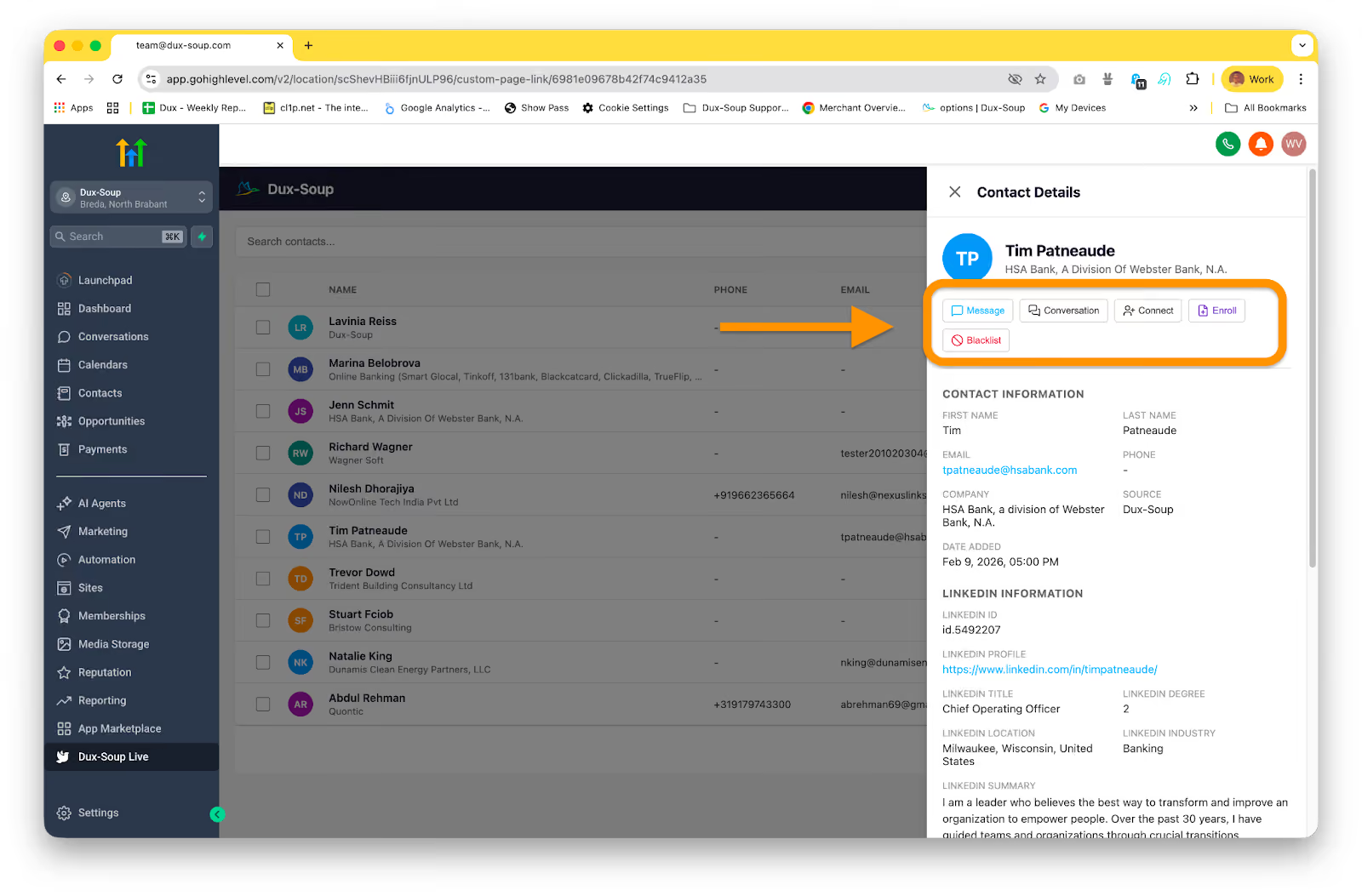
Or you can build STACKED outreach sequences that combine multiple LinkedIn touchpoints and enroll a list of HighLevel contacts into your campaign.
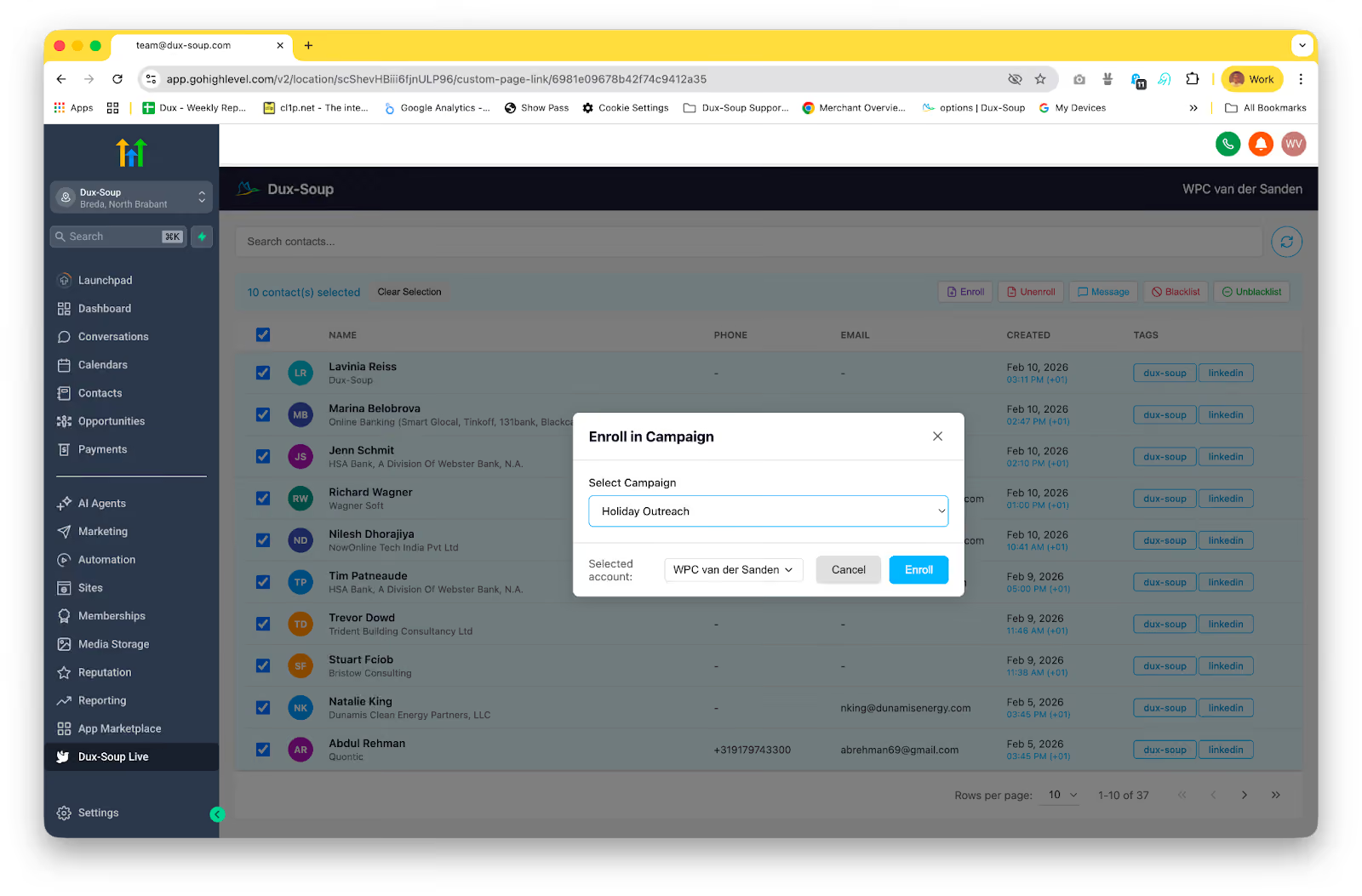
And because all engagement data is synced back to the CRM, your sales and marketing teams always have a single, up-to-date view of where every prospect stands.
Take action on contacts directly from HighLevel
You can carry out a full range of STACKED actions from the Contact page inside HighLevel, without needing to open STACKED separately:
- Enroll or unenroll contacts in a STACKED drip campaign
- Qualify contacts in or out of a campaign
- Continue a campaign sequence once a prospect has responded
- Send a direct LinkedIn message
- View the full LinkedIn conversation history
- Blacklist profiles from future outreach
- Perform bulk actions across multiple contacts at once
For agencies managing multiple clients, that last point is particularly useful. You can work across contacts at scale without ever leaving your HighLevel dashboard.
Who is this integration for?
Agencies running LinkedIn outreach for clients will get a huge amount from this. HighLevel is already the platform of choice for many agencies, and adding LinkedIn as a managed channel through STACKED means you can offer clients a fully coordinated multi-channel lead generation service from a single workspace.
Sales teams who want their LinkedIn activity to feed automatically into their CRM pipeline will stop losing leads to manual processes. Every connection, message, and reply lands where it should, with the right context attached.
Marketers building behaviour-triggered campaigns in HighLevel can now include LinkedIn as a trigger or action in those workflows, making outreach more timely and more personalised.
Solo operators who use HighLevel to manage their own pipeline will benefit from not having to maintain LinkedIn data separately. The integration keeps everything in sync so you can focus on conversations, not admin.
How to set it up in under 5 minutes
You'll need a STACKED local or cloud license (or be on a free trial) to access the HighLevel integration. Once you have that, the setup is straightforward and takes just a few minutes.
Step 1: Go to App Connections
From your STACKED dashboard navigate to App Connections. This is where all your integrations are managed.
Step 2: Find HighLevel under CRMS in the connector list, and press 'Connect'.
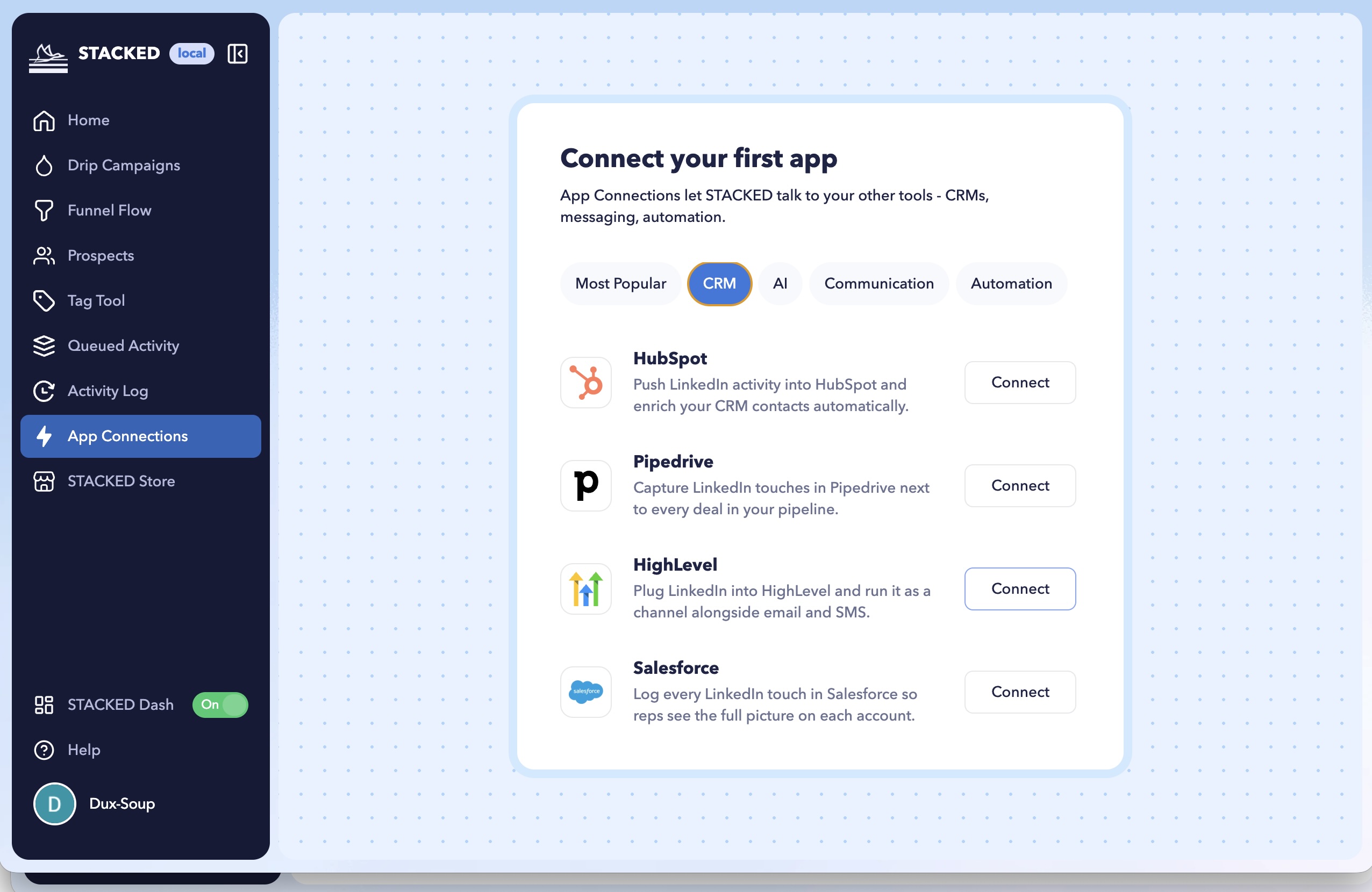
Step 3: Authenticate your accounts
You'll be prompted to connect your HighLevel account. Follow the on-screen steps to authorise the integration. Once done, it will appear under App Connections.
Step 4: Configure your sync preferences
Select when to create and update contacts in HighLevel, and choose how you want LinkedIn data to map to HighLevel fields.
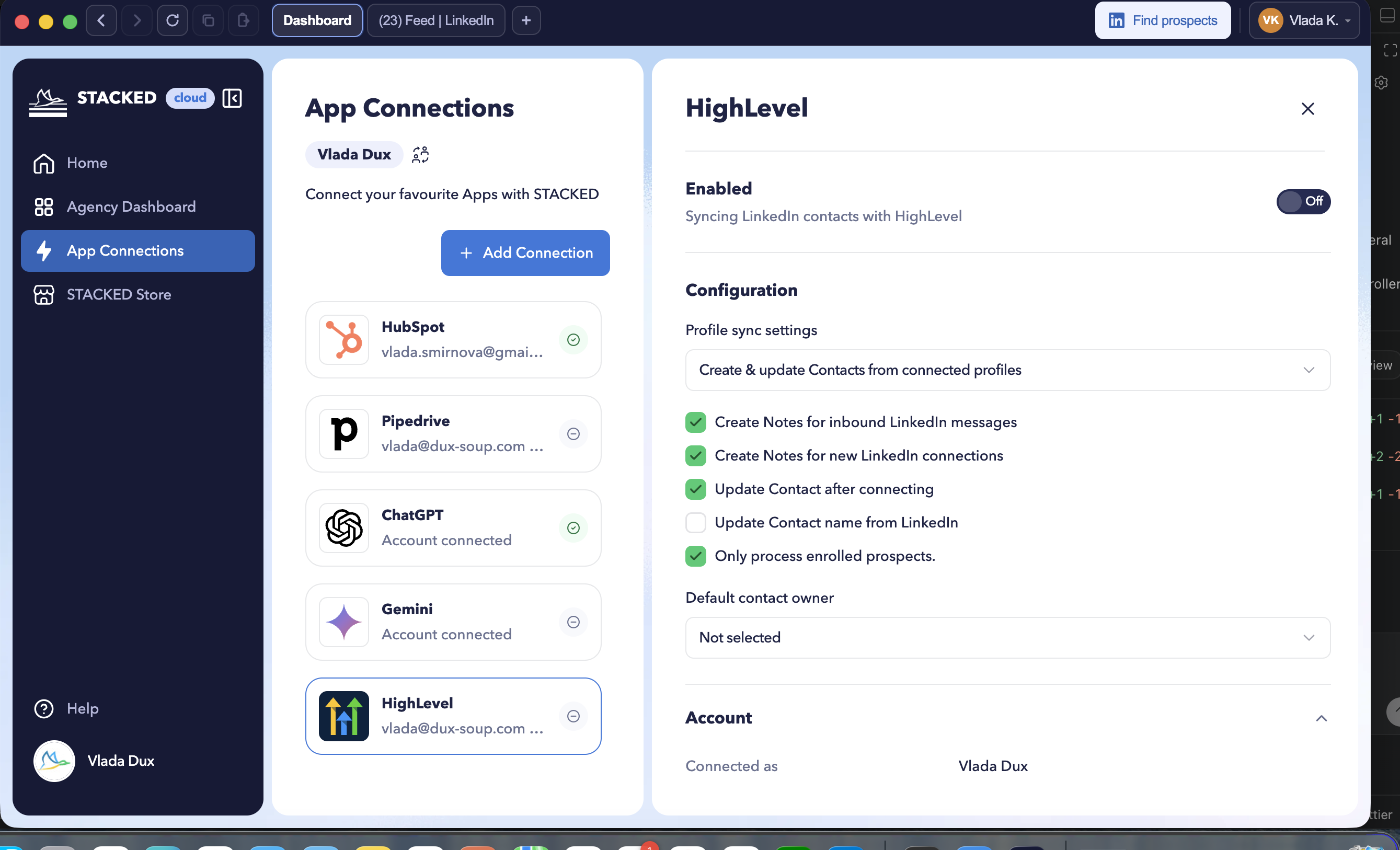
Step 5: Enable the integration by sliding the 'Enable' toggle.
From this point, LinkedIn activity syncs to HighLevel in real time. You can start enrolling HighLevel contacts in STACKED campaigns and triggering LinkedIn outreach directly from your HighLevel workflows.
Refer to our HighLevel support guides in the Help Centre for more detail.
The bottom line
LinkedIn is too valuable a channel to manage in isolation. When you connect it to HighLevel through STACKED, you stop treating it as a separate silo and start using it as a fully integrated part of your sales and marketing engine.
Your CRM stays accurate without manual effort. Your campaigns gain a new high-intent channel. And your team gets a complete picture of every prospect's journey, from first LinkedIn touch to closed deal, all in one place.
If you're already using HighLevel and STACKED separately, connecting them is one of the quickest wins you can make. Give it a go.
Ready to connect STACKED to HighLevel?
Available on all STACKED plans. Visit dux-soup.com to get started, or head straight to the App Connections page in your STACKED dashboard.