How to use STACKED with LinkedIn Recruiter

LinkedIn Recruiter is a powerful tool for finding and identifying potential candidates. But finding the right people is only the first step. Managing candidate lists, capturing profile information, sending personalized outreach, and following up can take up a significant amount of a recruiter's day.
STACKED helps recruiters automate repetitive LinkedIn activities, organize candidate data, and build structured outreach campaigns using LinkedIn Recruiter.
Whether you're an independent recruiter, an in-house talent acquisition professional, or part of a recruitment agency, STACKED can help you spend less time on repetitive tasks and more time building relationships with qualified candidates.
In this guide, we'll explain how to:
- Find and identify relevant candidates using LinkedIn Recruiter.
- Visit and capture candidate profile information.
- Scan candidate search results and export data.
- Organize candidates with tags.
- Build automated candidate outreach campaigns.
- Connect LinkedIn recruitment activity with your CRM.
What is STACKED for LinkedIn Recruiter?
STACKED is a LinkedIn automation tool developed by Dux-Soup. It works alongside LinkedIn Recruiter to help recruitment professionals manage candidate sourcing, profile data collection, and outreach.
LinkedIn Recruiter provides specialized tools for finding and managing potential candidates. STACKED complements this functionality by helping recruiters organize candidate information and automate selected follow-up activities.
Download STACKED and start your free 14-day trial
The Differences between Recruiter and other LinkedIn accounts
Understanding the difference between LinkedIn Recruiter and other platforms will enhance your productivity. Dux-Soup is very efficient, optimizing the functionality on each platform, but be aware that Recruiter does have some limitations.
It’s important to know you cannot send a connection request on Recruiter, the ‘Connect’ button simply isn’t there:
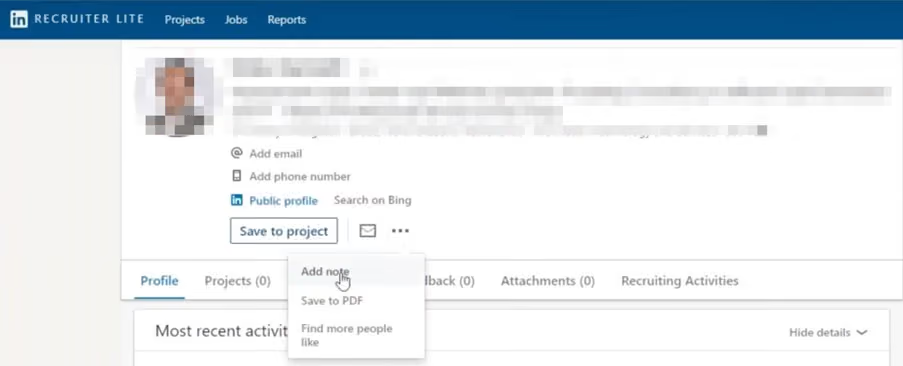
On the plus side, Recruiter provides you with many recruitment-related filters and the option to see who is looking for a job. Job seekers have an additional choice of only showing their “Open to Work” status if they want it seen by recruiters, so using another LinkedIn platform risks missing out on qualified candidates!
With STACKED, recruiters can:
- Automatically visit candidate profiles.
- Capture profile information for later use.
- Scan and export candidate search results.
- Add notes and tags to candidate profiles.
- Send InMail messages where supported.
- Enroll candidates in automated follow-up campaigns.
- Transfer candidate information into supported CRM systems.
The key distinction is that LinkedIn Recruiter helps you find candidates, while STACKED helps you manage the subsequent sourcing and outreach process.
How to use STACKED's Visit Profiles feature with LinkedIn Recruiter
One of the easiest ways to get started is with STACKED's Visit Profiles feature.
This allows you to visit candidate profiles from a LinkedIn Recruiter search and perform selected actions automatically.
When you visit profiles with STACKED, you can:
- Recording candidate profile information in a CSV file.
- Look up email addresses using available credits, where applicable.
- Sending InMail messages to eligible candidates.
- Automatically tagging candidate profiles.
- Transferring candidate information to your CRM through supported integrations.
How to Visit Profiles
To auto-visit a list of profiles, set up a Drip Campaign campaign in STACKED with a single Visit action, and enroll your list into the campaign.
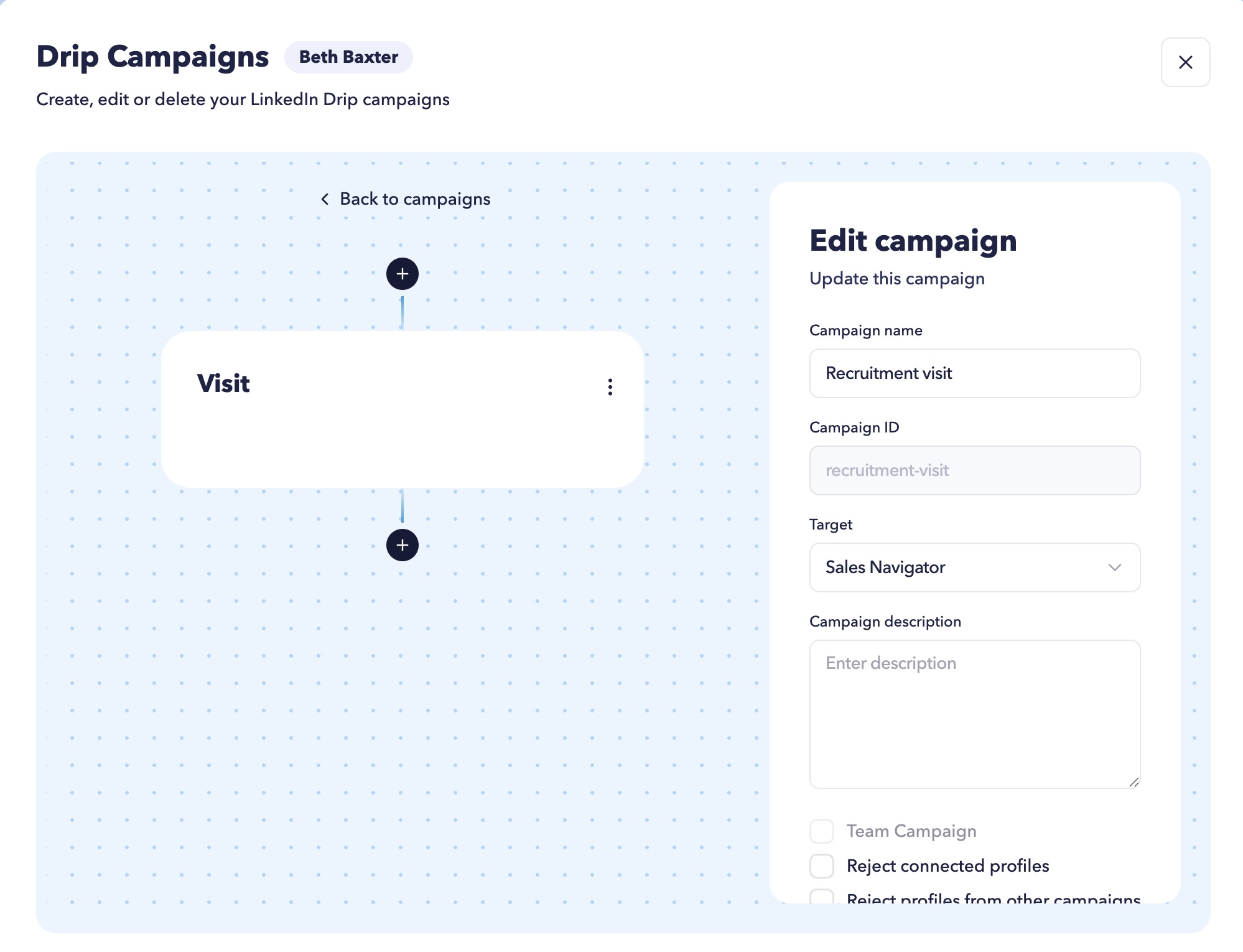
Next:
- Open LinkedIn Recruiter in your STACKED LinkedIn tab
- Run a candidate search using your preferred filters.
- Review your search results.
- Click on the 'Enroll prospects' button at the top of your dashboard.
- STACKED will auto-visit the selected profiles.

This is particularly useful when working with large candidate searches and collecting information consistently.
Recruitment tip: Use meaningful tags to distinguish candidates by role, skills, location, seniority, or recruitment campaign. This makes it much easier to retrieve and manage candidates later.
2. How to scan LinkedIn Recruiter profiles and export candidate data
Another useful feature is Scan Profiles.
Instead of visiting and recording the data for every candidate, you can scan a LinkedIn Recruiter search and export basic profile information into a CSV file. STACKED can Scan a list much more quickly than it can Visit it, as there are no LinkedIn limits to consider. Prospects won't be alerted that you've visited their profile either. See the difference between Scan and Visit features.
The information captured when you Scan a list can include:
- LinkedIn profile ID.
- Scan date and time.
- Recruiter profile URL.
- Public LinkedIn profile URL.
- First name.
- Last name.
- Current job title.
- Location.
- Industry.
- STACKED notes.
This creates a convenient candidate list that you can review and organize outside LinkedIn.
How to scan candidate profiles
- Open your LinkedIn Recruiter tab inside STACKED.
- Run your candidate search using relevant filters.
- Click on the Scan Profiles button at the top of your STACKED dashboard.
- Allow STACKED to process the search results.
- Your scan data will automatically download to your Downloads folder when done.
- Open the CSV file and review the candidates.

You can then remove profiles that aren't relevant to your recruitment requirements.
For example, you might remove candidates who have the wrong location, insufficient experience, or skills that don't match the vacancy.
Once you've cleaned your list, you can use it for subsequent outreach activities.
Why is this useful?
Scanning allows you to separate candidate discovery from candidate engagement. You can first build a relevant shortlist, review it, and then decide which candidates should receive further attention.
3. How to send LinkedIn connection requests to candidates found in Recruiter
LinkedIn Recruiter has different functionality from a standard LinkedIn account, so connection requests require an alternative workflow.
STACKED allows you to take a candidate list gathered through Recruiter and process selected profiles using your standard LinkedIn account.
This gives you more control over which candidates receive connection requests.
Step 1: Search for candidates in LinkedIn Recruiter
Start by running your candidate search.
Use the available filters to identify people who meet your recruitment criteria.
For example:
- Job title.
- Location.
- Industry.
- Skills.
- Experience.
- Current or previous company.
Once you've identified your candidates, use STACKED's Scan Profiles feature to create your CSV file.
Step 2: Review your candidate list
Locate the scan data in your Downloads folder and open it in your spreadsheet application.
Remove candidates who aren't relevant to the role.
This allows you to review your shortlist before starting any outreach.
Step 3: Upload the file to a Drip Campaign
Switch to your standard LinkedIn account in STACKED.
Go to your Funnel Flow section of the STACKED dashboard. Above the Funnel, you'll see an 'Enroll from file' button. Click on that, upload your file and select the campaign you wish to add the prospects to. Your drip campaign should include a connection request, and you can tailor this to each candidate using the AI-powered feature. Or use standard personalization copy like:
"Hi [First Name], I came across your profile while researching professionals with experience in [relevant skill]. I'd be interested in connecting and learning more about your career interests."
Keep your message relevant to the candidate rather than sending a generic recruitment pitch.
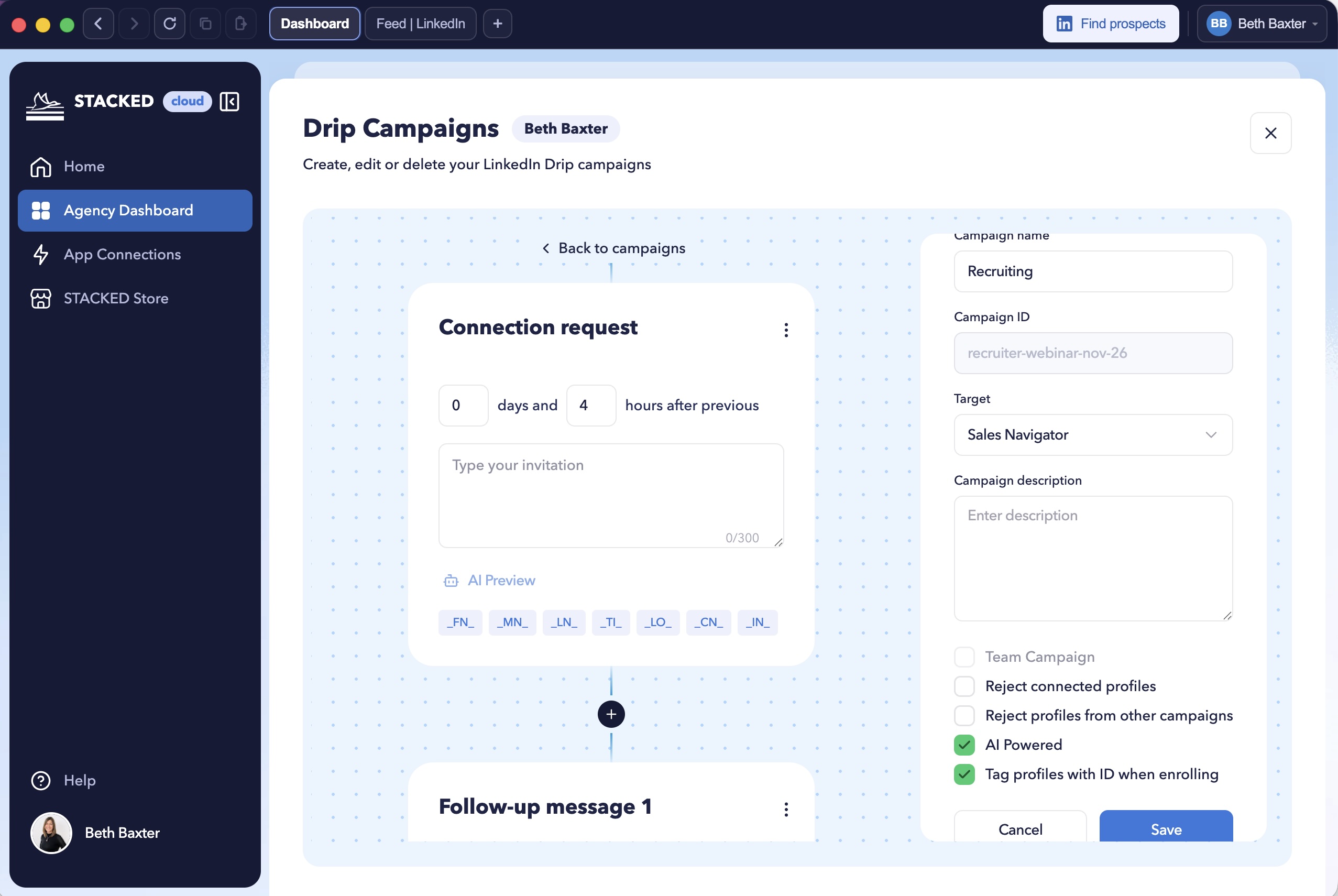
STACKED will use the candidate profile URLs in the file to identify the profiles you want to process.
You can also include follow-up messages to automatically send after someone has received your connection invitation and accepted.
4. How to organize candidates using STACKED tags
When you're recruiting for multiple vacancies, keeping track of potential candidates can quickly become difficult.
STACKED's tagging functionality can automatically tag profiles when enrolling them into campaigns, helping you organize profiles and retrieve relevant candidates when you need them.
This is particularly useful when working across multiple vacancies or managing several candidate searches simultaneously.
A consistent tagging structure also makes it easier to segment candidates for future outreach.
5. How to add LinkedIn Recruiter candidates to automated campaigns
Once you've identified and organized your candidates, you can take your recruitment outreach further using STACKED's drip campaign functionality.
STACKED allows you to build structured sequences of LinkedIn outreach messages and InMails so you can create a workflow that works for you.
Instead of manually remembering when to follow up with every candidate, you can create a campaign that schedules your messages.
How to create a recruitment campaign
First, open STACKED and navigate to your Drip Campaigns.
Create a new campaign and add the connection request and follow-up messages you want to use.
For example:
Action 1: Connection request
Introduce yourself and explain why you'd like to connect.
Action 2: First follow-up message
After the candidate accepts your invitation, send a short message explaining the opportunity.
Action 3: Second follow-up message
Share additional information about the role, company, or career opportunity.
Action 4: Final follow-up message
Send a polite final message and leave the door open for future opportunities.
You can configure up to 11 follow-up actions in a campaign after the initial connection stage, subject to the applicable campaign configuration and platform limitations.
How to enroll candidates from LinkedIn Recruiter
Once your campaign has been created:
- Open LinkedIn Recruiter in your STACKED dashboard
- Run your candidate search.
- Select the profiles you want to target.
- Select Enroll Profiles at the top of your STACKED dashboard
- Choose the recruitment campaign you created.
STACKED will schedule the appropriate campaign actions.
For candidates who are not yet connected, the campaign can start with either a connection request or an InMail if you want to get straight to the detail without connecting with a prospect. Once they accept your connection, the configured follow-up messages can be scheduled.
For candidates who are already first-degree connections, the campaign can begin with the appropriate direct message.
Important: Campaigns should always be configured with appropriate delays, relevant messaging, and sensible activity limits. Stop or adjust outreach when a candidate responds.
For more ideas, read our guide on how to use LinkedIn automation effectively.
6. How to integrate LinkedIn Recruiter with your CRM
Recruitment teams often use applicant tracking systems (ATS) and customer relationship management platforms to manage candidate relationships.
Keeping LinkedIn information synchronized with these systems can reduce manual data entry and make candidate management more efficient.
STACKED offers integration options that can help transfer LinkedIn profile information and outreach activity into supported platforms.
Depending on your setup, you can use integrations with platforms such as HubSpot, HighLevel Pipedrive, and Salesforce, as well as other supported CRM and automation tools.
This can help you:
- Store candidate information centrally.
- Keep LinkedIn profile URLs associated with candidate records.
- Track outreach activity.
- Manage follow-up processes.
- Reduce repetitive data entry.
- Build more connected recruitment workflows.
To get started, open STACKED and navigate to App Connections.
Select your preferred integration and follow the setup instructions.
You can also use Zapier or Make to connect STACKED with other applications, where supported.
Read our related guide: How to integrate LinkedIn with your CRM.
7. How AI can improve LinkedIn recruitment outreach
AI can help recruiters make their LinkedIn outreach more relevant and personalized.
Rather than sending identical messages to every candidate, AI-powered campaign functionality can help tailor messages using available candidate information and campaign context.
S
TACKED supports AI integrations that can help personalize connection requests, direct messages, and InMails, depending on your configuration.
For recruitment teams, this creates opportunities to:
- Personalize messages around a candidate's experience.
- Reference relevant skills and professional backgrounds.
- Create more natural-sounding outreach.
- Adapt messaging to different candidate groups.
- Improve the relevance of follow-up communication.
AI should support the recruiter's judgment, not replace it. Always review your messaging and ensure that candidate data is handled appropriately.
Find out more in our guide to LinkedIn automation with AI.
Frequently Asked Questions about STACKED and LinkedIn Recruiter
Can you use STACKED with LinkedIn Recruiter?
Yes. STACKED works alongside LinkedIn Recruiter to help automate profile visits, scan candidate profiles, capture profile data, organize candidates, and manage selected outreach activities.
Some actions, such as sending connection requests, require a different workflow using a standard LinkedIn account.
Can STACKED send connection requests from LinkedIn Recruiter?
LinkedIn Recruiter's search interface does not provide the same connection-request functionality as a standard LinkedIn profile.
However, you can use STACKED's Scan Profiles feature to export selected candidates from Recruiter and process their profiles using your standard LinkedIn account.
Can STACKED export candidate information from LinkedIn Recruiter?
Yes. STACKED's Scan Profiles functionality can capture selected candidate information and export it into a CSV file.
The exported information can include names, profile URLs, job titles, locations, industry information, and other available profile data.
Can I send InMail messages using STACKED?
STACKED supports InMail actions for eligible LinkedIn profiles, subject to your LinkedIn account permissions, available InMail credits, and product configuration.
Can I add LinkedIn Recruiter candidates to STACKED campaigns?
Yes. You can use STACKED's campaign functionality to enroll candidate profiles and schedule structured outreach.
Candidates can be added through supported enrollment workflows, using the Enroll Profiles option
Does STACKED integrate with recruitment CRMs?
STACKED offers CRM and automation integrations that can help transfer LinkedIn profile information and outreach activity into supported platforms.
You can see our current list of STACKED integrations.
Which STACKED plan is best for recruitment?
The best STACKED plan depends on whether you want to run your automation from your computer, or from our infrastructure.
STACKED local and cloud both offer the same features, but cloud allows you to enroll profiles into a campaign then shut down your computer while your automation runs from our servers.
Final thoughts: Make LinkedIn Recruiter work harder for you
LinkedIn Recruiter gives you access to a powerful candidate search environment, but finding potential candidates is only part of the recruitment process.
STACKED helps you take the next steps by capturing candidate information, organizing profiles, managing outreach, and building structured follow-up campaigns.
By combining LinkedIn Recruiter with STACKED, you can create a more consistent and efficient candidate sourcing workflow.
Whether you're recruiting for one vacancy or managing multiple searches across a recruitment team, STACKED can help reduce repetitive work and give you more time to focus on meaningful candidate conversations.
Ready to improve your LinkedIn recruitment workflow?
Discover STACKED, powered by Dux-Soup, and find out how LinkedIn automation can help you manage candidate sourcing and outreach more efficiently.
Download STACKED and start your free 14-day trial