LinkedIn automation with AI: How to do it the easy way
If you’re into AI and into LinkedIn automation, you may be wondering how to make them work together and what benefits they can offer your LinkedIn lead generation results.
LinkedIn automation with AI offers huge potential. Scaling your outreach with automation gets volume; personalizing your outreach with AI gets replies. Together you’ve got a winning formula: more results and better conversion rates. Just think of the impact this can have on your growth trajectory.
In June, the LinkedIn automation market took a huge leap forward as Dux-Soup launched its AI integrations with ChatGPT, Claude, and Gemini, quickly followed by STACKED, its new LinkedIn automation tool that offers the same Dux-Soup automation power in an easy-to-use interface running on a desktop app.
Whilst LinkedIn automation tools have been citing AI for a while, this is different. Instead of using AI to help polish your message 'template', STACKED users can:
- Send individually personalized messages to every prospect based on their LinkedIn profile, so no two messages are the same, and every message is directly tailored to the prospect you're targeting
- Use AI for first-line response management to qualify leads, continue them in campaigns, and surface the hottest leads for you to follow up
- Connect your AI tool to STACKED via MCP so you can run your LinkedIn automation from your AI.
In this article we cover the key highlights of how to get started with STACKED AI.
What you need
- An AI subscription with ChatGPT, Claude, or Gemini (with ChatGPT and Claude, you need paid editions, but with Gemini there is a free tier that you can use to test it out on.)
- A STACKED plan (local or cloud) or a free trial
Setting up your LinkedIn automation with AI
Step 1: Connect your AI platform to STACKED. Add the ChatGPT, Claude or Gemini connection under App Connections in the STACKED dashboard . Click ‘New Connection’ , then go straight to AI at the top. Select ChatGPT, Claude, or Gemini from the list of available integrations.
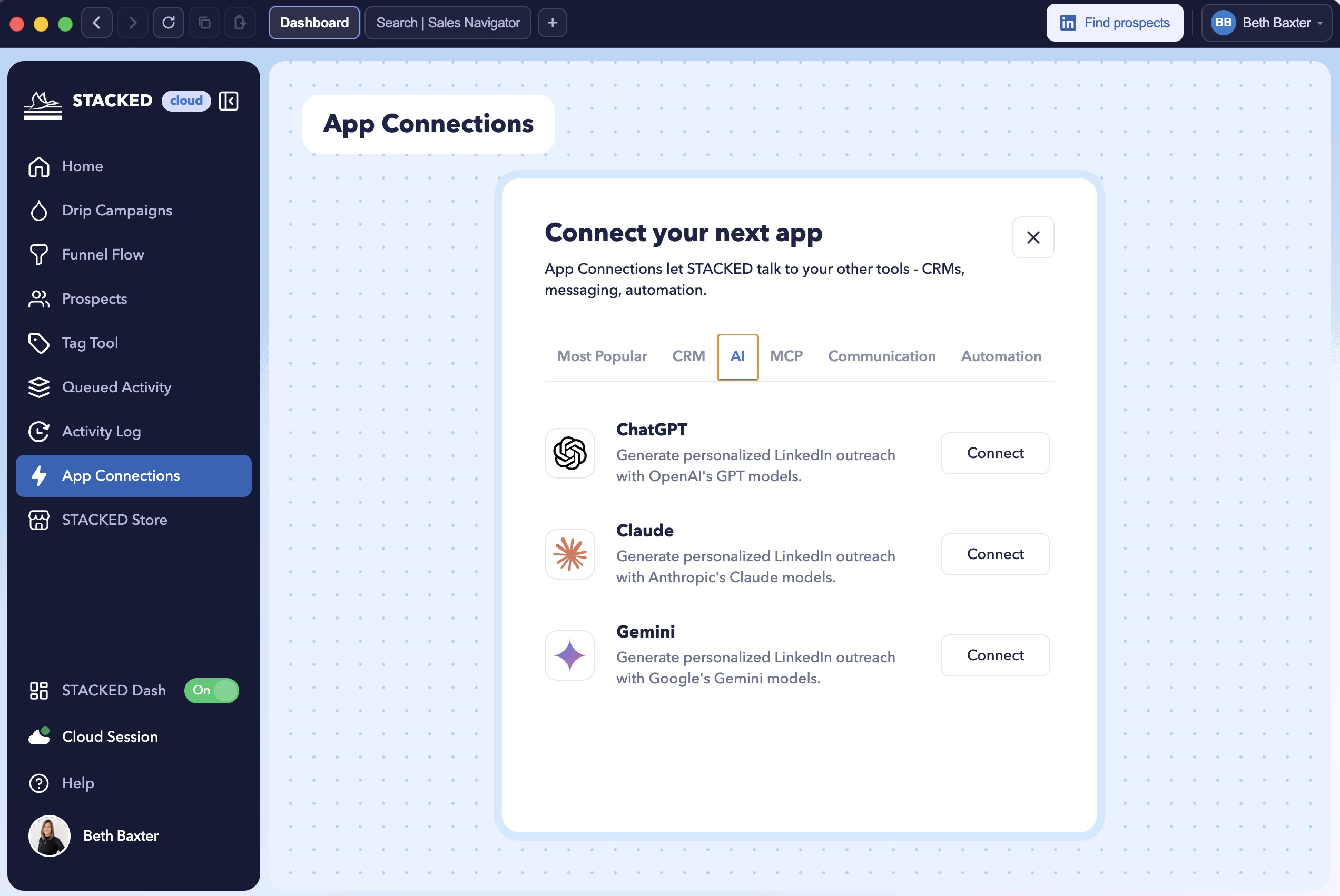
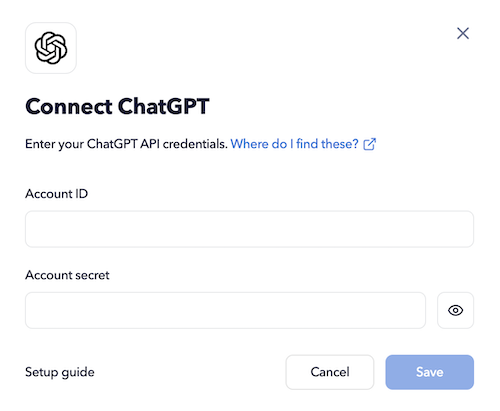
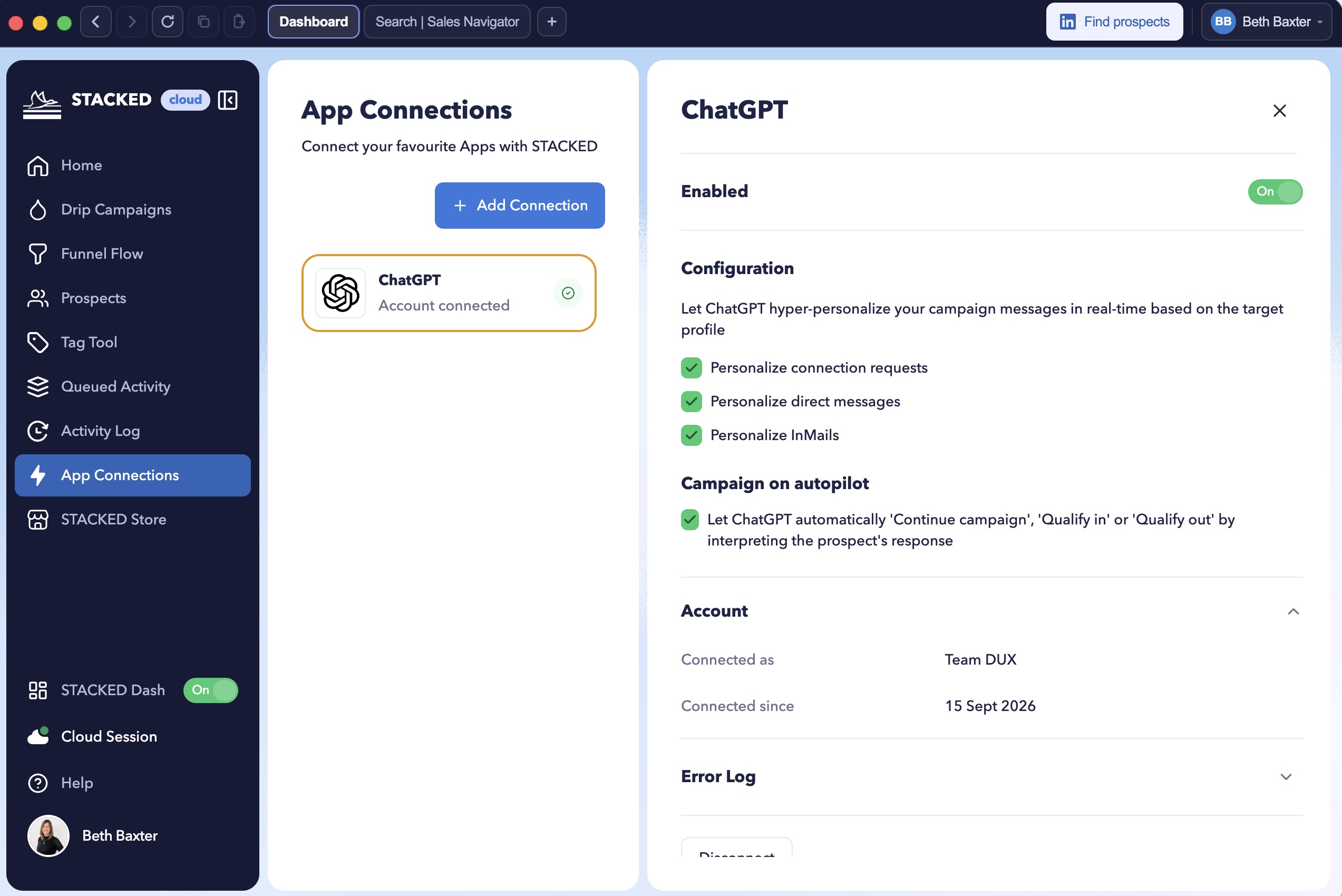
Then enter your account ID (this can be anything you like) and your ‘secret API key’ from that platform. This is your AI API key, normally found in your AI platform's settings. Click ‘Save’ and your integration will appear in your Dux-Dash, like this:
You can now enable it, plus configure it to allow your AI assistant to personalize connection requests, direct messages and InMail message for you, and allow it to manage and prioritize your responses for you.
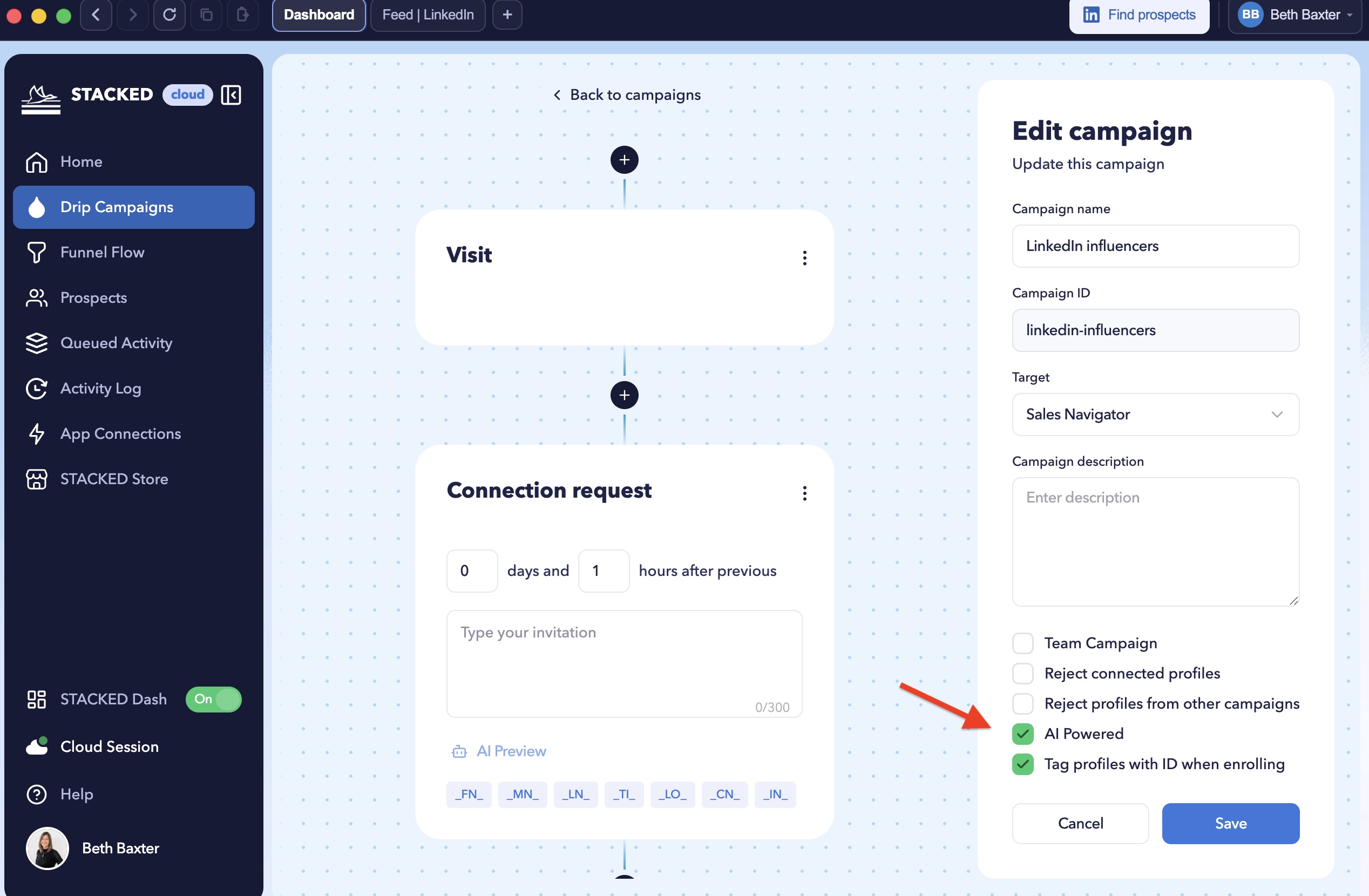
Step 2: Turn on AI for your campaign. When you create a campaign, Tick the ‘AI Powered’ box on any drip campaign to turn it on. This means that you have the ability to only use AI-generated copy for chosen campaigns.
Step 3: Enrol your prospects as normal. Build your list in LinkedIn, Sales Navigator or Recruiter, and enrol them into the campaign the same way you always have. STACKED handles the dynamic personalization from there.
Preview messages before sending
Letting AI loose on your prospects can be pretty scary, right? Which is why, before anything goes out, you can hit the AI preview button at the bottom of your message. It generates an example for one of your 5 most recently visited profiles to see exactly what message will be generated.
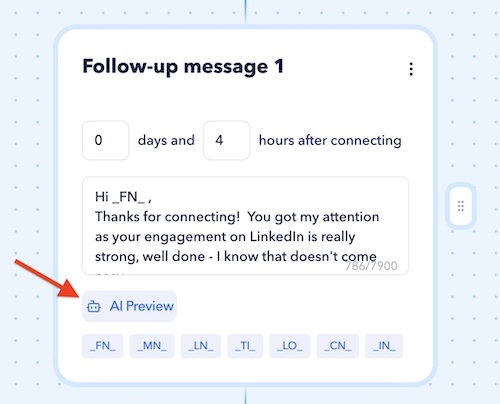
This is a useful sense check. Each AI platform has its own personality: ChatGPT tends to stay close to the structure of your original message, while Claude typically produces a slightly more elaborate rewrite. Neither is right or wrong. If you have multiple AI accounts, it’s worth previewing both to see which tone fits your audience.
How AI-powered campaigns actually work
You write one base message, the same simple template you'd use for any STACKED campaign, using the personalization tags like before. If the AI Powered box is checked, STACKED takes your templated message and runs it through AI before sending. AI rewrites it for that specific prospect, using the information on their LinkedIn profile:
- Name, job title, company and location
- Industry
- Profile summary and company website
- Profile language (note: if a prospect’s LinkedIn profile is set to, say, Dutch, the message is translated and personalized in Dutch automatically)
That last point matters more than it might first seem. It means your outreach can speak the language of your prospects, without any extra effort on your part.
AI-generated example
If we write a simple campaign message like below:
“Hi _FN_, Check my blog dux-soup.com/blog. Scott”
ChatGPT rewrites it to become this:
”Hi Vlada,
I hope you’re having a great day. Given your role in workflow automation and API integrations at Dux-Soup, I thought you may find some interesting insights in my blog dux-soup.com/blog. It touches on some topics that could align with your expertise. Scott”
During the launch lots of questions were raised about the creation of messages with AI, and whether you could add prompts etc. You can watch from the 30 minute mark of the webinar to see the answers.
Three best practices from the Dux-Soup team
- Keep to a plain base template. The AI messaging works best when it's adding personalization to a clear, simple message, not untangling a complicated one. A vanilla template with your call to action is the right starting point.
- Don't try to script the AI’s tone through instructions in the message box. It’s tempting to add instructions like tone or formatting rules directly into your template. Note: This is not a full prompt dialogue that you would get in your AI tool. We know that users are already asking for more traditional prompt features and these are on the roadmap. For now, we recommend simple messages.
- Remember your template is the fallback. If your AI platform ever has an outage, the plain template message is what will be sent. Keeping it simple and avoiding adding extra prompt instructions means your message will still look professional if an outage occurs.
It’s also worth noting that ChatGPT and Claude currently require a paid plan with API credits. Gemini offers a free tier if you want to test the waters.
AI response management
STACKED’s smart AI assistant takes this further. It reads a prospect’s reply and decides what happens next in the campaign. This could be flagging it as a qualified lead, marking it irrelevant, or simply continuing with the next message in the drip campaign.
All you need to do is click on the ‘Qualified’ section of the Funnel Flow to get instant access to the leads that your AI chatbot has qualified in for you, so you can focus on closing deals.
The STACKED MCP server
STACKED’s MCP connection will let you manage your LinkedIn outreach account directly from your chosen AI platform.
Early use cases include being able to:
- Ask for a plain-language breakdown of how a campaign has performed
- Build an entire campaign from a single prompt, such as finding first-degree connections in a specific city and inviting them to an event
- Give conversational instructions on how you want your prospect lists to be built before enrolling them into campaigns
Access 40+ LinkedIn automation AI prompts that work with STACKED.
See how STACKED ranks in AI for LinkedIn automation.
FAQs
Will AI replace my message template? No. Your template remains the foundation of every message; the AI dynamically personalizes it, it doesn't rewrite it from scratch.
How do I know what will actually be sent?
Use the AI preview button on one of your recently visited profiles. It shows you the exact personalized message for that person, so you can check tone and accuracy before it goes live.
Does it work in multiple languages?
Yes. STACKED will personalize and, where needed, translate the message according to the language set on the target's LinkedIn profile.
Do I need a paid AI subscription?
ChatGPT and Claude currently require a paid account with API credits. Gemini has a free tier available, which is a good way to test the feature before committing to buying credits.
Can I write custom prompts to control tone or formatting?
Not yet. Today the AI works from your base template and the prospect’s profile data. More granular control is expected once the upcoming STACKED MCP server rolls out.
How can I stop AI from generating the same opening line?
If your AI-generated messages are becoming too similar, start by checking the AI platform you're using. Different AI models can produce noticeably different styles and structures, so testing another connected model may produce more variety. More importantly, keep your base message simple and focused on the core purpose of your outreach. STACKED's AI personalization is designed to work from that foundation and personalise it using the prospect's profile. Always use the AI preview function to check what is actually being generated before launching a campaign at scale.
What's the best strategy for using AI to personalize LinkedIn outreach?
Use AI as a personalisation layer rather than as a replacement for your outreach strategy. Start with a clear, concise base message and segment your audience so that each campaign is targeting a genuinely relevant group. AI can then personalize the message using information from each prospect's LinkedIn profile. Avoid trying to make one campaign relevant to everyone. The better your audience segmentation, the more useful the AI personalization will be. And don't rely on complicated instructions inside your message template. Keep the underlying message professional and usable as a fallback if the AI service is unavailable.
Can I include a personalized ROI link for every prospect?
There are several ways to approach this, depending on how your data and campaigns are structured. You can use personalized variables or separate campaigns for different customer groups where each group needs a different URL. More advanced use cases may also be possible through STACKED's newer AI and MCP capabilities. For complex personalized links, it's important to test the workflow thoroughly before putting it into a live campaign. Your fallback message should always remain usable if the personalization step fails.
Can I measure accepted or replying contacts against specific job requirements?
Yes, this is an area where your campaign data can be combined with AI analysis. Export your campaign or prospect data from STACKED, including relevant fields such as job title, and give that data to an AI tool such as ChatGPT or Gemini. You can then ask it to analyse the results against your criteria and identify patterns in the contacts who accepted or replied. This can turn your campaign data into a more useful source of insight rather than simply a record of activity.
Try it for yourself
AI-powered campaigns are live and available today in your existing STACKED subscription. Just connect your AI platform and switch it on.














.png)

