STACKED Microsoft Teams integration: Never miss a lead again

Your LinkedIn campaigns are running. Prospects are replying.
But are you capturing every hot lead the moment they respond?
By connecting STACKED with Microsoft Teams, you can turn your LinkedIn automation into a real-time sales engine, without changing how your team works. Grab yourself a free STACKED trial license and test it for yourself.
Why Speed-to-Lead Matters in LinkedIn Automation
You’ve done the hard part:
- Built a targeted LinkedIn outreach campaign
- Automated connection requests
- Set up follow-up drip sequences
Then a prospect replies - and they are interested.
Now what?
Speed is everything. The faster your response, the higher your conversion rate.
But in reality:
- You are juggling multiple campaigns
- Switching between LinkedIn, CRM, and email
- Missing replies for hours or longer
That delay can cost you the deal.
I’ve noticed that LinkedIn sends me an email the day after a prospect replies to my messages. A whole day! That’s not helping with quick response times. But there is an answer to the speed challenge.
The Solution: Real-Time Alerts in Microsoft Teams
The STACKED Microsoft Teams integration ensures you never miss a message again.
The moment a prospect replies:
- A notification is sent instantly to your Teams channel
- Your entire team can see and act on it
- No need to log into LinkedIn or STACKED
A True Two-Way Integration
This is not just another alert system.
STACKED’s integration with Microsoft Teams is bi-directional. This means:
- You receive LinkedIn messages in Teams
- You can take action directly from Teams
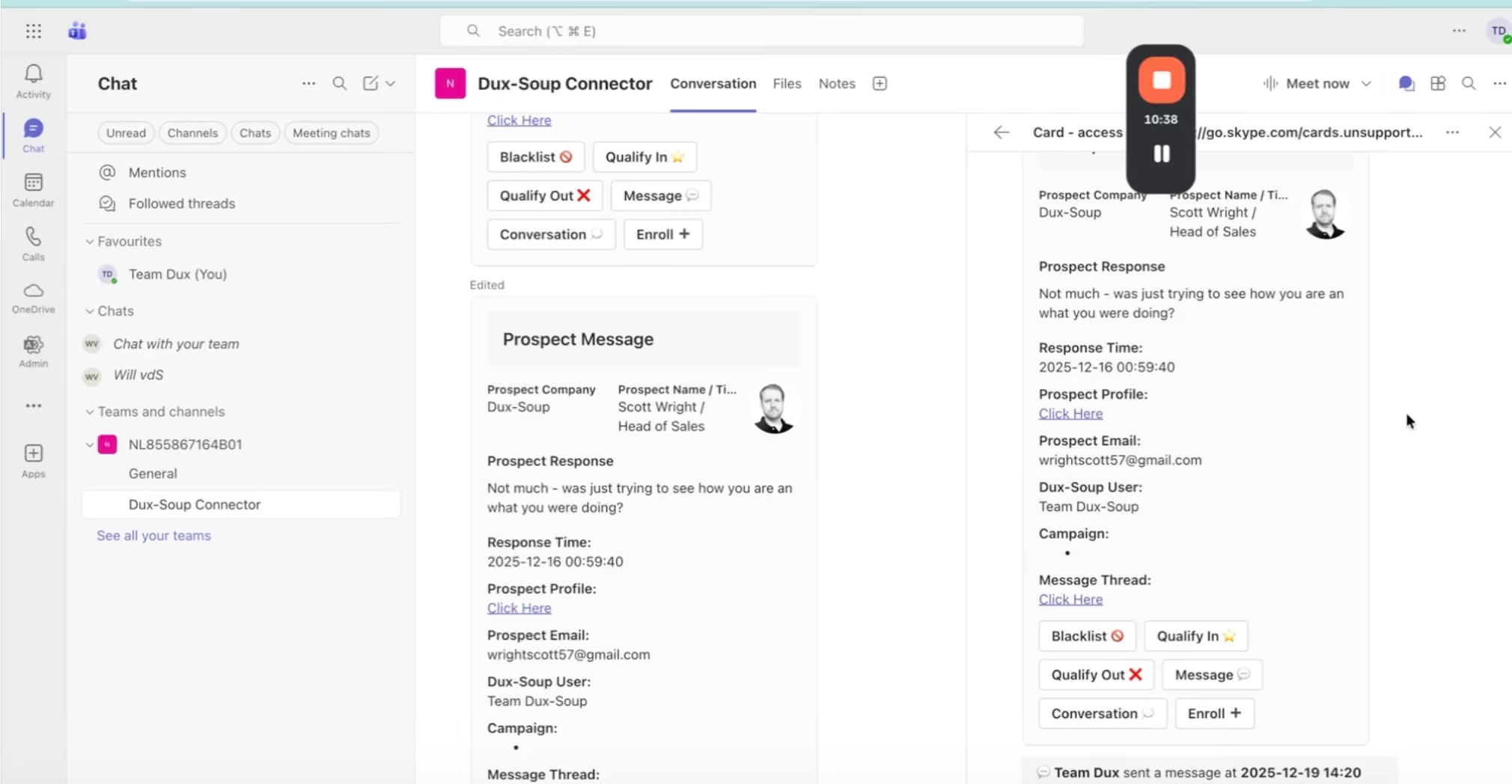
Even better, your team does not need a STACKED license to respond.
Perfect for:
- Sales teams
- SDR pods
- Agencies managing LinkedIn outreach
What You Can See Inside Teams
Each notification gives you full context instantly:
- Prospect name, job title, company
- Email address if available
- Direct link to LinkedIn profile
- Full message conversation
- Campaign details and ownership
No more switching tabs. Everything is in one place.
What You Can Do Without Leaving Teams
From inside Microsoft Teams, you can:
- Qualify leads in or out
- Reply directly to LinkedIn messages from Teams
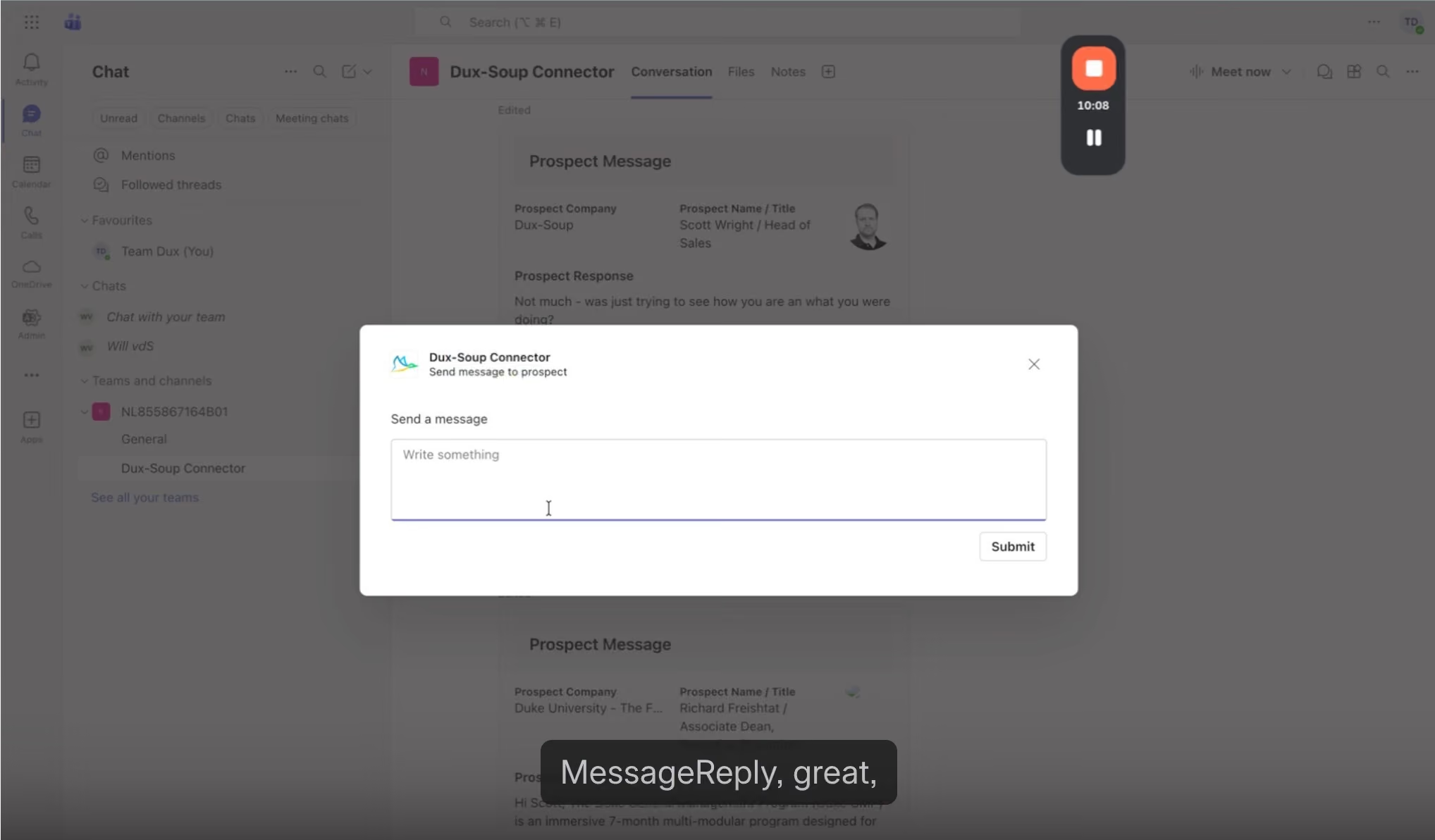
- Move prospects between campaigns
- Blacklist irrelevant contacts
Anyone in the channel can take action. This turns your whole team into a real-time response unit.
Real-World Use Case: From Reply to Meeting in Minutes
Imagine this:
A Head of Procurement, your ideal prospect, replies to your LinkedIn message.
Without integration:
- The message sits in your inbox
- You check it hours later, or wait until you're notified in your email inbox
- The opportunity cools
With STACKED and Teams:
- Instant notification in Teams
- Team sees full context immediately
- Someone replies within minutes
This is the difference between a booked meeting and a lost lead.
Who Should Use This?
This integration is ideal for:
Sales Teams and SDRs
Respond faster and collaborate without switching tools.
Sales Managers
Gain visibility into LinkedIn campaign performance and responses.
Agencies
Manage multiple LinkedIn outreach campaigns across clients in one place.
Solo Operators
Get instant mobile alerts and respond on the go.
How to Set Up the STACKED Microsoft Teams Integration
Setup takes less than a minute.
- Go to App Connections in your STACKED dashboard
- Select Microsoft Teams connector
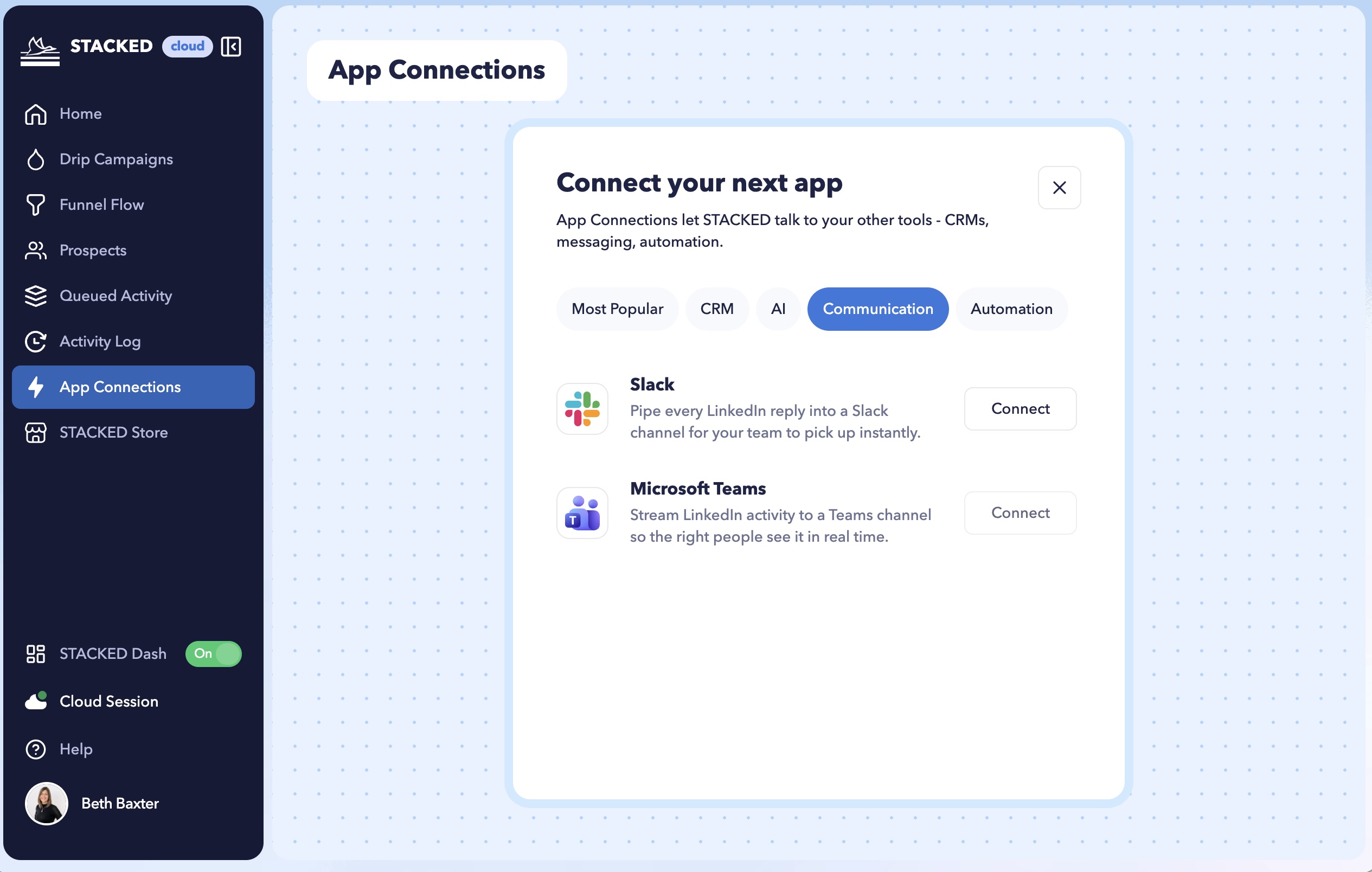
- Authenticate your Microsoft account
- Choose your Teams channel, for example #linkedin-leads
- Configure preferences such as drip campaign filtering
That’s it.
Your next LinkedIn reply will appear directly in Teams.
For a detailed walkthrough of the installation steps, check out the STACKED x Microsoft Teams support articles.
Why This Matters for Your Pipeline
LinkedIn outreach is scalable, but conversions depend on:
- Timing
- Relevance
- Fast response
STACKED handles the automation. Microsoft Teams ensures you act at the right moment.
The Bottom Line
If you are serious about:
- LinkedIn lead generation
- B2B sales automation
- Improving response times
Then connecting STACKED to Microsoft Teams is a simple upgrade with real impact.
Ready to Capture Every Lead in Real-Time?
STACKEDs Microsoft Teams integration is available on STACKED cloud and local plans.
Set it up in under a minute and start turning LinkedIn conversations into conversions instantly.













.png)

