The best LinkedIn automation tools in 2026 - Tried, Tested and Ranked

Updated August 2026
The best LinkedIn automation tools can act as your ultimate sales accelerator. The right ones foster genuine engagement that actually gets replies, safeguard your account, and free you up to focus on the conversations that really matter - with the prospects that will become your next clients.
Here we review the best-know LinkedIn automation tools for 2026 - evaluating each one on features, pricing, safety record, and the latest must have LinkedIn automation capability - AI personalization for one to one messaging.
The most widely used LinkedIn automation tools in 2026 are Dux-Soup, Dripify, Linked Helper, Expandi, Octopus CRM, HeyReach and Waalaxy. Each suits a different use case:
- Dux-Soup leads on AI personalized messaging and CRM integration
- Dripify is the easiest-to-use cloud option for solopreneurs
- Expandi is popular with recruiters, has strong campaign logic, and offers image and GIF personalization
- Octopus CRM is the most affordable entry point for beginners
- HeyReach is best for agencies running high-volume multi-account outreach
- Waalaxy suits sales professionals who want a simple, self-contained LinkedIn and email outreach workflow
The right tool depends on your team size, outreach volume, CRM requirements, and whether AI personalization matters to your results.
What is LinkedIn Automation – and why use it?
LinkedIn automation tools help sales teams, recruiters, consultants, and agencies automate repetitive LinkedIn activities such as profile visits, connection requests, messages, post likes, and InMails. LinkedIn outreach that engages with and nurtures prospects over time, in a targeted and personal manner, can help businesses to grow their sales pipeline, and their business.
Building a pipeline manually on LinkedIn is slow, repetitive, and hard to scale. Automation tools handle the volume so you can focus on the conversations that really matter. Done right, automation doesn't just save time, it manages your pipeline for you - allowing you to focus on closing deals. Examples include closing $1million in sales from using LinkedIn automation and one person managing multiple accounts making $1.58m in two years demonstrate its effectiveness as a business growth enabler.
Cloud vs Browser LinkedIn Automation - What's The Difference?
Before comparing tools, it's worth understanding the two types of LinkedIn automation, because the architecture affects both safety and performance.
1. Cloud-Based Automation
Cloud-based tools run your LinkedIn outreach from the provider's servers, not your computer. Your campaigns keep running 24/7, whether your laptop is open or not.
Pros: Always-on automation that doesn't slow down your machine or tie up your browser
Cons: Some cloud tools run in headless mode, a browser without a visible interface, which LinkedIn can detect as non-human activity. Not all cloud tools work this way, but it's worth knowing which ones do.
2. Browser-Based (On-Premise) Automation
Browser-based tools run directly inside your own browser using your local computer's resources.
Pros: Because the activity looks and behaves exactly like a real user navigating LinkedIn, it's significantly harder for LinkedIn to distinguish from genuine human use.
Cons: Your computer needs to be turned on and your browser open while the tool runs. For users running focused outreach during working hours, this isn't always practical.
In short: Cloud runs 24/7 from external servers and is ideal for always-on outreach at scale. Browser-based runs from your own machine and offers the closest match to natural human behavior. Read our guide to Cloud vs Browser-based LinkedIn automation: Here's the real truth.
| Cloud | Browser-Based | |
|---|---|---|
| Runs 24/7 | ✅ | ❌ |
| Uses your computer resources | ❌ | ✅ Some impact |
| LinkedIn detection risk | ⚠️ Varies by tool | ✅ Lower |
| Dux-Soup option | ✅ Cloud Edition | ✅ Turbo Edition |
What Are The Best LinkedIn Automation Tools in 2026?
We researched, tested and reviewed the top seven LinkedIn automation tools that dominate the market, and here are the results.
| Tool | Best For | AI Personalization MCP connection | Cloud or Browser | Price | Trustpilot Score |
|---|---|---|---|---|---|
| Dux-Soup | Sales team, CRM users | ✅ Claude, ChatGPT, Gemini | Cloud and Browser | $99/month Cloud $55/month Browser | 4.6 |
| Dripify | Solopreneur, ease-of-use | ❌ | Cloud | $59/month | 4.6 |
| La Growth Machine | Small teams, wanting omni-channel outreach | ⚠️ Message optimization only, not full generation. Claude MCP connection | Cloud | $150/month | 2.9 |
| Expandi | Recruiters, image and gif users | ⚠️ in beta | Cloud | $99/month | 4.4 |
| Octopus CRM | Beginners, simple campaigns | ❌ | Cloud | $9.99/month | 3.5 |
| HeyReach | Agencies, multi-account | ❌ | Cloud | $79/month | 4.0 |
| Waalaxy | Sales Professionals, simple workflows | ❌ | Cloud | $52/month | 4.7 |
1. Dux-Soup
Dux-Soup is one of the longest-running LinkedIn automation platforms (around since 2015). It remains popular with sales teams and professionals who use Sales Navigator, value CRM integrations, and want individually AI-personalized messages that make the outreach feel more human.
Key Strengths
- AI-Powered campaigns: Generate individually personalized messages for each prospect, using ChatGPT, Claude, or Gemini helping outreach feel more relevant and human, and improving reply rates
- Integrations: 2-way native integrations so you can run outreach from CRMs including Salesforce, Hubspot, Pipedrive and HighLevel, as well as 2-way sync with MS Teams and Slack
- Enhanced safety features: Inbuilt warm-up, recommended settings depending on personal situations, human behavior, auto-snooze on limits and personalized messaging that supports human engagement
- Unified inbox: Reads LinkedIn, Sales Navigator and Recruiter messages, collating your leads in a central inbox
- Team & Agency Management: Manage multiple LinkedIn accounts, share campaigns, view team statistics, and assign roles
- AI-powered response assistant and lead prioritization
Best For
Sales teams with Sales Navigator and existing CRM systems, who want AI-powered individual messaging at scale. Seamlessly run LinkedIn outreach from CRM systems including Hubspot, Salesforce, Pipedrive and more, or send leads to MS Teams or Slack for your team to close.
The Team Plan lets you:
- Share campaigns among teammates
- Prevent duplicate enrollments
- Manage your team's licenses, access, campaigns, enrollment and replies on their behalf if you're an admin.
- Track performance metrics per user and for your whole team
AI Personalization, Response Assistant and MCP Connection
As of June 2026, Dux-Soup supports AI personalization. It can generate personally crafted outreach messages using ChatGPT, Claude, or Gemini based on a prospect's LinkedIn profile. The result is something that's never before been possible at scale: outreach that feels human, gets replies, and signals authentic engagement to LinkedIn, making it more effective and safer too.
Dux-Soup's AI response assistant automatically prioritizes and sorts your responses into Continue, Qualify In, and Qualify Out - surfacing hot leads so you can spend more time closing business, and continuing to nurture leads in your campaigns that aren't yet ready to engage.
Dux-Soup also connects to Claude, ChatGPT and Gemini via MCP server so you can control Dux-Soup from your AI chat bot. Ask it to create campaigns, find leads, respond to messages and a lot more, without ever leaving your chat bot of choice.
Check out the LinkedIn automation AI rankings.
Cloud and Browser-based options
One of Dux-Soup's distinguishing features is its support for both cloud-based and browser-based automation
- Cloud-based automation runs from Dux-Soup's infrastructure and is on 24/7
- Browser-based automation runs from the user's computer
Safety
Dux-Soup has maintained a track record of zero known LinkedIn account bans when using the inbuilt safety controls. It has 6 safety points, including a unique snooze feature:
- Mimics human behavior
- Undetectable by LinkedIn as it acts directly via your LinkedIn account
- Preconfigured robot speed for safety
- Preconfigured daily limits for safety
- Auto-snoozes when it reaches daily limits
- Dux-Soup AI individually personalizes messages - no two messages are the same
There's another safety angle worth noting: AI-personalized messages generate higher reply rates and more genuine two-way conversations - which signals to LinkedIn that you're a legitimate, engaged user. Better outreach isn't just more effective. It's safer.
Curious about LinkedIn automation safety? Check out this LinkedIn automation safety guide for the latest insights and best practices.
Agency License
If you’re an agency offering “done-for-you” LinkedIn lead generation services, Dux-Soup’s Agency License lets you:
- Add and manage multiple client profiles
- Create and monitor separate campaigns
- Track performance and optimize outreach at scale
What Can You Achieve With Dux-Soup?
Dux-Soup, reinvented in 2026, allows you to have more relevant conversations, better reply rates, and streamlined lead management - especially when paired with your CRM.
Free Trial
Dux-Soup offers a free 14-day Turbo trial for new users to try it. Unlike many other LinkedIn automation tools, you don't need to enter credit card details or make a commitment. If you choose not to buy a paid plan at the end, you'll simply revert to a free plan with limited functionality.
Price
There are three paid plans:
- Pro, $14.99/month: Includes connection requests and a single follow-up message, but for LinkedIn outreach a Turbo or Cloud plan is recommended.
- Turbo, $55/month: Run unlimited drip campaigns concurrently, using the AI feature to ensure every message is unique and hand crafted, connect with your CRM/Apps and manage your LinkedIn lead funnel for conversion optimization
-Cloud, $99/month: Everything with Turbo, but in the Cloud for always-on outreach at scales. Easily run Dux-Soup across multiple LinkedIn accounts, and turn your computer off after you enroll your prospects into campaigns. The tool for agencies.
Cloud is used for the teams or agencies plans, offering discounts on the more licenses you buy, and centralized billing for businesses.
Integrations
The list of 2-way Dux-Soup integrations is ever-growing too, which currently includes: ChatGPT, Claude, Gemini, Microsoft Teams, Slack, Salesforce, Hubspot, Pipedrive, HighLevel, SharpSpring, Zapier, Make, LeadFuze and Freshsales, making your outreach efforts even more effortless.
Reviews
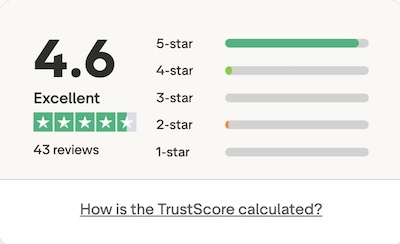
Dux-Soup scores 4.7/5 on Trustpilot. Check out some of the latest reviews.
Limitations
Some users find the tool tricky to use, and the UI outdated. A refreshed UI is on the way for summer 2026 to bring it in line with more modern tools. For users concerned that browser-based LinkedIn automation tools are riskier, Dux-Soup's Cloud edition provides a more reassuring option.
FAQs
Does Dux-Soup have AI personalization?
Yes, Dux-Soup's built-in OpenAI integration automatically personalizes every LinkedIn message using live profile data including job title, company, industry, and profile summary - before it's sent.
How Does Dux-Soup AI Personalization Work?
Most LinkedIn tools send the same message to everyone. Dux-Soup does something different. Dux-Soup AI individually writes every message before sending it - not just using merge tags, but intelligently creating hooks from a prospect's LinkedIn profile. Because your outreach is relevant, you'll get more responses. Personalized messages generate reply rates of up to 9.66%, compared to 5.44% for generic templates, and connection acceptance rates of 45% compared to 15% for generic outreach. That's the difference Dux-Soup AI makes at the message level.
Dux-Soup is currently the only LinkedIn automation tool with a built-in AI integration included for free with Turbo and Cloud plans. Connect ChatCPT or Claude within seconds.
Is Dux-Soup AI safe to use on LinkedIn?
Yes, AI personalized messages generate more genuine two-way conversations, which improve your LinkedIn social selling index and signal authentic engagement. Combined with Dux-Soup's pre-configured safety limits and snooze feature, Dux-Soup has maintained a track record of zero known account bans since 2015.
What is Dux-Soup's AI lead management and prioritization feature?
Dux-Soup's AI response assistant offers smarter lead management, it reads every incoming campaign reply and automatically categorizes it as Continue, Qualify In, or Qualify Out. High-intent leads are flagged instantly, allowing users to focus on closing deals, not sorting their inbox.
Does Dux-Soup AI work with existing campaigns?
Yes, the AI-powered feature can be enabled in any new or existing drip campaign without rebuilding the sequence.
2. Dripify
Dripify is a popular cloud-based LinkedIn automation tool that gets good reviews for its intuitive visual campaign builder and simple approach to building drip campaigns.
Key Strengths
- Clean UI: drag-and-drop interface with conditional logic makes it easy to design complex sequences with ease
- Multi-channel: combines LinkedIn outreach with email sequences in higher plans, for companies that don't have a CRM system
- Solid performance dashboards for easy visibility and analysis of campaign results
- Team management and role assignment, with delegation capability
For users who want something simple and don't need deep CRM integration or AI-Powered personalization, it's a strong option. But with the need to upload contacts into Dripify before your outreach can start, campaigns can be delayed by days. It doesn't send paid InMails or support Sales Navigator, so you won't be able to benefit from sending InMail campaigns, and you won't be able to communicate with prospects via Sales Navigator - a less cluttered inbox.
Best For
Solopreneurs, freelancers and small teams who prioritize simplicity, visual workflow design and standalone LinkedIn and email outreach. It's a god fit for users who want cloud convenience without CRM or third-party integrations.
Safety
Dripify operates within LinkedIn’s daily activity limits and uses randomized delays to mimic human interaction patterns. Dripify also supports activity throttling, safe connection speeds, and session time randomization to reduce risk and maintain your professional reputation.
Dripify comes with the following pre-set limits:
Free plan/day: 200 visits, 75 connections, 50-100 messages, like/follow 50, InMails 25
Paid plans/day: 400 visits, 150 connections, 100-200 messages, like/follow 100/day, InMails 50
What Can You Achieve With Dripify?
Fast set-up and intuitive drip campaigns that run autonomously, helping you to scale outreach. Useful for consistent lead generation once you have a workflows that converts.
Free Trial
Dripify offers a 7-day free trial that gives users full access to the platform’s features, without a credit card required.
Price
Dripify has three main pricing tiers:
- Basic, $39/month:Includes a single drip campaign,
- Pro, $59/month:Unlimited drip campaigns, 100 email finder credits a month
- Advanced, $79/month: Multi-team management
Discounts are available for annual billing and team licenses, with flexible plans to suit both individuals and enterprise users.
Integrations
Dripify integrates using Zapier or Make. As of now, there are no native integrations so you will need additional investment and skillsets if you want to integrate with third party tools.
Reviews
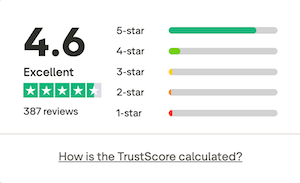
Dripify is rated 4.6/5 on Trustpilot. Check out their reviews.
Users praise its ease of use, team features, and safe automation design. But negative reviews have been left when users haven't cancelled during the trial period and been charged for continuing the service unknowingly, and for the lack of guidance when getting started.
Limitations
Delayed outreach: Before Dripify can start sending messages, it needs to upload your contacts. At a rate of 200 -400 per day, which can take up to five days - delaying your outreach start date. You can only add 1,000 prospects to each campaign, equivalent to LinkedIn's search limits, a constraint if you are running high-volume outreach.
No native integrations: Dripify connects to third-party tools via Zapier or Make only. There are no native 2-way integrations with CRMs like Salesforce, HighLevel, HubSpot or Pipedrive. This means additional cost, setup and points of failure compared to Dux-Soup's native integrations.
No AI personalization: Dripify has no built-in AI personalization. Messages are template-based, with standard variable insertion. There is no equivalent to Dux-Soup's OpenAI integration, which automatically generated a personally written message for every prospect based on their live LinkedIn profile data.
Doesn't support Sales Navigator and paid InMails: Dripify can't read the Sales Navigator inbox, send paid InMails in campaigns, or interact with Sales Navigator inboxes. For users who have invested in Sales Navigator licenses, you're missing an opportunity to engage on a less crowded platform, and instead sending messages to the same inbox that every other templated message is arriving in.
Dripify can't send paid InMails, and with LinkedIn effectively removing free InMails to OpenProfiles unless you're using Sales Navigator, the InMail feature in Dripify is something even they have recommended not using. read out article on why LinkedIn-only automation tools are failing Sales Navigator users.
Sends email, but replies are not displayed in the Dripify inbox. Although you can connect Dripify to your Gmail or Outlook email account, and send emails as part of your outreach workflow, you won't see the reply in your Dripify inbox, leaving your response management disjointed, especially if running outreach as a team.
| Dux-Soup Cloud | Dripify Pro | |
|---|---|---|
| Price | $99/month | $79/month |
| AI personalization | ✅ | ❌ |
| Native CRM and App integrations | ✅ Salesforce, HubSpot, Pipedrive, HighLevel, MS Teams, Slack and more | ❌ Zapier only |
| Campaign prospect limit | ✅ Unlimited | ⚠️ 1,000 |
| Free trial | ✅ 14 days, no credit card | ⚠️ 7 days, no credit card |
| Cloud based | ✅ (Browser also available with Turbo) | ✅ |
How does Dux-Soup compare to Dripify?
3. La Growth Machine
La Growth Machine (LGM) Is a French-built cloud-based multi-channel outreach platform that runs LinkedIn email and SMS sequences from a single visual workflow builder. It's less of a pure LinkedIn tool and more of an all-in-one prospecting system, with built-in lead enrichment and a unified inbox layered on top of the automation.
Key Strengths
- Visual Multi-Channel Sequence Builder: Drag and drop workflow editor that lets you branch your sequence across LinkedIn, email, and X in one campaign
- AI voice messages: LGM can clone a sample of your voice and generate personalized LinkedIn voice notes for each prospect automatically
- Magic Messages: AI-assisted message personalization based on a lead's job title, industry, company size, and recent activity
- Built-in enrichment automatically finds and verifies emails, phone numbers, LinkedIn, and ex-profiles from a name and company without a separate data tool
- Unified Inbox centralises LinkedIn and email replies in one place, with the ability for teammates to cover each other's inboxes
Best For
Small to mid-sized sales teams who want LinkedIn, email, and X outreach running from one interface and who are willing to pay a premium per-seat price for a genuinely multi-channel workflow rather than a LinkedIn-only tool.
AI Personalization
LGM connects to Claude via MCP so you can instruct it to run your outreach from Claude. When it comes to AI message personalization, LGM offers an AI assistant using Claude to improve your outreach messages - you can instruct on tone and target audience, but ultimately the same message is then sent to every prospect on your list, rather than the individually crafted messages for each prospect.
Cloud-Based
LGM is a Cloud based tool, so campaigns keep running independently of your browser or computer.
Safety & Compliance
LGM builds in randomised delays between actions, daily activity caps, and gradual warm-up for new accounts to mimic human behavior. as with any LinkedIn automation tool, LGM cannot guarantee immunity from LinkedIn restrictions, and outside reviewers who tested it over extended periods report no LinkedIn warnings when used within its default limits.
What Can You Achieve With La Growth Machine?
A single sequence that opens on LinkedIn (visit, connect, message) and automatically falls back to email or adds an X touch point if a prospect doesn't respond, with enrichment and reply tracking. It's smaller teams who don't have a pre-existing tech stack and want to consolidate several tools (Scraper, LinkedIn Automation, Cold Email, and X) into one system.
Free Trial
LaGrowth Machine offers a 14-day free trial with