Get Started with Dux-Soup Team or Agency Plans: A Guide for License Administrators

Get Started with Dux-Soup Team or Agency Plans: A Guide for License Administrators
As a license administrator, you want to ensure that your team or agency can make the most of Dux-Soup's powerful LinkedIn outreach and lead generation tools. In this guide, we will take you through the process of purchasing and managing Dux-Soup's Team or Agency plan.
This includes:
- Pricing options
- Adding team members
- Reassigning license seats
- Adding extra seats to the plan
Dux-Soup Team or Agency Plan: which one should I choose?
Wondering about the options? When it comes to choosing the right plan for your needs, there are two main options to consider: the Agency plan and the Team plan. Each plan offers distinct features and benefits tailored to different organizational structures and requirements.
The Agency Plan is designed for businesses that offer LinkedIn management services to other businesses. This is a flexible monthly plan, ideal for short-term contract management. The fees are structured to offer better value for your money, making it a win-win situation for your business.
Now, if you are looking to use Dux-Soup for your own business, then the Team plan simplifies managing multiple subscriptions for collaborative LinkedIn outreach.
Keep reading for a quick breakdown of the Agency and Team plans to help you pick the best for your needs.
Agency plan
If you are an Agency looking to manage LinkedIn accounts for businesses and you have a large customer base, then this plan could be the right one for you.
The Agency Plan operates on a monthly payment basis. The pricing structure contains 5 pre-paid Cloud seats, plus any additional seats you require based on the number of client accounts managed. If you add additional seats, these will be automatically charged for on the next invoice. Find the detailed pricing information for the Agency Plan here.
Upon purchase, you receive a license key for your chosen plan that you and your team members need to activate to access the paid features Dux-Soup has to offer.
What's great about Dux-Soup's Agency plan is that you don't need to buy a Dux-Soup license to be an Admin. You only pay for the LinkedIn accounts you're running automation against (i.e. your clients) so your Agents can use Dux-Soup for free. It saves a lot of money if you're an agency with 50 agents managing LinkedIn outreach for clients.
Team plan
Managing multiple Dux-Soup subscriptions can be challenging due to the individual nature of each subscription.
If you are a business owner and you have a team of people using Dux-Soup for LinkedIn outreach, or you are considering LinkedIn automation and want to use it collaboratively across multiple team members with centralized billing, a Dux-Soup Team plan is an ideal solution. Here’s why:
- You can start with a minimum of 1 seat and add as many seats as you would like to later on.
- The admin of the Team plan can add new users, remove inactive ones, and reallocate Dux-Soup seats to team members.
- You can be an admin without using a seat. You can manage the license without Dux-Soup paid features and leave LinkedIn outreach to your team.
- You can share the Dux-Soup points purchased by your other team members.
- You can also share history and tags between members to simplify team effort.
With a Team plan, you can share your campaigns among your team mates! These drip campaigns offer workflows of up to 12 actions, including connection requests and messages that can be sent over a certain period of time. There are custom delays and automatic stopping points when responses are achieved. How cool is that!
We also prevent duplicate targeting with our Team plan, meaning that you can't enroll the same prospect twice into the same campaign.
Bonus
Our Team plans offer a tiered pricing model. This means that the more seats you purchase, the cheaper they get.
An annual plan is perfect for larger teams who want to supercharge their LinkedIn outreach with Dux-Soup and get even more value for their investment, with extra discounts applied!
High Flyer (Dux-Soup VIP)
And guess what? Dux-Soup has an exciting High Flyer program to help teams and agencies accelerate their lead generation and expand their LinkedIn network. This program is specifically designed to provide users with the necessary tools to enhance their LinkedIn performance.
Here are some of the benefits:
- Priority email support
- Priority technical support calls
- Complimentary High Flyer accelerator calls
- Dedicated account management
Curious to know if you qualify?
All Dux-Soup Agency plan users will have automatic High Flyer status!
For Team plan users, head over to our support page to check out the criteria for eligibility!
Adding Team Members
Once you purchase the Team or Agency plan, you are automatically assigned as the license administrator. You will be able to manage user access and deactivate users so other team members can use the license as needed.
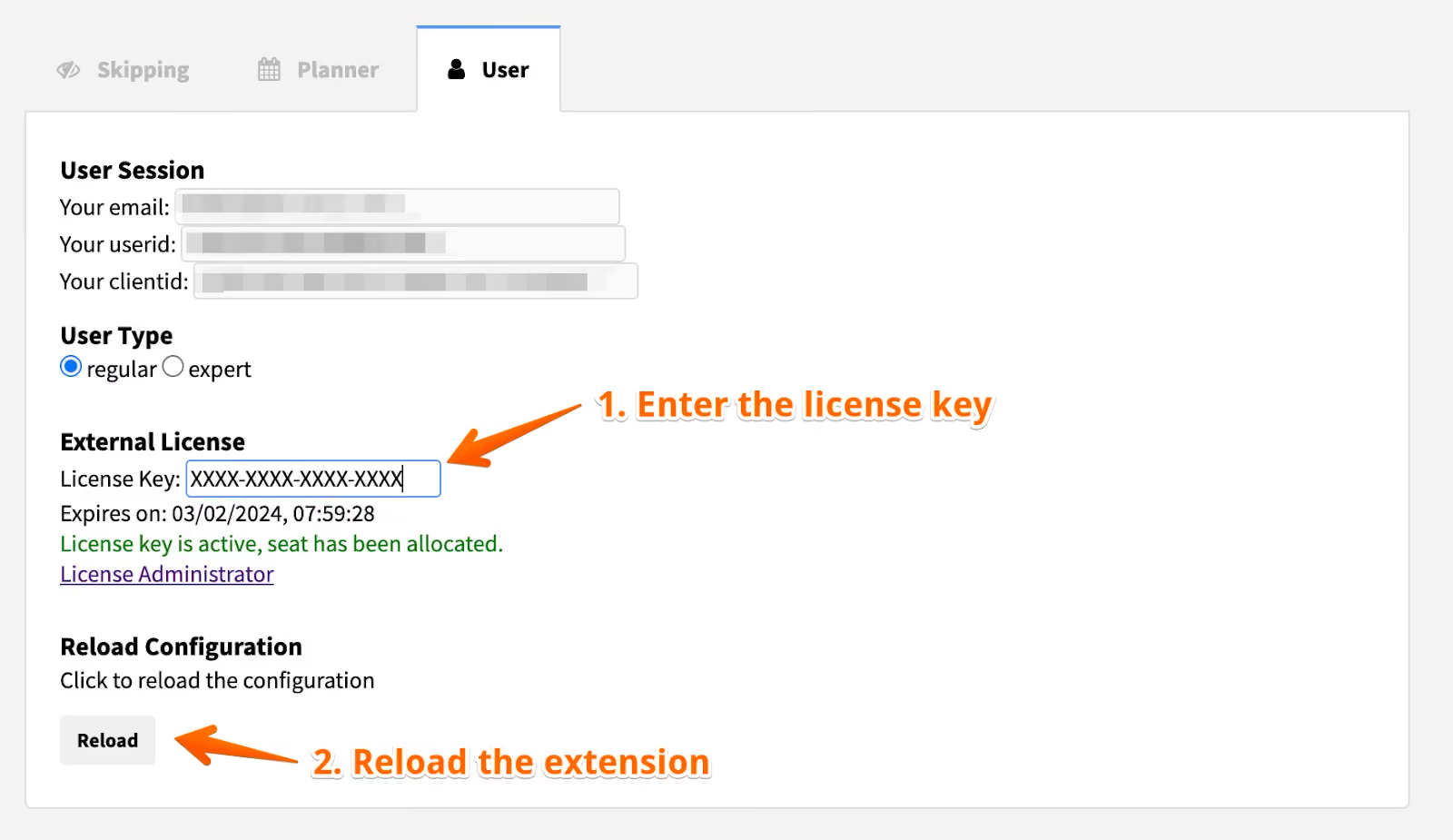
Once purchased, the license key is displayed in the Dux-Dash. All the License Administrator needs to do is share the key with the team and once they activate the key, the team will appear in the License Administrator panel (Options > User tab).
The license key should be activated by everyone who wants to access the paid features Dux-Soup has to offer. So drop them an email with the key and these activation steps!
We like to make things easy for you, so here's a ready-to-use template to inform your team about it…
_________________________________________________________
Hi everyone,
Exciting news!
I just bought a team license for Dux-Soup. It's time to activate our Dux-Soup accounts and unlock the full potential of LinkedIn outreach.
Our license key is : XXXX-XXXX-XXXX-XXXX
Here are the license activation steps
To install Dux-Soup, please watch this short tutorial and use this link to download the extension.
P.S. Dux-Soup is a Chrome extension so you can either use it with your Google account or create a new Google account here
As always, if you have any questions or need assistance, I'm here to support you every step of the way.
The Dux-Soup support team is always available to help so feel free to send them an email anytime: info@dux-soup.com.
Best regards,
[Your Name]
P.S. Remember to bring your authentic selves and let your professionalism shine as we engage with our prospects. Together, we'll achieve greatness!
_________________________________________________________
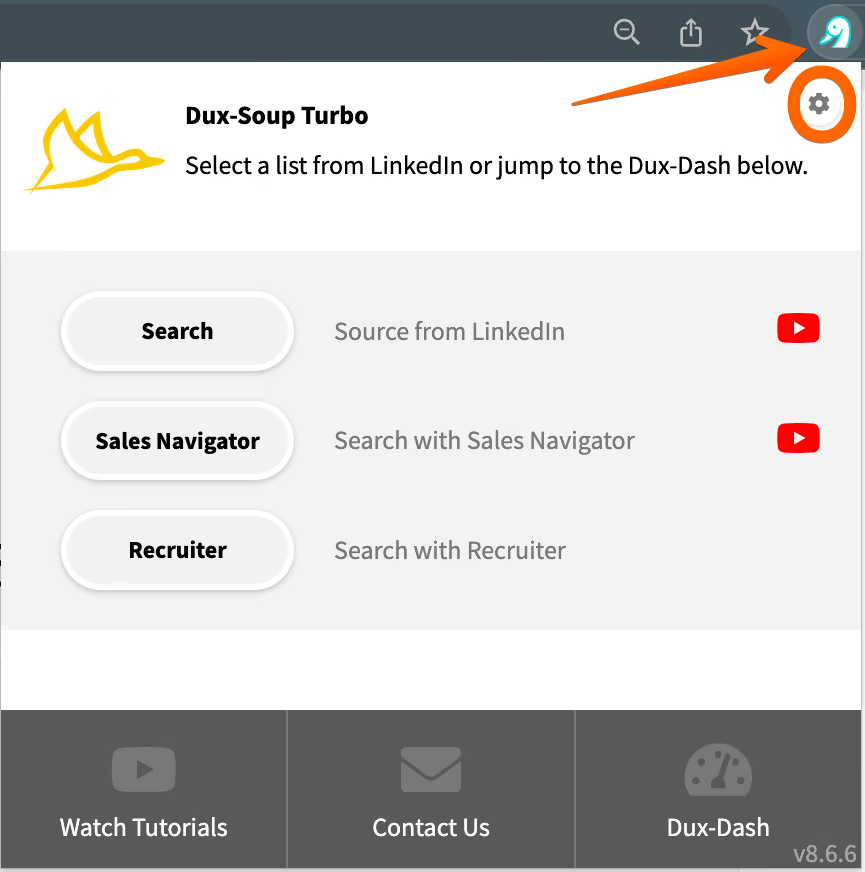
As the license administrator, if you also want to use Dux-Soup, you need to activate the same key in the User tab. Simply click on the Dux-Soup icon at the top-right corner of the browser toolbar and select the “Options” gear:
Reassigning License Seats
We understand that team members occasionally move on to new adventures, and we've got you covered!
If a team member leaves your organization or you need to reassign license seats, you can do this easily in your Dux-Soup dashboard. To reassign the seat, the user has to be deactivated first from the License Administrator panel:
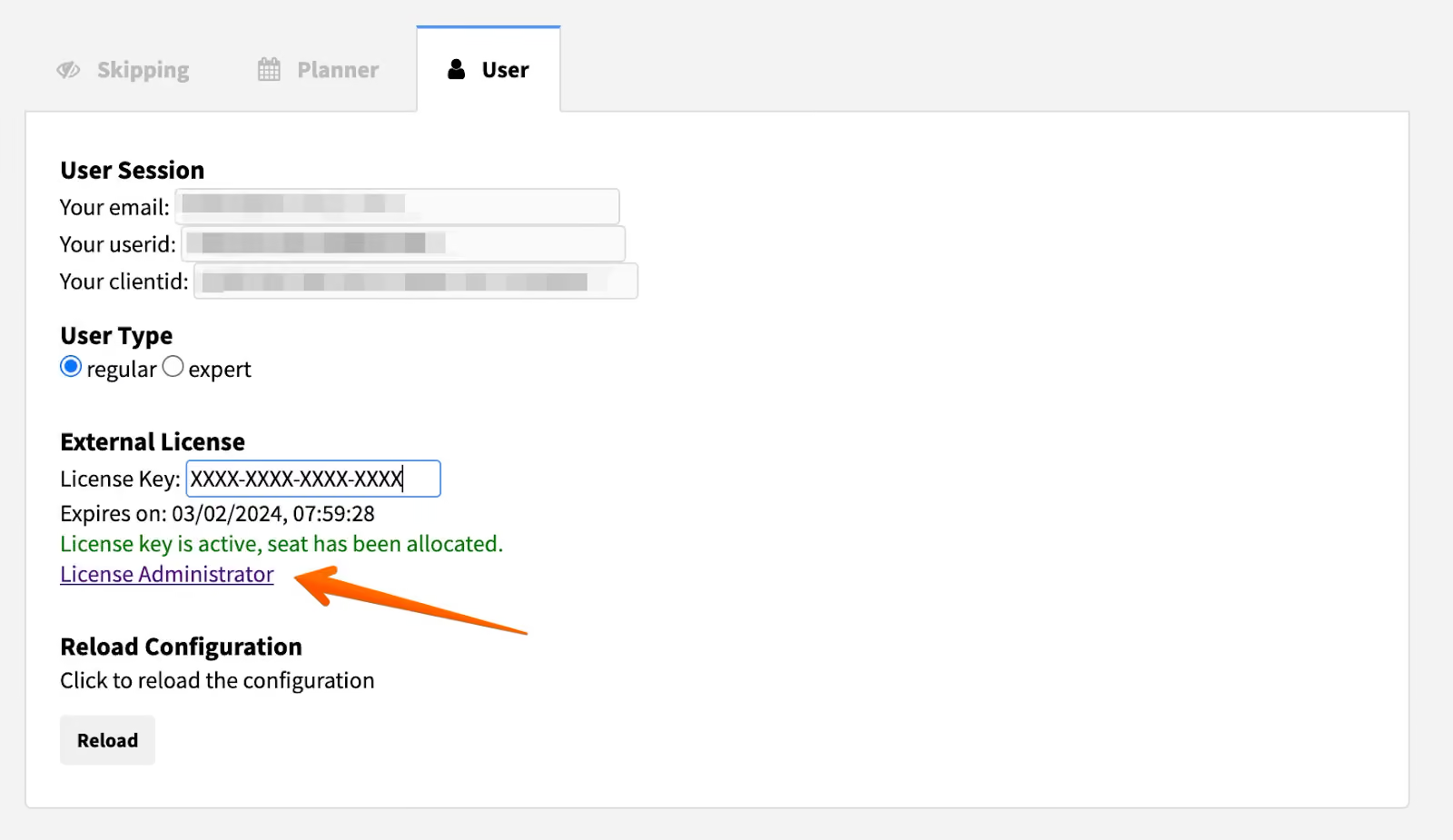
From there, you can remove a team member's access:
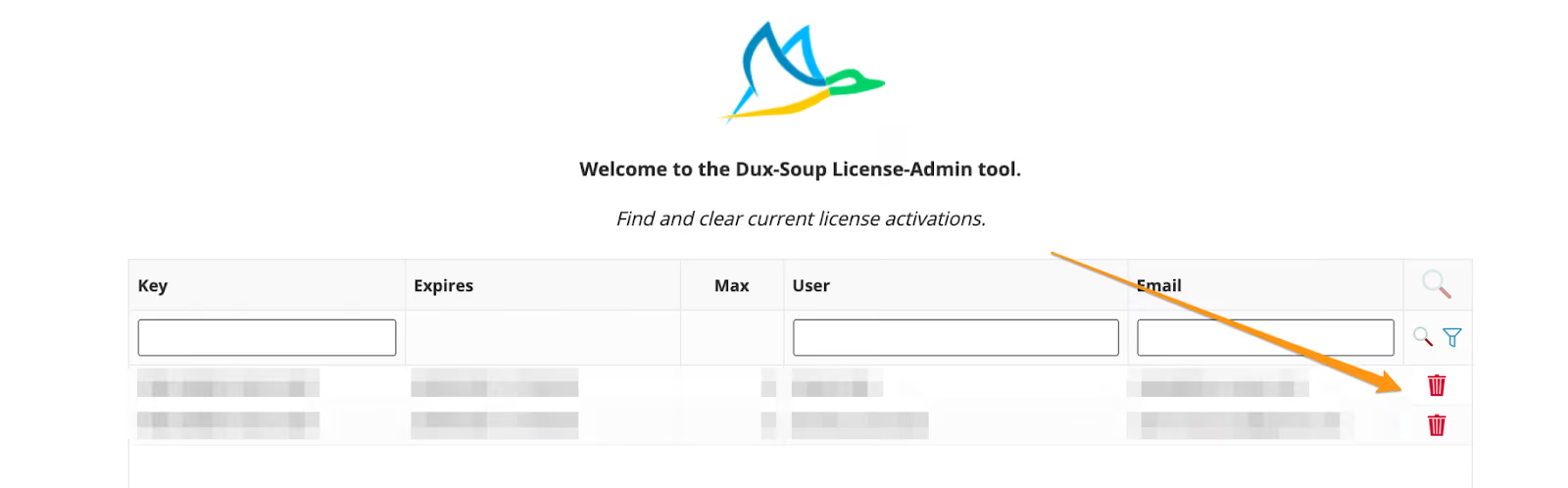
Then, share the same key and license activation details with a new team member.
Adding Extra Seats if you have the Team Plan
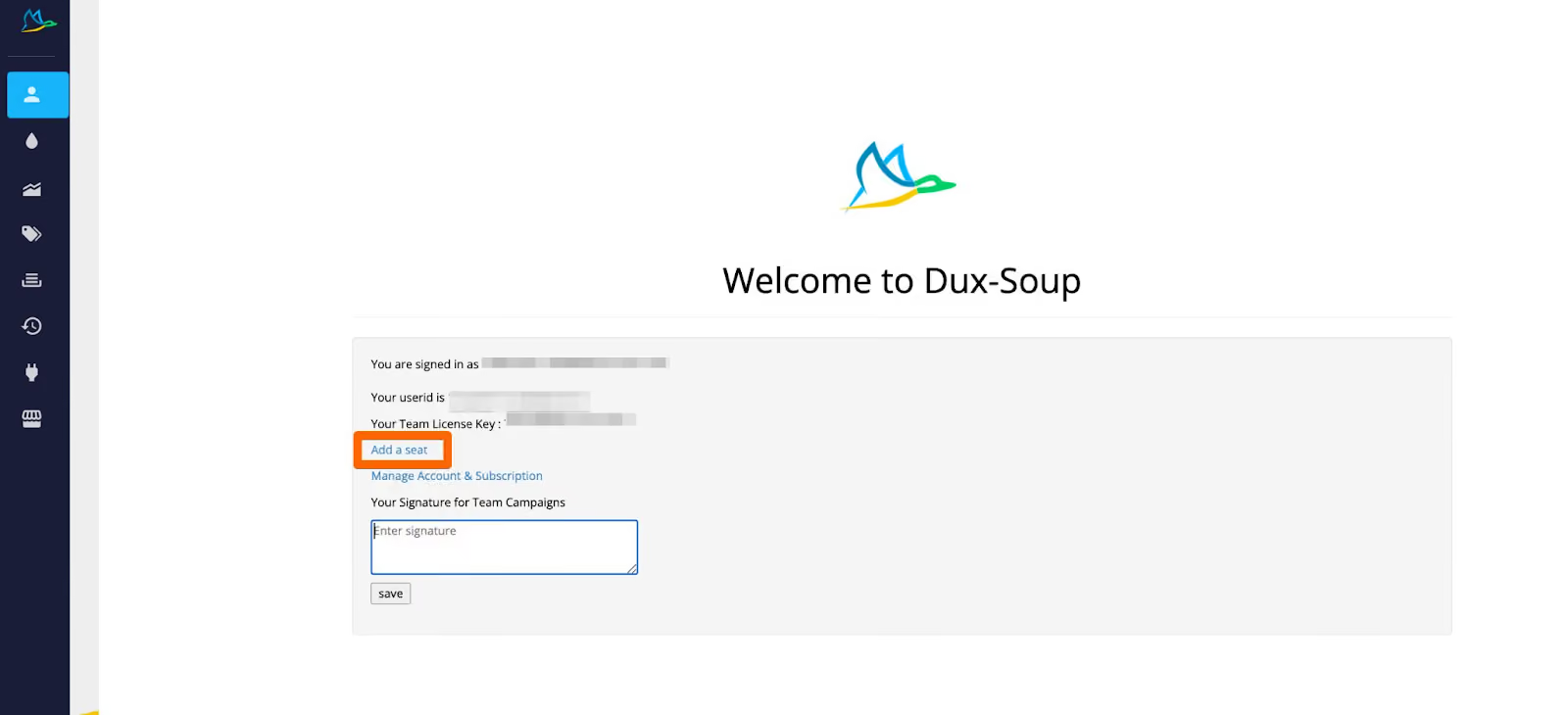
Need to bring more members on board your Team plan? No worries! Adding extra seats is a breeze.
Just head over to your Dux-Soup dashboard and click on "Add a seat." It adds one seat at a time.
Adding Extra Seats if you have the Agency Plan
Is your team on the rise and do you need to accommodate more members? We've simplified the process for you!
The minimum seat requirement is 5 for our Cloud Agency plan.
Additional seats are automatically charged and added to the invoice for the subsequent monthly renewal when the user activates the license key. The email addresses of all users are displayed on the invoice for your reference.
To make things easier for you, we've set up a dedicated page where you can find all the rates for post-paid seats.
Extra Team features: Shared Campaigns
Drip campaigns are set up in Dux-Dash. You can add or “enroll” 1st, 2nd and 3rd-degree connections into your campaigns, so feel free to create as many campaigns as your heart desires.
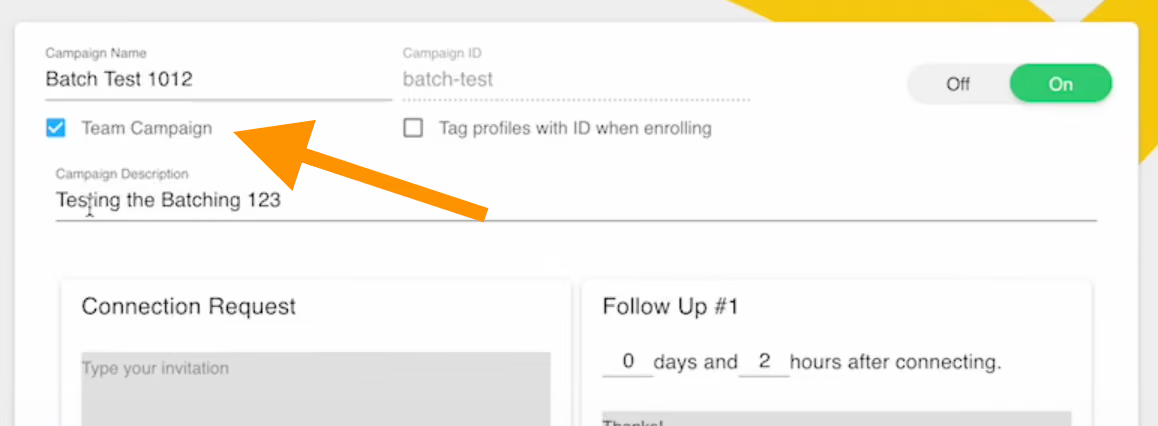
The “Team Campaign” option allows you to share campaigns with other team members without the need to manually duplicate them. To use shared team campaigns, you can navigate to the "Drip Campaigns" tab within Dux-Dash and click on "Create Campaign."
From there, you can select “Team Campaign” which makes the campaign visible across your team. This feature makes it easy to collaborate with your team and streamline your LinkedIn outreach efforts.
Worried about duplicates? Fear not!
Here's the fantastic advantage: when multiple team members are using the same campaign they will not be able to enroll LinkedIn prospects that have been enrolled by one of the team members.
Team members have the power to edit campaigns too. This amazing feature ensures brand consistency and saves valuable time when setting up campaigns for the entire team. Share the successful ones, remove the ones that don't hit the mark, and witness your results soar!
Note: Team campaigns will show only individual data, i.e. it won't show the total number of profiles enrolled by the team, it only shows what you've achieved.
Extra team features: Signature
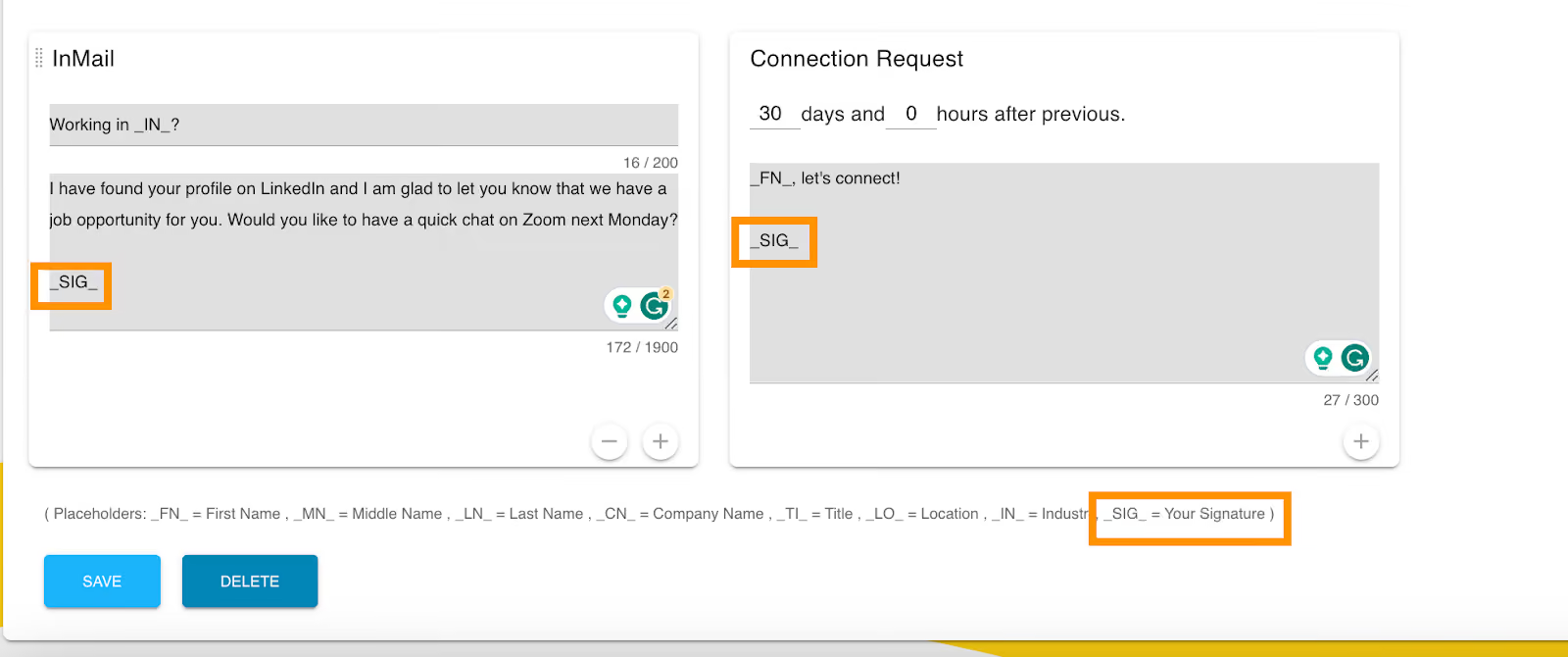
When you open the Dash, you'll notice a signature entry box that will enable you to maintain a professional and consistent look across your entire team.
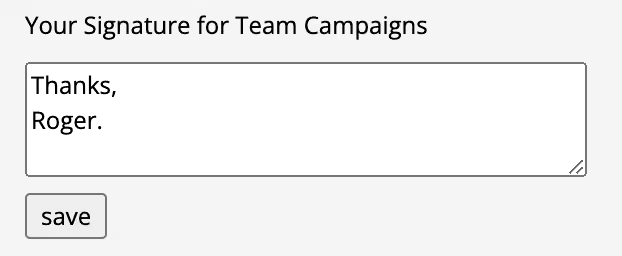
Team license users will also see an additional field for signature in the placeholder sections of the Campaign Editor:

Final Thoughts
In summary, the Dux-Soup Team and Agency plans offer powerful LinkedIn outreach tools for teams and agencies.
As the person in charge, you have the power to manage user accounts, deactivate team members, and transfer Dux-Soup licenses as needed. Armed with this knowledge, you're well-equipped to make an informed decision to suit your needs and to unlock the full potential of Dux-Soup. It's all in your capable hands to keep things running smoothly for the team!
Stay tuned for more exciting insights and happy Duxing!